The Relational Model
1 Basic Introduction to Databases
1. The Origin of Databases
We use databases to store data permanently. Without a database, the only way to store data permanently would be on a hard drive. If we ignore the read/write efficiency of storing data on a hard drive, and assume that all data runs on a single machine, then storing data on a hard drive is fine. But without a doubt, the premise of this assumption is fatal. If all data runs on one machine and that machine breaks, the whole system is paralyzed and data safety cannot be guaranteed; the first thing lost is system stability. Besides that, the hardware performance of a single machine is ultimately limited. There are two approaches to scaling hardware performance:
- Vertical scaling: use multiple top-of-the-line CPUs, hard drives and memory in one machine
- Horizontal scaling: combine multiple ordinary machines, so that the various components of the program run distributed across different machines
Clearly, vertically scaling a single machine has limits (you can’t add to one machine indefinitely), so horizontal scaling is better: this approach improves performance while also taking system stability into account. However, the different components certainly use the same data, and data cannot be shared between multiple machines. At this point we need a machine dedicated to data storage, and we write a server based on the C/S architecture that establishes connections with the different client machines.
2. Database Management Systems
A machine dedicated to storing data is like a warehouse for storing data, commonly called a 数据库 (database). Running on this machine is a database management system, which is really just a socket program. Maybe you are capable of writing such software, but to use it in a production environment, it needs to meet the following requirements:
- Data redundancy and inconsistency: for example, Sun Wukong is Tang Seng’s eldest disciple and also the Monkey King of Mount Huaguo, so both files need to store his name. This not only causes redundancy, increasing storage and access overhead, but can also lead to data inconsistency: if Sun Wukong’s name is changed to Sun Xingzhe, one file might be updated while the other is not.
- Difficulty accessing data: for example, if a university wants to find all students whose scores are above 90 in every course, this query is quite complex.
- Data isolation: different data is stored in different files. Even if we assume all files have a uniform format, retrieving the needed data across all of them is still very difficult.
- Integrity problems: values stored in a database must satisfy certain consistency constraints. For example, a child’s height increases with age, but a person’s height cannot exceed 3 meters. We can add appropriate code to the system to enforce this constraint, but when new constraints are added, such as a person’s weight cannot exceed 3 tons, it becomes hard to enforce them through program restrictions, especially when constraints involve multiple data items across different files; the problem becomes extremely complex.
- Atomicity problems: suppose the system fails while you are transferring money to your girlfriend: your money is gone, and your girlfriend didn’t receive it either. Atomicity means either everything happens or nothing happens. In traditional file-processing systems, maintaining atomicity is very hard.
- Concurrent access: since data may be accessed by multiple different client machines at the same time, if concurrent access isn’t controlled, the result is corrupted data. Controlling concurrent access across a large number of files is very hard.
- Security problems: different roles should have different access permissions. If a long-exploited programmer sees that everyone else in the company earns far more than he does, and he has execute permissions, the next thing that happens might be “drop the database and run”.
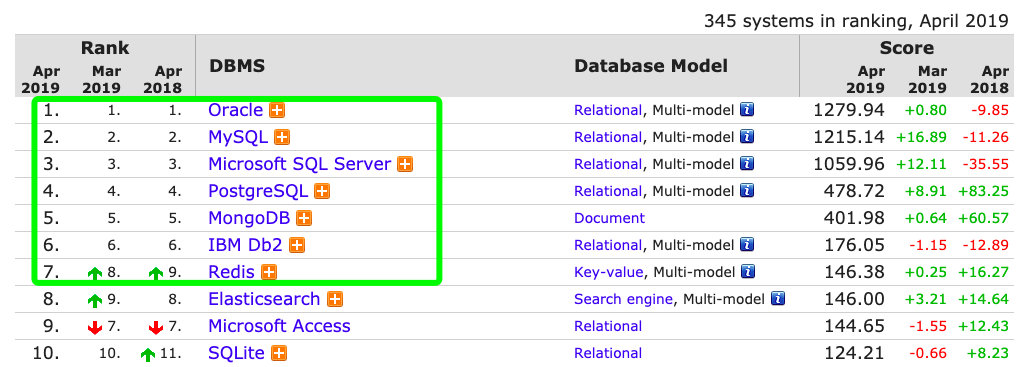
Every company’s project needs such a database management system. Since everyone has this need, it creates commercial value, which led to the birth of databases. The figure below shows the top ten databases worldwide; enterprises generally mainly use the first seven.
3. Types of Databases
Databases are divided into relational and non-relational. Relational databases are built on the relational model, while non-relational databases describe a collection of methods for storing large amounts of structured data. If you must have a plain explanation, you can temporarily understand it as storing and retrieving by key and value, but that description is not accurate. This tutorial mainly studies relational databases (all relational databases are basically similar; the mainstream ones currently used in enterprises are Oracle, MySQL and PostgreSQL; once you learn one, you can pretty much use the others). Divided into relational and non-relational, databases fall into two categories:
- Relational databases (RDBMS), such as
Oracle,MySQLandPostgreSQL - Non-relational databases (NoSQL), such as
MongoDBandRedis
4. The Rules of Databases
When the functions of the parts of a complete project are split out to run on different machines, the data everyone uses should still be the same data. Without adding any solution, the data of each part is certainly independent, so how do you solve the problem of data sharing? At this point you need to write a C/S-architecture socket program based on network communication, with a client and a server; this is a database management software. Writing such software requires considering the following issues: concurrency, properly handling simultaneous operations, the security of core data, user authentication, and reducing IO operations as much as possible to improve the program’s efficiency. If from now on every programmer had to write a database management software before writing any program, writing it would take a year and you couldn’t do anything else; after finishing, you’d find bugs and spend another year fixing them; before you finished, the company would go bankrupt, and you’d go to the next company and keep writing.
Where there is a hard demand there is commercial value. At this point a company stepped up and said: I’ll write this database management software, and you can focus on writing your programs’ business logic. That company was Oracle, and so databases were born. Since we don’t want to spend time writing database management software, if we use software written by others we have to play by their rules. For example, if we need to record a person’s information, we need to extract some distinctive characteristics of that person.
id = 1
name = 'Albert'
age = 18
height = 180
weight = 80
is_hansome = True
We use these pieces of data together to describe a person’s information; in a database this is called a record. To store this data in a file, we need to create a file. What if there are multiple records in this file?
1,Albert,18,180,80,Ture
2,James,34,203,113,False
3,Curry,30,190,95,False
Obviously, storing it like this is not intuitive. If we store it in the form of a table, it becomes much more intuitive.
| id | Name | Age | Height | Weight | Handsome |
| 1 | Albert | 18 | 180 | 80 | True |
| 2 | James | 34 | 203 | 113 | False |
| 3 | Curry | 30 | 190 | 95 | False |
This is actually very much like the Excel spreadsheets we use, so in a database it is called a table, and name, age and height are like the table headers, called fields in a database. Multiple records make up a table, a table has multiple fields, and a table is like a file. When you store things on your own computer, you categorize different files into different folders; the people who wrote database management software naturally thought of this too: multiple tables make up a database, just like putting multiple files into one folder.
5. Database Servers
Database management software is really just an application. To run it, it must be started on an operating system. Since the requirement prioritizes stability, it definitely runs on Linux. Once it is running, it is a database server.
What do people usually mean by “database”?
- A folder, i.e. a database (schema); this is what developers usually mean
- A machine, i.e. the Linux server running the database management software
- The database management software
2 Installing the Database
1. Database Versions
The latest MySQL version is currently 8.0 and above. Although some enterprises are using it, and it may become widespread in two or three years, most enterprises still mainly use versions 5.5, 5.6 or 5.7. Here our explanations will use version 5.6 as the standard.
Versions 8.0 and above are indeed upgraded compared to 5.6, and are handier in a very small number of minor places, but most usage is the same. Once we learn version 5.6, picking up 8.0 and above is very easy; the reverse is not.
2. Installation
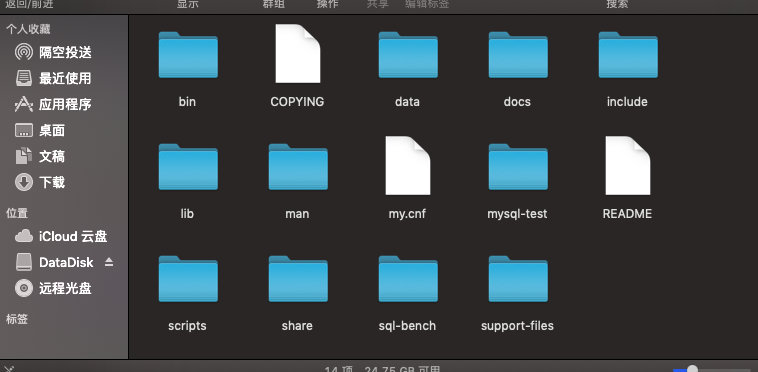
Open the official website: https://dev.mysql.com/downloads/mysql/, click the link MySQL Community Server 5.6 and download the version for your operating system. On Windows you can easily find the bin folder inside the MySQL folder, which contains the mysql.exe and mysqld.exe files, corresponding to the MySQL client and server startup programs respectively. On macOS, go to the folder /usr/local/mysql/, and after pressing Enter you can see the same files. On Windows, to make MySQL a system service that starts at boot, we use the mysqld --install command; macOS doesn’t need this configuration.
3. Configuring Environment Variables
The purpose of configuring environment variables is to be able to run MySQL commands directly in the terminal, rather than only after entering the /usr/local/mysql/bin/ path. So we need to add this path to the environment variables. With root permissions, use the command vim /usr/local/mysql/.bash_profile to create and open a new file, add export PATH=${PATH}:/usr/local/mysql/bin to the empty file, and the environment variable configuration is complete.
3 Basic Usage
1. Logging In
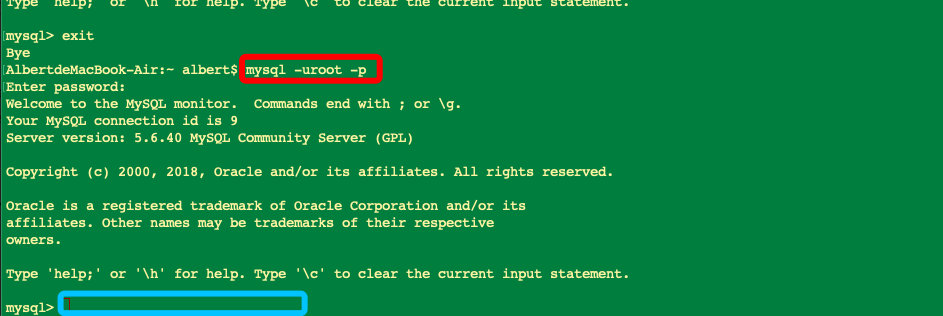
We use the command mysql -h 127.0.0.1 -P 3306 -uroot -p to log in with the client. -h refers to the IP address and can be omitted for local connections; -P (uppercase P) refers to the port number, which defaults to 3306 and can also be omitted; -uroot refers to the username, with a built-in administrator username root; -p (lowercase p) refers to the password. The simplified login command is mysql -uroot -p. Initially we haven’t set a password, so just press Enter to log in.
2. Changing the Password
MySQL comes with an administrator user that has no password by default, so we need to set a password for it. There are many ways; here we cover three.
- Use the
mysqladmin -uroot -p passwordcommand, which directly changes the password stored on the server. Note that it must be run as administrator and executed in the MySQL installation path. Windows and macOS differ slightly. Windows:mysqladmin -uroot -p password '123'changes no password to the password 123, andmysqladmin -uroot -p123 password '123456'changes the password 123 to 123456. macOS: first runsudo -ito get administrator privileges on the machine, then runcd /usr/local/mysql/binto switch to the installation path, and finally run./mysqladmin -uroot -p password '123'. The above is the complete procedure for changing no password to 123;./mysqladmin -uroot -p password '123456'changes the password from 123 to 123456. The differences from Windows are twofold: the command must be prefixed with./, and the old password is entered again at the prompt instead of being written on the command line. After the password is changed successfully, there is a warning:Warning: Using a password on the command line interface can be insecure.This means that using a plaintext password is insecure, since others can see it by scrolling through the command history; you can ignore it for now. - After logging in, use the
set password for 用户名@地址 = password('新密码');command (username@host, new password), which changes the password indirectly through the client. Example:set password for root@localhost = password('1');changes the original password to1; then run the refresh commandflush privileges;. - After logging in, use the command
update mysql.user set password=password('1') where user='root' and host='localhost';, then refresh again.
3. Cracking the Administrator Password
If you forget the password, in a test environment you might have many ways to solve the problem, but in a production environment that isn’t allowed. Let’s think about it: MySQL is a piece of software on the operating system, so we only need to control MySQL’s user authentication mechanism when it starts, so that we can log in directly without a password and then change the password. Windows and macOS differ slightly. Windows: first stop the MySQL service, then, as administrator, run the mysqld --skip-grant-tables command in the installation path, which starts the MySQL service skipping the grant tables (tables are files). Next, open another command-line window and log in directly without entering a password; then you can change the password. Finally, stop the MySQL service and start it normally. macOS: the command differs slightly, ./mysqld_safe --skip-grant-tables; the other steps are the same.
4. Modifying the Configuration File
Character encodings differ slightly across operating systems and SQL versions. After logging in, we can use the \s command to view the local character encoding, so we need to modify the character encoding in the configuration file. Windows: create a my.ini file in the root of the installation path; MySQL will read the configuration file automatically. macOS: find the my.cnf file under the path usr/local/mysql. The configuration file content is the same on both systems, as shown below:
# 1. Modify the server character encoding configuration
[mysqld]
default-character-set=utf8
collation-server=utf8_general_ci

# 2. Modify the global client character encoding configuration
[client]
default-character-set=utf8

# 3. Modify the client character encoding
[mysql]
default-character-set=utf8

# The global client configuration applies to all client software globally
# If it conflicts with the mysql configuration, the mysql configuration takes precedence
# If there is no mysql configuration, the client configuration takes precedence
4 Basic SQL Statements
Basic SQL statements are the key to getting started, yet they are so simple they’ll make you question your life choices. Using a database is all about creating, reading, updating and deleting data, and the objects of the data are databases, tables and records.
During creation or deletion, you can see the folders or files under the data directory of your database installation change. The
.frmfiles store the table structure, and the.ibdfiles store the data related to the table.
# View the currently logged-in user
select user();
# If you typed a command wrong, you can end it with: [\c]

# 1 Folder (database)

# Database naming: may consist of letters, digits, underscores, @, #; case-sensitive; must be unique; cannot use keywords such as create select; cannot consist of digits alone; at most 128 characters.

# Create: create database db1; you can specify its encoding, otherwise the configuration file's character encoding is used. Simplified: create database db1;
create database db1 charset utf8;

# Update: change the database's character encoding to gbk; the database name cannot be changed directly
alter database db1 charset gbk;

# Read: view the names of all databases; you can see the change in character encoding when viewing
show databases;
# View the information of a single database
show create database db1;

# Delete
drop database db1;

# 2 File (table)
# First switch folders:
use db1;
# View the current folder
select database();

# Create: create a table; field names must be given a type, int is integer, char is string.
create table t1
(
    id   int,
    name char
);

# Update: rename the table
rename table t1 to t0;
# Change the field length; the char type has a default length of 1
alter table t0
    modify name char(16);

# Read: view all table names in the current database
show tables;
# View the detailed information of table t0
show create table t0;
# View the table structure, can be abbreviated as [desc t0]
describe t0;

# Delete: delete all data in the table along with the model relationship
drop table t0;

# Delete: keep the model relationship, delete only the data
delete from t0;

# 3 A line of a file (record)

# Create: insert records; inside the db1 directory, [db1.] can be omitted
insert into db1.t0
values (1, 'Albert'),
       (2, 'James'),
       (3, 'zimuge');

# Update: modify field values
update db1.t0
set name='nba'
where id >= 1;
# Modify multiple fields at once
update db1.t0
set name='nbaaaa',id=111
where id >= 1;

# Read: view the data
select id, name
from db1.t0;

# # Delete: delete records
delete
from db1.t0
where name = 'nba';
5 System Databases
- information_schema: a virtual database that takes up no disk space; it stores parameters after the database starts, such as user table information, column information, privilege information, character information, etc.
- performance_schema: a database added starting with MySQL 5.5, mainly used to collect database server performance parameters and record various events, locks and other phenomena that occur while processing query requests.
- mysql: the grant database, mainly storing privilege information for system users.
- test: a test database created automatically by the MySQL database system.
6 Storage Engines
After logging in, we can use the show engines; command to view the storage engines. A storage engine is simply a storage function: for different files, we store them in different ways, just as you might save text files as .doc and image files as .jpg. MySQL is all about storing and retrieving data. In versions 5.6 and above, the default storage engine is InnoDB, and we can just use it directly.
# The default storage engine, the one we focus on
create table t1
(
    id int
) engine = innodb;

# Does not support transactions, row-level locks or foreign keys
create table t2
(
    id int
) engine = myisam;

# Like a recycle bin: everything written into it disappears
create table t3
(
    id int
) engine = blackhole;

# Stored in memory, cannot be saved permanently
create table t4
(
    id int
) engine = memory;
7 Data Models
The foundation of a database structure is the data model, a collection of conceptual tools for describing data, data relationships, data semantics and consistency constraints. Data models can be divided into four categories:
- The relational model: this is essentially
SQLstatements. It uses a collection of tables to represent data and the relationships between data. It is the most widely used data model, and it is the data model used in this tutorial. - The entity-relationship model: also called the
E-Rdata model, it is based on a perception of the real world, and the entity-relationship model is widely used in database design. - Object-based data models: these manipulate the database with a programming language, combining features of object-oriented programming languages and the relational model.
- The semi-structured data model: the semi-structured data model allows data definitions in which data items of the same type have different sets of attributes.
XMLis widely used to represent semi-structured data; it is rarely used now, so just be aware of it.
8 Database Keys
1. Primary Keys
Each row of data in a database is stored as a 元组(tuple) (tuple). Query results are computed as Cartesian products and are also presented as tuples. We must have a way to distinguish different tuples in a relation, which is done by their attributes; that is, no two tuples in a relation have the same values on all attributes.
- A
超码(super key)(super key) is a set of one or more attributes whose combination allows us to uniquely identify a tuple in a relation; theidused in Section 4 is a super key. 候选码(candidate key)(candidate key): a super key may contain irrelevant attributes. If we use the combination ofidandnameas a super key, this naturally meets the definition of a super key, but we are usually interested only in some super keys; minimal super keys are called candidate keys.主码(primary key)(primary key): this is what people commonly call the primary key. We use the term primary key to denote the candidate key chosen by the database designer as the principal means of distinguishing different tuples in a relation. The designation of a key represents a constraint in the real world on the thing being modeled.
The primary key must be chosen carefully. As we know, a person’s name is clearly not sufficient as a primary key, whereas an ID card number or passport number is. By convention, we list the primary key attributes of a relational model before the other attributes.
WeChat, such a great product, has long been criticized for not allowing users to change their WeChat ID, and in some products even nicknames can’t be changed freely. Feel free to imagine the reasons, but it shows that WeChat is still pretty awesome.
2. Foreign Keys
A relational model [r1] may include among its attributes the primary key of another relational model [r2]. This attribute is then called a 外键(foreign key) (foreign key) on [r1] referencing [r2]. Model [r1] is called the referencing relation of the foreign key, and model [r2] is called the referenced relation of the foreign key.
9 Basic Data Types
The SQL standard has many data types. Here we’ll cover a few of the most basic ones; later chapters will cover more data types.
char(n): a fixed-length string, with the length n specified by the user, defaulting to 1; the full namecharactercan also be used.varchar(n): a variable-length string, with the maximum length n specified by the user; equivalent tocharacter varying.int: an integer type, equivalent tointeger.numeric(p,d): a fixed-point number with user-specified precision, where p means the number has p digits, d of which are to the right of the decimal point. So in a field of this type, numeric(3,1) can exactly store 21.6, but cannot exactly store numbers like 898.2 or 1.23.
The debate over
charversusvarcharhas gone on for a long time. We should choose the appropriate data type for different business scenarios. I don’t like fence-sitting verdicts; if I had to choose one in general, I would lean towardvarchar.
The char type is used to store fixed-length strings. For example, if the attribute name has type char(10) and we store the string “albert” in it, 4 spaces will be appended to the string to reach a length of 10 characters; varchar, on the other hand, doesn’t add spaces. When comparing two char values of different lengths, extra spaces are automatically appended to the shorter value before comparison so that their lengths match. When comparing a char and a varchar, the automatic padding we expect may or may not happen, depending on the database system. Fortunately, in MySQL versions 5.6 and above it pads automatically, but we still recommend always using one of char or varchar to avoid such problems, because not all databases are this fault-tolerant.
10 Basic Schema Definition
1. Using the Database
This is a practical summary of what has been covered above. It also involves the concept of integrity constraints, which is really the real-world constraints on the modeled things expressed in SQL statements.
# Department table
create table department
(
    department_name varchar(20),
    building        varchar(15),
    budget          numeric(12, 2),
    primary key (department_name)
);

# Product table
use db1;
create table product
(
    product_id      varchar(7),
    title           varchar(20) not null ,
    credits         numeric(8, 0),
    department_name varchar(20),
    primary key (product_id),
    foreign key (department_name) references department (department_name)
);

# Staff table
create table staff
(
    staff_id   varchar(10),
    name       varchar(15) not null ,
    age        int,
    product_id varchar(7),
    primary key (staff_id),
    foreign key (product_id) references product (product_id)
);
Notes:
- Every data type may include a special value called
空值(null). A null is a missing value: the value may exist but be unknown, or it may not exist at all. Where possible, I want to prevent nulls from being added. Anot nullconstraint on an attribute indicates that nulls are not allowed on that attribute. - Primary key attributes are already restricted to be non-null and unique, so no null constraint is needed.
- The
referencesconstraint ensures that the foreign key attribute value must exist in the primary key attribute of the referenced model.
2. Integrity Constraints
SQL prohibits any database update that violates an integrity constraint. For example, we created three tables above; if we try to delete the department table, this violates the foreign key integrity constraint, so SQL will flag an error and prevent the update. To perform the deletion, currently the only way is to first delete the models that are not referenced by a foreign key. Besides that, when we need to update or delete data, it also can’t be executed because the foreign key integrity constraint would be violated. In this case, we should use the cascade option in the foreign key to cascade updates.
# Optimize the foreign key relationships

# Department table
create table department
(
    department_name varchar(20),
    building        varchar(15),
    budget          numeric(12, 2),
    primary key (department_name)
);

# Product table
use db1;
create table product
(
    # Use the int type and change it to an auto-incrementing primary key
    product_id      int primary key auto_increment,
    title           varchar(20) not null,
    credits         numeric(8, 0),
    department_name varchar(20),
    foreign key (department_name) references department (department_name)
        on update cascade
        on delete cascade
);

# Staff table
create table staff
(
    staff_id   varchar(10),
    name       varchar(15) not null,
    age        int,

    # The referencing foreign key and the referenced key should have the same data type
    product_id int,
    primary key (staff_id),
    foreign key (product_id) references product (product_id)
        on update cascade
        on delete cascade
);

insert into department(department_name, building)
values ('市场部', '市场部大楼'),
       ('研发部', '研发部大楼'),
       ('人事部', '人事部大楼');

insert into product(title, department_name)
values ('1号产品', '研发部'),
       ('2号产品', '研发部'),
       ('3号产品', '研发部'),
       ('4号产品', '市场部');

delete
from department
where department_name = '研发部';

update department
set building='市场部牛逼大楼'
where department_name = '市场部';