User Interaction
This article is part of the General Python Programming tutorial series, which is now fully complete. Its goal is to take you from zero to mastery of the Python programming language. This tutorial does not skim over Python in generalities; instead it explains things in a refined, in-depth way, across 5 stages and 25 chapters. So you need to study patiently to truly gain something. Although it doesn’t involve using any frameworks, it gives a holistic explanation of operating systems and network communication, and even rewrites some open-source modules and servers. When you finish, you won’t just have mastered the Python programming language; you’ll also have the ability to learn other programming languages quickly, read any Python source code without difficulty, and have a comprehensive understanding of computers and networks. For complete beginners, it is an excellent textbook for getting into the field of computing and mastering a programming language. For those who already have some Python foundation, I believe this tutorial will take your skills to the next level.
1 Getting Started with Programming
1. The Concept of Programming
Before learning a programming language, we first need to be clear about what programming is and why we program; only then do we learn how to program.
Computers were invented to replace human labor with machines, helping people do endless work without even being paid for it. That is the purpose of programming. Since computers can’t understand human speech, people have no choice but to speak the computer’s language to tell it how the work should be done. The process of a person speaking “machine talk” is programming: it’s how humans convey the work they need done to a computer through some kind of instructions.
2. Categories of Programming Languages
Just speak “machine talk” and you’re done. Surely there aren’t different kinds of “machine talk”?
Yes, there are. Human languages each have their own merits, and “machine talk” naturally comes in many flavors too. The forms of expression mentioned above that a computer can recognize are programming languages. Language is the medium of communication between people, and a programming language is the bridge between programmers and computers.
To sum up: programming is a programmer using a programming language to write down their own workflow, and the result is a bunch of files containing characters, digits or English letters. Note that before a program runs, it’s no different from an ordinary file. Only when the program runs does the computer read its contents according to the syntax of that programming language; only then does the program’s content take effect and the computer actually do its work.
Programming languages have gone through three stages of development to date: machine language, assembly language and high-level languages.
Machine language can be understood as a person speaking pure “machine talk”. First we need to know that computers work on binary, so binary is what a computer understands (binary will be explained in detail later in the character encoding section). So let’s program in binary: for example, if I want the computer to calculate 100 plus 200, I’d have to do this:
1100100,101011,11001000Note: binary 1100100 represents decimal 100, binary 11001000 represents decimal 200, and binary 101011 represents the ”+” sign. Calculating 100+200 in machine language looks roughly like the code above. I’m too young; I wasn’t born in that wonderful era. Obviously, writing programs this way is extremely painful for programmers, and development efficiency is very low. On the other hand, when a computer sees something like 100100000, it thinks, “This is right up my alley, this is exactly what I like.” But you, as a programmer, can’t write that stuff easily. So to sum up, with machine language people program from the computer’s point of view: development efficiency is low, and execution efficiency is high.
Assembly language can be understood as a person speaking “machine-human talk”: people use abbreviated English identifiers in place of binary. This certainly makes writing code more efficient for people, but the computer is a little unhappy, because it isn’t getting binary directly; it has to convert these English identifiers into binary first before it can execute the code. So compared with machine language, assembly language raises development efficiency and slightly lowers execution efficiency.
High-level languages can be understood as people speaking “human talk” (humans: finally we can talk properly). They’re called high-level because they’re fundamentally different from the two languages above: high-level languages are built on top of an operating system, while the other two need no operating system and operate the hardware directly. The operating system was created by people to improve their work efficiency and let them use computers better. Thanks to the encapsulation the operating system provides, it takes on the sad job of operating the hardware itself and makes programming very friendly for programmers, who can program with syntax very similar to their own language, which greatly improves development efficiency. The computer, on the other hand, has an opinion about this.
# Computer: You foolish humans, what kind of junk operating system have you come up with? Now I have to translate this into binary before I can run it, it runs slowly, I'm very unhappy, and the consequences will be severe.
# Programmer: I don't care whether you're happy or not, what are you going to do to me? "Severe consequences", ooh, I'm so scared. Why don't you just fly up to the sky?
# Computer: Oh, fine...... you win......
To sum it up in one sentence: going from machine language to assembly language to high-level languages, programmers’ development efficiency went up while program execution efficiency went down. So is this progress or regression?
Speed isn’t the key; development efficiency is king. Speed has a bottleneck. From machine language to high-level languages, speed dropped, but it’s still so fast that the human brain can’t perceive the difference. 0.000000001 seconds and 0.00001 seconds should feel no different to you, even though they differ by a factor of 10,000. Development efficiency, however, can be greatly improved, so this development is naturally progress.
2 Categories of High-Level Languages
High-level languages are closer to human language. They must first be converted into binary that a computer can understand before they can be executed. By the way they’re converted, they fall into:
Compiled languages and interpreted languages
A compiled language needs a compiler, just like Google Translate. The code you write is a program, and before the program runs it has to be compiled first (like translating an English book into Chinese before handing it to you to read). Only after compilation turns it into binary can the computer run it. This brings a problem: when the program needs changing, you can’t directly modify the compiled target file; you have to modify the source file, compile again to generate the target file, and then have the computer run it again to see the result. Because different computers have different operating systems, the target files generated by the compiler differ as well (different operating systems provide different hardware interfaces, so different hardware interfaces require different binary files to execute). Compared with interpreted languages, compiled languages run faster and depend on a compiler, and above all, debugging is a hassle. C and C++ are compiled languages.
An interpreted language needs an interpreter, just like oral interpretation, translating sentence by sentence. The application’s source code is “translated” into target code (machine language) by the corresponding language interpreter while being executed at the same time, so efficiency is relatively low. It also can’t produce a standalone executable file, and the application can’t be separated from its interpreter (to run it, you must install the interpreter first, just like talking to a foreigner requires an interpreter to be present). But this approach is more flexible, letting you adjust and modify the application dynamically. Python and PHP are interpreted languages.
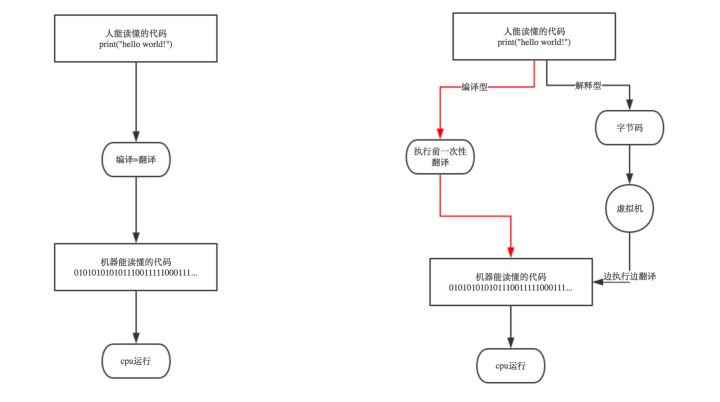 The execution process of compiled vs. interpreted languages
Summary: compiled and interpreted languages each have their pros and cons. When the program we need to write doesn’t need frequent changes or upgrades, we usually choose a compiled language, for example to write an operating system or other fairly low-level applications. When the program we’re writing needs frequent changes and upgrades to meet users’ new needs, we usually choose an interpreted language, for example for application software and website projects. It’s worth mentioning that thanks to its simplicity and high level of encapsulation, Python is still the easiest to debug and most flexible to use among interpreted languages. So when a project needs rapid development and iteration, many companies choose Python for new projects. You can write mobile app APIs with it, write web projects, and very conveniently do fairly complex machine learning and data mining computations, and so on. This is one of the reasons Python is so popular.
3 Introduction to Python
1. About the Python Language
_Python was created by Guido van Rossum. During Christmas 1989, Guido started writing an interpreter that could interpret the syntax of the Python language. The name Python comes from Guido’s beloved TV show Monty Python’s Flying Circus. He hoped this new language called Python would fulfill his ideal: to create a language between C and the shell that was full-featured, easy to learn and use, and extensible. In the latest TIOBE ranking, Python overtook C++ to take 4th place. Python values beauty, clarity and simplicity, and is an excellent and widely used language. Python can be applied in many fields, such as data analysis, component integration, web services, image processing, numerical computing and scientific computing. Today almost all large and mid-sized internet companies in the industry use Python, such as YouTube, Dropbox, BT, Quora (China’s Zhihu), Douban, Zhihu, Google, Yahoo!, Facebook, NASA, Baidu, Tencent, Autohome, Meituan and more.
2. Python’s Application Areas
- Web development: Django, the web framework you can get up to speed with fastest, and the small but powerful Flask framework, suitable for startups to quickly build their product’s business logic.
- Network programming: the Twisted network framework, which supports high concurrency, makes asynchronous programming very simple.
- Web scraping: in the scraping field Python is practically the dominant player. With Scrapy\Request\BeautifuSoap\urllib and others, you can easily scrape almost any resource on the web.
- Cloud computing: OpenStack, currently the best-known open-source cloud computing framework, is written in Python, which has greatly driven the development of the cloud computing industry.
- Artificial intelligence: which will become the number one development language of the AI and big data era? That’s no longer a question worth debating. In the past people used languages like MATLAB and Octave for scientific computing, but when it came to building applications they still used C++, Java, R or Python. Now Python has the open-source PyTorch and TensorFlow, and its position as the leading language of the AI era is basically established; the only suspense left is who can hold on to second place.
- Automated operations: ask every operations engineer in China which language an ops engineer must know. Even if you ask 10 people, I believe they’ll all give you the same answer, and its name is Python
- Financial analysis: many analysis programs and high-frequency trading software written by financial analysis companies use Python. To date, Python is the most widely used language in financial analysis and quantitative trading
- Scientific computing: did you know that since 1997 NASA has been using Python heavily for all kinds of complex scientific computations? With the development of many libraries such as NumPy, SciPy, Matplotlib and the Enthought libraries, Python has become more and more suitable for scientific computing and drawing high-quality 2D and 3D images. Compared with Matlab, the most popular commercial software in scientific computing, Python is a general-purpose programming language with a wider range of applications than the scripting language Matlab uses
- Game development: Python is also widely used in online game development. Compared with Lua or C++, Python has higher-level abstraction than Lua and can describe game business logic with less code. Compared with Lua, Python is better suited as a host language, meaning the program’s entry point is better placed on the Python side, with C/C++ used to write some extensions when really necessary. Python is very well suited to projects of more than 10,000 lines, and it can keep an online game project’s size under 100,000 lines of code. Also, as far as I know, the famous game
was written in Python
3. Python in Companies
- Google: projects like Google App Engine, code.google.com, Google Earth, Google’s crawler and Google Ads all make heavy use of Python
- CIA: the website of the US Central Intelligence Agency is developed in Python
- NASA: the US space agency (NASA) uses Python heavily for data analysis and computation
- YouTube: YouTube, the world’s largest video website, is developed in Python
- Dropbox: the largest online cloud storage website in the US is implemented entirely in Python, handling uploads and downloads of 1 billion files every day
- Instagram: the largest photo-sharing social network in the US, where over 30 million photos are shared every day, is developed entirely in Python
- Facebook: a large number of its foundational libraries are implemented in Python
- Red Hat: the yum package manager in the world’s most popular Linux distribution is developed in Python
- Douban: almost all of the company’s business is developed in Python
- Zhihu: China’s largest Q&A community is developed in Python (its overseas counterpart is Quora)
- Chunyu Doctor: this well-known Chinese online medical website is developed in Python
- Besides the examples above, companies such as Sohu, Kingsoft, Tencent, Shanda, NetEase, Baidu, Alibaba, Taobao, Tudou, Sina and Guokr all use Python to accomplish all kinds of tasks.
4. Python 2 or Python 3?
First, let’s look at a passage from the official documentation
In summary : Python 2.x is legacy, Python 3.x is the present and future of the languagePython 3.0 was released in 2008. The final 2.x version 2.7 release came out in mid-2010, with a statement ofextended support for this end-of-life release. The 2.x branch will see no new major releases after that. 3.x isunder active development and has already seen over five years of stable releases, including version 3.3 in 2012,+3.4 in 2014, and 3.5 in 2015. This means that all recent standard library improvements, for example, are onlyavailable by default in Python 3.x.Guido van Rossum (the original creator of the Python language) decided to clean up Python 2.x properly, with less regard for backwards compatibility than is the case for new releases in the 2.x range. The most drastic improvement is the better Unicode support (with all text strings being Unicode by default) as well as saner bytes/Unicode separation.Besides, several aspects of the core language (such as print and exec being statements, integers using floor division) have been adjusted to be easier for newcomers to learn and to be more consistent with the rest of the language, and old cruft has been removed (for example, all classes are now new-style, “range()” returns a memory efficient iterable, not a list as in 2.x).
Although many companies in the industry still make heavy use of Python 2.6 or 2.7, because old projects with hundreds of thousands or even millions of lines of code can’t easily be upgraded to 3.0 quickly, almost everyone uses 3.x when developing new projects. Besides, Python 3 really has made many improvements over 2.x. Intuitively speaking, it feels just like upgrading from XP to Win7: great. We’ll gradually go deeper into the specific differences between Python 2 and Python 3 in later lessons.
5. Installing the Python Interpreter
Python now supports all mainstream operating systems. Linux, Unix and Mac systems come with a Python environment; on Windows you need to install it, which is super simple
Open the download center on the official website https://www.python.org/downloads/windows/
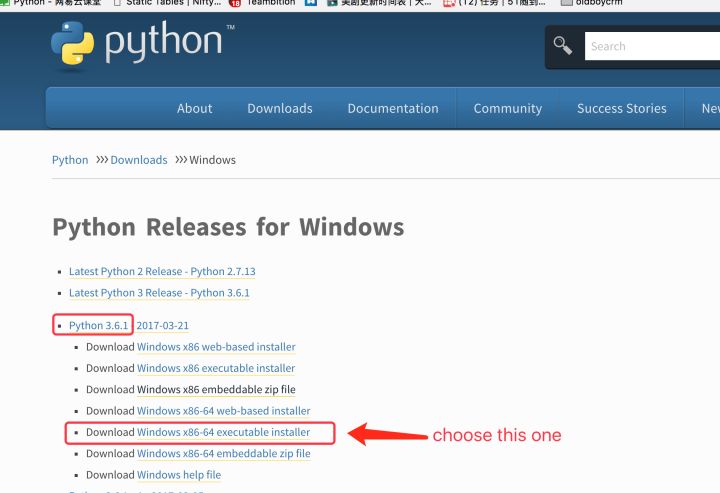
Things to watch out for during installation:
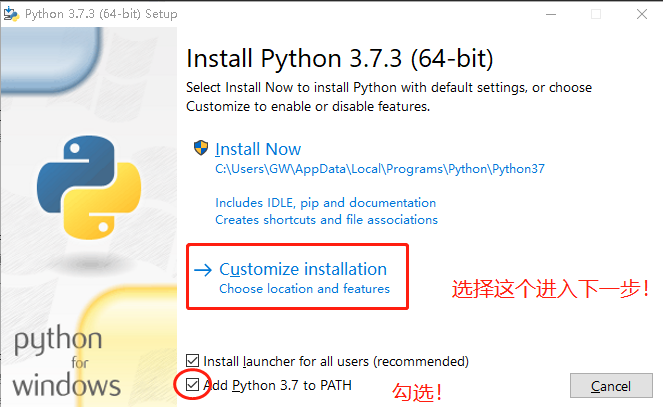
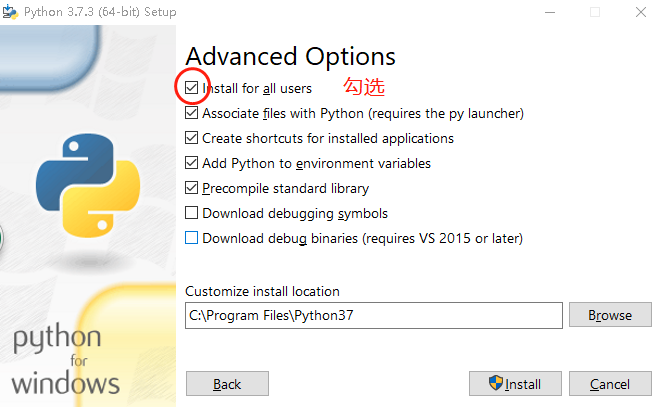
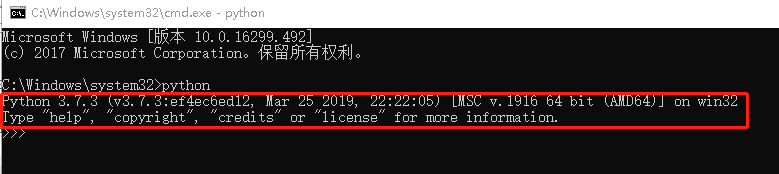
- Test whether the installation succeeded: Windows —> Run —> type cmd and press Enter. When the cmd program pops up, type python. If you can enter the interactive environment (see the image below), the installation succeeded.
- Demonstrating multiple coexisting versions. Note: find python.exe in the installation directory, make a copy, and name it python2.exe or python3.exe. Be sure to keep the original, because the pip tool calls it.
6. Two Ways to Write Programs
- Enter the interpreter’s interactive mode: convenient for debugging, but code can’t be saved permanently
- Script files (demonstrated with Notepad++): code is saved permanently
PS: Notepad++ is a text editor for the Windows operating system (software license: GPL), with a fully localized Chinese interface and support for writing in many languages. Search for Notepad on Baidu to download it
Emphasis: the Python interpreter executes programs by interpretation, that is, it opens the file and reads its contents, so there’s no hard restriction on the file extension, but it’s usually given a .py ending
Write a Hello World program in Python
print('Hello World')Compare how Hello World is written in other languages
# C++
#include <iostream>
 int main(void)
 {
  std::cout<<"Hello world";
 }
# C
#include <stdio.h>
int main(void)
{
printf("\nhello world!");
return 0;
}
# JAVA
public class HelloWorld{
  // The program's entry point
  public static void main(String args[]){
    // Print a message to the console
    System.out.println("Hello World!");
  }
}
# PHP
<?php
             echo "hello world!";
?>

# GO
package main
import "fmt"
func main(){
    fmt.Printf("Hello World!\n God Bless You!");
}
# A master of hello world in every language
Installing PyCharm, the dedicated Python IDE
Why use an IDE> By now we’re people who have written code too, but have you noticed that every time you write code you have to create a new file, choose where to save it when you’re done, and switch to the command line to call the Python interpreter to run it? What a hassle. Can’t it all be done in one go, so I can simply write code? This is where the IDE development tool comes in; a good IDE can greatly improve your development efficiency. Many languages have fairly popular development tools, such as Eclipse for Java and Visual Studio for C# and C++. What about Python? PyCharm, the best Python IDE
Installation
Download link: https://www.jetbrains.com/pycharm/download. Choose the Professional edition
Go to the> PyCharm official website and download the Professional edition following the prompts. The Community edition is free but supports fewer features, so go with the Professional edition. After registering and launching it, it will first ask you to create a project, which is really just a folder; all our future code will be stored in it.
Installation tutorial for reference: https://blog.csdn.net/ling_mochen/article/details/79314118
4 Variables and Constants
1. The Concept of Variables
Put plainly, the work a computer does is creating, deleting, updating and querying data. So data must change, and to store changing data we should use “variables”.
What is a variable
- A variable is a quantity that changes. Its core lies in two words, “vary” and “quantity”: vary means change, and quantity means measuring a state.
Why do we need variables
- The essence of program execution is a series of state changes, and change is the direct manifestation of a program running. So we need a mechanism that can reflect, or rather save, the state of a program while it runs and how that state changes.
- #For example: a hero’s level is 1, and after fighting monsters it levels up (changes) to 10; a zombie’s alive state is True, then it’s killed by a plant, so it changes to False; a person’s name is Albert, and it can also be changed to AlbertMa.
How to define a variable in Python
- Variable name (like a house number, pointing to the space where the value lives), equals sign, variable value; assignment goes from right to left.
name='Albert'
sex='male'
age=18
level=10
2. Rules for Defining Python Variables
- A variable name can only be any combination of letters, digits or underscores
- The first character of a variable name can’t be a digit
- The following keywords can’t be variable names
[‘and’, ‘as’, ‘assert’, ‘break’, ‘class’, ‘continue’, ‘def’, ‘del’, ‘elif’, ‘else’, ‘except’, ‘exec’, ‘finally’, ‘for’, ‘from’, ‘global’, ‘if’, ‘import’, ‘in’, ‘is’, ‘lambda’, ‘not’, ‘or’, ‘pass’, ‘print’, ‘raise’, ‘return’, ‘try’, ‘while’, ‘with’, ‘yield’]
3. Ways to Name Python Variables:
Camel case
Camel case is used when a variable or function name is made of one or more words joined together.
There are two kinds of camel case:
1 Upper camel case: the first letter of every word is capitalized, AgeOfTeacher
2 Lower camel case: the first letter of every word except the first is capitalized, ageOfTeacher.
#Upper camel case
AgeOfAlbert = 18
NumberOfStudents = 80
#Lower camel case
ageOfTeacher = 28
Underscores (recommended)
age_of_albert = 18
number_of_students = 80
Bad ways to name variables
- Variable names in Chinese or pinyin
- Variable names that don’t convey their meaning
- Variable names in Chinese. Python actually supports Chinese variable names, which really turned my worldview upside down; maybe it’s an optimization made to look after some of our country’s programmers
It’s worth mentioning: when projects at a company are large, we often give variables fairly long names. On one hand this keeps variable names from clashing, and on the other hand it lets you know what the data means just by looking at the variable name
Here’s a saying for you: variables are logic
A defined variable has: id (unique identifier), type (variable type) and value (variable value)
- The equals sign compares value,
- is compares id
Emphasis:
- If the ids are the same, the type and value must be the same
- If the values are the same, the type must be the same, but the id may differ, as follows
>>x='Info Albert:18'
>>y='Info Albert:18'
>>x == y
>>True
>>x is y
>>False
If you test this yourself in a terminal or in PyCharm, x is y may come out True. Don’t worry, that’s a memory optimization done by PyCharm or the terminal environment; with a longer value it works as shown.
4. Constants
A constant is a quantity that doesn’t change, such as pi 3.141592653…, or a quantity that doesn’t change while a program runs. For example: the Japanese prime minister’s age is a variable, but if he suddenly kicked the bucket today, his age would never change again, and then it would be a constant. Python has no dedicated syntax for constants; by convention, programmers use all-uppercase variable names to represent constants
JAPANESE_PRIME_MINISTER_AGE = 56In C there is dedicated syntax for defining constants, const int count = 60; once something is defined as a constant, changing it raises an error
5 Basic Data Types
1. Overview
Python is a strongly typed dynamic scripting language: strongly typed means adding different types together is not allowed; dynamic means you don’t declare a data type when defining a variable, and a variable’s type is determined the first time it’s assigned a value.
If this is your first time seeing this material, a rough impression is enough; data types will be covered in depth later.
2. Strings (str)
Just now we defined a person’s name with name = ‘Albert’. Defining something by writing content between single quotes, double quotes or triple quotes, like ’ ’ or ” ” or """ """, gives the str type, which we call the string type
print('Hello world') # 'Hello world' is a stringWhen defining a variable, the right side of the equals sign is assigned to the variable on the left side.
We not only need to know its data type is str (string); when learning a data type we also need to know whether it’s a mutable or immutable type.
- Immutable type: when the variable’s value changes, the id changes too. It’s like allocating a new block of memory and reassigning the variable; the original value can’t be changed. str is an immutable type
- Mutable type: when the variable’s value changes, the id can stay the same. It’s like modifying it in place; the location doesn’t change
A mutable type can be thought of as a big house staying in the same spot, and renovating the house is making a modification. An immutable type is a house that can’t be renovated: if you want a change, fine, build another house somewhere else and move in there.
3. Integers (int)
When we define a person’s age we use age = 18, with an integer directly after the equals sign. This variable’s data type is int, which we call an integer. Integers are an immutable type.
4. Floats (float)
When we define a person’s height we use height = 1.83. Likewise, this is the float type, which we call a floating-point number. Floats are an immutable type; intuitively, a float is a variable whose value needs to be precise to decimal places.
5. Lists (list)
When we need to store the names of all the students in a class, we’re using one variable to store multiple values. Each of the three data types above can only store one value; in this case we can use the list data type, which we call a list.
How it’s defined: inside square brackets, multiple elements separated by commas, where each element can be any data type. Lists are a mutable type.
names = ['albert','james','kebo']  # store multiple students in a class
information = ['albert',18,1.83]  # store one person's information
# store multiple people's information
informations = [['albert',18,1.83],['james',34,2.03],['kebo',40,1.98]]
6. Tuples (tuple)
Another data type similar to list is tuple, which we call a tuple. It’s used very much like a list, except that a list can be modified while a tuple can’t; it can only be viewed. It’s defined inside parentheses, with multiple elements separated by commas, where each element can be any data type. Just change the square brackets in the code above to parentheses; note that they must be English (ASCII) parentheses (). Tuples are an immutable type.
7. Dictionaries (dict)
When the code above stored multiple people’s information, you could probably tell that I was storing each person’s name, age and height, but it isn’t explicit, and we can’t rely on guessing. The way to solve this is to spell it out when defining the data, and that’s where dictionaries come in.
How it’s defined: inside curly braces, multiple elements separated by commas, with each element in the form key: value.
Note: dictionary keys can only be immutable types; we usually use strings. Dictionaries are a mutable type.
information = {'name':'albert','age':18,'height':1.83}  # store one person's information
informations = [
        {'name':'albert','age':18,'height':1.83},
        {'name':'james','age':34,'height':2.03},
        {'name':'kebo','age':40,'height':1.98}
]  # store multiple people's information
8. Sets (set)
There are over 400 players in the NBA. If we want to store these 400-plus players without caring about order, there certainly can’t be duplicates; each player counts only once. The lists and tuples above allow duplicates. We just need to know that “Albert” is definitely not in there.
How it’s defined: inside curly braces, multiple elements separated by commas, where each element can be any data type but can’t be repeated. Sets are a mutable type.
NBA_players = {'James', 'Kobe', 'Jordan', }9. Booleans (Bool)
There are many players in the NBA, but some people may never play in the NBA in their whole lives. If we want to determine whether a person is an NBA player, we can use the Boolean type. It has only two values, True and False.
That’s all we need to know about the basic data types for now; later chapters will explain how to use these data types in more detail.
10. Supplement (Very Important)
Here’s a small supplement about naming variables. It’s simple, but very important.
I recommend using “Hungarian notation”, which is also the most standardized way of naming variables at work. Sometimes when you look at someone’s code, just looking at their variable names lets you roughly judge their skill level.
In short, Hungarian notation means putting an abbreviation of the variable’s “type” at the very front of the variable name. The key point is that the variable “type” here refers to types related to your code’s business logic. For example, say your code has two variables, students and teachers, representing a set used to store students and a list used to store teachers respectively. Using “Hungarian notation”, you can rewrite these two names like this:
students -> set_students
teachers -> list_teachers
In many cases, using “Hungarian notation” is a good idea, because it can improve your code’s readability, especially when there are lots of variables and the same type appears many times. Just be careful not to overuse it.
6 Comments
As your studies go deeper, before long you’ll be able to write complex code of thousands or even tens of thousands of lines. Some code you spent a long time writing, and when you come back to it a few days later, you find you can’t understand it anymore. That’s perfectly normal.
Also, you’ll find at work that a project is usually built by several or even dozens of developers together. You need to call code others wrote, and others need to use yours. If your code has no comments, even you can’t understand it, let alone anyone else, and that’s how you get beaten up.
So to avoid this kind of embarrassment, you must make your code more readable.
Anything after the ” # ” sign isn’t output when the code runs; it exists as an explanation
There are three kinds of code comments:
- Single-line comments: the comment occupies its own line, starts with #, followed by a space and then the comment’s content
a = 1
# a += 1 This is how the comment ”#” is used; everything after # is explanation and the computer won’t run it.
- Inline comments: at the end of a line of code, type two spaces, then a #, then another space, followed by the comment’s content.
a += 1 # inline comment
- Multi-line comments: you can write the comment content between three pairs of double quotes
"""注释内容 """, or between three pairs of single quotes. Obviously, multi-line comments let you comment over multiple lines. When your comment is fairly long, writing it on one very long line isn’t easy to read, so in that case we recommend multi-line comments.
"""
hello, world!
"""
Principles for code comments:
- You don’t need to comment everything; just add comments to the parts you think are important or hard to understand
- Comments can be in Chinese or English, but don’t use pinyin, and don’t mix Chinese and English
Note (very important):
Everyone can probably write comments now, but in fact at work, apart from some companies with high standards, very few people write comments properly. Writing comments, and writing them to standard, is the simplest indicator of a programmer’s coding discipline.
7 File Headers
Note: since it’s a file header, it naturally goes at the top of your code file. This is one of the details of development standards.
#!/usr/bin/env python  # specify the interpreter
# -*- coding: utf-8 -*-  # specify the file's character encoding, covered in depth in the character encoding chapter

# then write your code
Writing this ourselves every time we write code is a bit of a waste of time. We can configure it in PyCharm first, and from then on the file header is added automatically every time we create a new file.
macOS users can click in the top-left corner of PyCharm and follow: PyCharm—Preferences—Editor—File and Code Templates—Python Script to find a blank area, and paste the following code into it.
Windows users can follow: File—Settings—Editor—File and Code Templates—Python Script and do the same.
Note: you can change the author line to your own name.
#!/usr/bin/env python
# -*- coding: utf-8 -*-
# @Time    : ${DATE} ${TIME}
# @Author  : Albert
# @File    : ${NAME}.py
8 Implementing User Interaction
Only at this point does the article officially get to this chapter’s title; everything before was groundwork.
Long ago, when we went to the bank to withdraw money, a bank clerk had to wait for us to give him our account number and password, then he would verify them, and once that succeeded we’d enter/tell him the amount to withdraw. Proud modern people provide customers with an ATM (which is just a computer) and let the ATM interact with users, replacing human labor. But a machine is lifeless; we have to write programs for it to run, which requires our programming language to have a mechanism for interacting with users and receiving the data they input.
User interaction means the program waits for the user to input data before executing the next step. We use input to do this.
name = input('请输入姓名:')  # I assign what's entered to the variable name
print(‘你好’ + name)  # once the user has entered their name, it prints 你好XXX
Differences between Python 2 and Python 3
- In Python 3, input: whatever value the user enters is stored as a string
- In Python 2, input: whatever type the user enters is stored as that type
- raw_input in Python 2: equivalent to input in Python 3
Note: when a number needs to be entered, considering that we’ll use that number in calculations and Python 3’s input converts it to str by default, we need to convert the user’s input to int (int will be explained in detail on day four, “Data Types - Numbers and Strings”).
age = input('请输入年龄')
age = int(age)  # convert the string age into an int age for calculation