Data Types - Lists and Tuples
While reading this course series, you should type in and run the teacher’s course code in your own Python environment to deepen your understanding.
I. Lists
1. Basic Introduction to the List Type
Values are separated by commas inside [], and a list can hold n values of any type. It is used for cases where multiple values need to be stored, for example a person having several hobbies. Example definition format:
students=['albert','james','kd',]
# or students=list(['albert','james','kd',])
A list can store multiple values, is ordered, is a mutable type, and is not hashable.
2. Common Methods of the List Type
(1) Adding Elements
The append method appends an element to the end of the list
l1 = ['a', 'b', 'c', 'd', ]
l1.append('e')
print(l1)
print(l1.append('e'))
# Appends to the end of the list; there is no return value

# ['a', 'b', 'c', 'd', 'e']
# None
The insert method inserts an element into the list
l1 = ['a', 'b', 'c', 'd', ]
l1.insert(3,'x') # 3 specifies inserting at index 3, which is where 'd' is, pushing 'd' back
print(l1)

# insert lets you specify the position to insert at

# ['a', 'b', 'c', 'x', 'd']
The extend method inserts several elements into the list at once: how to use extend and how it differs from append
append adds the argument as a whole
l1 = [1, 2, 3, 4, 5, ]
l1.append([6, 7, 8, 9, ])
# l1.append(*[6, 7, 8, 9, ])  # raises an error
print(l1)
l1.extend([6, 7, 8, 9])
print(l1)
It can only accept one argument. If * is used to unpack, it will still be treated as multiple arguments, because the program executes from left to right and from top to bottom; by the time the * appears, the list has already been unpacked, so the program sees it as being passed multiple arguments.
extend adds the elements one by one
l1 = [1, 2, 3, 4, 5, ]
l1.extend([6, 7, 8, 9])
print(l1)
l1.extend('abc')
print(l1)
l1.extend('a')  # also an iterable
print(l1)
# l1.extend(1)  # error: not iterable
print(l1)
When extend adds elements, the argument passed in must be an iterable; iterating over it solves the problem of passing in multiple values at once. If you don’t know about iterables yet, don’t worry, you will very soon.
(2) Removing Elements
pop removes an element and has a return value; by default it removes the last element of the list, or you can specify the index to remove
l1 = [1, 2, 3, 4, 5, 6, ]
print(l1.pop())  # Removes an element from the list, the last one by default; this has a return value,
because this is an iterable type, in the same family as extend from earlier
print(l1)
print(l1.pop(2))  # 2 specifies the index in the list
print(l1)
remove deletes an element; it has no return value and no default, and you specify the element to delete
l1 = [1, 2, 3, 4, 5, 6, ]
print(l1.remove(2)) # Note that this 2 is the list element 2, not an index; keep this distinct from pop above,
pop removes the element corresponding to an index
# print(l1.remove())  # error
print(l1)
clear deletes the contents: it keeps the list’s name and empties the values inside
l1 = ['a', 'b', 'c', 'd', 'e', 'b', 'c']
l1.clear()
print(l1)
del deletes: a general-purpose deletion, but it is rarely used
l1 = [1, 2, 3, 4, 5, 6, ]
del l1[2]  # by index: l1[0] = 1,l1[1]=2,l1[2]=3
print(l1)
l1 = [1, 2, 3, 4, 5, 6, ]
del l1  # deletes l1 from memory, as if l1 had never been defined
# print(l1)  # error
(3) Changing Elements
Note how this differs from insert: both use the original position as the reference, but insert pushes things aside and is essentially adding, whereas here it is replacing
l1 = [1, 2, 3, ]
l1[2] = 4# replace the element at index 2 with 4
print(l1)
(4) Finding Elements
Look up by index or by a specified element of the list
l1 = ['a', 'b', 'c', 'd', 'e', 'b', 'c']
print(l1.index('a'))  # returns the index of a in l1
print(l1.index('b',1,4))  # the two numbers are the start and end positions
print(l1[0:5])  # getting values by index works the same as with strings
print(l1[:5])
print(l1[0:5:2])
print(l1[:-1])
print(l1[:-2])
print(l1[5:1:-2])
Looking up a list in segments
l1 = ['a', 'b', 'c', 'd', 'e', 'b', 'c']
a = int(len(l1)/2)
print(l1[:a])  # starting from the middle, list all the elements before it
print(l1[a:])  # starting from the middle, list all the elements after it
Using enumerate to enumerate a list
l1 = ['a', 'b', 'c', 'd', 'e']
for i, x in enumerate(l1, 100):  # 100 specifies the number the enumeration starts from
    print(i, x)
(5) Getting the Length
print(len([1,2,3,4,]))(6) Counting Occurrences of an Element
print(['a','b'].count('a'))(7) Sorting
reverse reverses the order
l1 = ['a', 1, 'b', 'c', 'd', 'e', 'b', 'c']
l1.reverse()
print(l1)
sort sorts by ASCII code
l1 = ['a', '1', 'b', 'c', 'd', 'e', 'b', 'A', 'Z', 'c']
l1.sort()
print(l1)
l1.sort(reverse=True)
print(l1)
(8) Copying a List
l1 = ['a', '1', 'b', 'c', 'd', 'e', 'b', 'A', 'Z', 'c']
print(l1.copy())
(9) The Difference Between Assignment, Shallow Copy and Deep Copy in Python
Assignment
The simplest way to “copy” is assignment, which means creating a new reference to an object: the new target and the original target point to the same memory address. Assignment merely adds a reference; it does not allocate any new memory space. As shown in the figure below
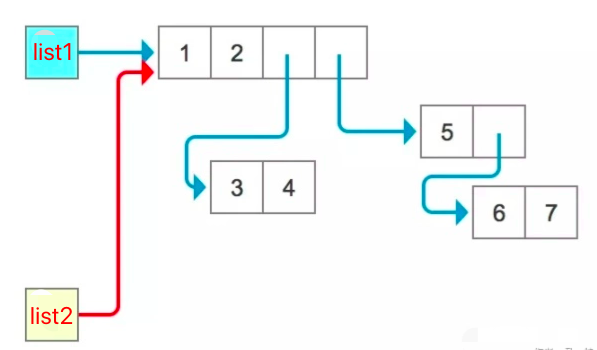
Verify it with id and you will see that list1 and list2 are still the same thing. Naturally their elements are the same too, so modifying one changes the other as well:
list1 = [1, 2, [3, 4], [5, [6, 7]]]
print('list1:', id(list1))
print([id(i) for i in list1])
list2 = list1
print('list2:', id(list2))
print([id(i) for i in list2])
print(list1 is list2)
print(list1[0] is list2[0])
print(list1[2] is list2[2])
list2[0] = -1
print(list1)
list2[2][1] = -1
print(list1)
That is why some people call this operation “old wine in an old bottle”: it just sticks on one more label, which doesn’t achieve our goal. To get a “copy” of an object, we need the copy method.
Shallow Copy
A shallow copy, as the name suggests, copies only shallowly. We can think of assignment as creating a new reference to an object, pointing a new variable at the data in the original object’s memory space, so that the same block of memory is pointed to by two variables. A shallow copy is different from assignment: since it is a copy, it allocates a new block of memory, and what it copies are the references to the element objects inside the original object. However many element objects there are, that many references are copied. Some people call this “old wine in a new bottle”. But if the old bottle has another bottle nested inside it, you need to be careful. So any change (including adding, modifying and deleting) to the elements inside a mutable element of either the copy or the original will cause a change on the other side. However, if you modify a first-level element of the object as a whole (in which case, for the contents of a mutable element, you can only delete), then even though their elements share memory addresses, the references inside the copy and the original are independent: deleting a reference on one side leaves the reference on the other side intact.
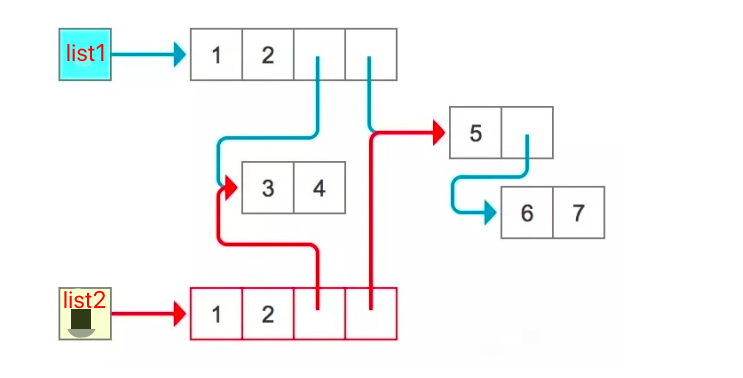
from copy import copy

list1 = [1, 2, [3, 4], [5, [6, 7]]]
print('list1:', id(list1))
print([id(i) for i in list1])
list2 = copy(list1)
print('list2:', id(list2))
print([id(i) for i in list2])

# 1 Checking and demonstrating
print(list1 is list2)  # different ids, so naturally not; id is used here to represent the memory address
print(list1[0] is list2[0])  # corresponding elements of the two point to the same address
print(list1[2] is list2[2])

# 2 Demonstrating whole-element changes at the first level (here even mutable elements can only be changed as if immutable)
list1[0] = -1  # changing list 1 or list 2 affects only that list
print(list1)
print(list2)

list2[1] = -2
print(list1)
print(list2)

list1[2] = -3
print(list1)
print(list2)

list2[2] = -30
print(list1)
print(list2)

# 3 Adding elements to the object
list1.append('add1')
print(list1)
print(list2)

list2.append('add2')
print(list1)
print(list2)

# 4 Deleting
list1.pop()
print(list1)
print(list2)

list2.pop()
print(list1)
print(list2)

list1.pop()
print(list1)
print(list2)

# 5 Only changes (adding, modifying, deleting) to the elements inside a mutable element of the object are reflected on both sides
list2[-1][0] = '5->55'
print(list1)
print(list2)

# # It works the same with list1, but you need to comment out some of the code above so the index positions don't go wrong
# list1[3][0] = '5->55000'
# print(list1)
# print(list2)
Deep Copy
A deep copy is fundamentally different from a shallow copy. It does not copy any references: the data of every element in the object, its child elements, grandchild elements, great-grandchild elements and so on, are all copied. That’s why this operation is called “new wine in a new bottle”. It is implemented with recursion: as long as any element still contains child elements, the data of those child elements is copied to a new memory address. That being the case, after a deep copy, changes to the original object will not cause any change in the copy.
import copy

list1 = [1, 2, 3, 4, 5, [6, 7, 8, ]]
list2 = copy.deepcopy(list1)
print(list1)
print(list2)

list1[5].append(9)
print(list1)
print(list2)

list1.append(6)
print(list1)
print(list2)

list1.pop()
print(list1)
print(list2)
Summary of assignment, shallow copy and deep copy:
- Assignment: creates a new reference to the original object’s memory address; the object itself does not get new memory space;
- Shallow copy: creates new references to the memory addresses of the original object’s first-level child elements; the object itself needs new memory space;
- Deep copy: copies the data of all N levels of child elements in the original object; all the data gets new memory space.
II. Tuples
The tuple type is very similar to the list type, except that [] becomes (). Purpose: storing multiple values. Compared with a list, a tuple is immutable (so it can be used as a dictionary key) and cannot be changed; it is mainly used for reading.
age=(11,22,33,44,55)
# essentially age=tuple((11,22,33,44,55))
A tuple can store multiple values, is ordered, is an immutable type, and is hashable. For common tuple methods, refer to the common list methods. Note that you can only read values from a tuple; you cannot change them