Intelligent Dialogue
I. Data Analysis and Natural Language Processing
When handling many data analysis tasks, we inevitably run into knowledge related to text content. This belongs to text mining, which clearly falls within the scope of NLP technology. With that in mind, let’s first get a basic understanding of natural language processing.
II. Natural Language Processing
If a computer can deceive a human into believing that it is human, then the computer should be considered intelligent. (Alan Turing)
Can machines understand text the way we humans do? This was people’s earliest dream of artificial intelligence. Today, it has become a core field of artificial intelligence: natural language processing (NLP for short). Natural language processing is a science that integrates linguistics, computer science and artificial intelligence, and people regard it as the crown of artificial intelligence. What it tackles is “enabling machines to understand natural language”, which so far has remained a privilege unique to humans. For this reason, natural language understanding (NLU) is hailed as the jewel in the crown of artificial intelligence.
Natural language processing involves many technologies, including but not limited to the following areas:
- Machine Translation (MT): automatic translation from one language into another
- Automatic Abstracting: automatically summarizing and distilling the main content and meaning of a document into an abstract
- Information Retrieval: finding relevant documents that meet the user’s needs from a massive collection of documents
- Document Classification: automatically categorizing large numbers of documents according to certain classification criteria
- Question-answering system: understanding questions posed by users and automatically answering them
- Automatic Speech Recognition: recognizing users’ speech and converting it into text
- Text-to-speech: synthesizing text into human speech
Above are a few briefly listed NLP-related technologies. Next, we hope to gain a basic understanding of NLP and some simple hands-on practice in a short time. I’ll lead you in writing a question-answering system, that is, an intelligent chatbot.
III. The Development of Chatbots
Chatbots are a very common application of artificial intelligence in our daily lives. Starting from this chapter, we’ll learn the technology and develop our own chatbot step by step. In fact, as early as 1965, Joseph Weizenbaum published an article in ACM titled “ELIZA—A Computer Program for the Study of Natural Language Communication Between Man and Machine”. The article described how this program, called Eliza, made it possible, to a certain extent, for humans and computers to hold natural language conversations. Eliza decomposed the input using keyword-matching rules, and then generated replies based on the reassembly rules corresponding to the decomposition rules. Since then, chatbots have developed rapidly; Microsoft XiaoIce, Apple Siri, Xiao Ai, Tmall Genie and so on are all concrete applications of modern chatbots.
IV. Types of Chatbots
We generally divide chatbots into three types:
- Task-oriented bots
- Knowledge-based bots
- Chit-chat bots
You can tell how chatbots are classified just from the names. Task-oriented bots can help us complete certain tasks in a particular domain or specific scenario; for example, Xiao Ai can control the air conditioner at home, and Siri can help us set alarms, and so on. Knowledge-based bots can help us deal with knowledge in a specific domain, such as Tmall’s automated customer service, or Sophia, who can answer all kinds of questions. Chit-chat bots are bots that can chat with us about anything. As I recall, when the iPhone 4S first came out, Siri launched this feature, and countless creeps flirted relentlessly with Siri’s “auntie”, Susan Bennett. Let’s take a look at the auntie’s beautiful face when she was young.

But when Siri’s original voice was being recorded, it looked like this

Thanks to Susan’s hard work, we had the Siri of those days and all the fun in our dorm room (oops, I accidentally gave away my age)
V. How Chatbots Work
There are currently four main approaches to building chatbots:
- Template-matching-based approaches
- Retrieval-model-based approaches
- Intent-recognition-based approaches
- End-to-end generative approaches
The core of the template-matching approach is defining rules one by one; it can be implemented without any AI technology, and Eliza, the earliest chatbot mentioned above, is a classic example. Although the process is simple, it requires designing a large number of rules and making sure the rules don’t conflict with each other (which is hard). It has poor scalability, involves a lot of repetitive work, and struggles to handle the diverse ways sentences can be expressed, and so on.
The retrieval-model-based approach can effectively avoid the drawbacks above. It first obtains the input text, then enters the retrieval model stage, and finally outputs the answer. In this chapter, we’ll mainly build a chatbot based on a retrieval model.
The last two approaches, intent recognition and end-to-end, will require deeper study of NLP before we can do more hands-on practice with them.
VI. Chinese Word Segmentation
1 Basics of Word Segmentation
Building a chatbot with the retrieval-model-based approach mainly involves the following four steps: Chinese word segmentation, text representation, similarity computation, and returning the result. Word segmentation means splitting text into words. In English, the sentence I love you, made up of three words, is already separated by spaces. But how should a Chinese sentence such as “我爱北京天安门” (“I love Tiananmen in Beijing”) be separated with spaces?
To let a program do this work for us automatically, Python offers several word segmentation libraries, such as jieba, SnowNLP, thulac, pynlpir, nltk, pyltp and so on. The most representative of them is Baidu’s jieba segmentation; its GitHub address is https://github.com/fxsjy/jieba, and interested students can look into it in depth. Chinese word segmentation works like this: people have compiled lots of words based on experience, and then a sentence is searched to find which characters can form a word. Once you use it, it automatically splits sentences into different words for us.
Sample code for jieba segmentation is shown below
import jieba

text = '我爱北京天安门'

result = jieba.cut(text)  # The segmentation result is a generator object

for i in result:
    print(i)
2 Segmentation Modes
The jieba library provides three segmentation modes: accurate mode, full mode and search engine mode.
- Accurate mode: cuts the sentence precisely, suitable for text analysis. The segmentation mode is determined by the cut_all parameter; if it is False, accurate mode is used. If the parameter is omitted, accurate mode is the default.
- Full mode: scans out all the words in the sentence that can form words, very fast, but it cannot resolve ambiguity. When the value of the cut_all parameter is True, full mode is used.
- Search engine mode: based on accurate mode, it further splits long words, suitable for search engine segmentation. Search engine mode is implemented with the jieba.cut_for_search() method.
Let’s look at an example to see what each of them produces. The code is as follows:
import jieba

text = '今天天气很热,我出去转了一圈出了一身汗,还是待在家里吹空调吧'

result1 = jieba.cut(text, cut_all=False)  # Accurate mode
result2 = jieba.cut(text, cut_all=True)  # Full mode
result3 = jieba.cut_for_search(text)  # Search engine mode
print(list(result1))
print(list(result2))
print(list(result3))
From the results, we can see that accurate mode is more suitable for text analysis scenarios; the other two modes split words too finely.
VII. Text Representation
1 Basic Introduction to Word Vectors
In natural language processing, text representation is very important; only after text is represented as numbers can we process it further. This way of representing text with numbers is the word vector. As the name suggests, it represents a word in the form of a vector.
2 How Word Vector Representation Works
Imagine I now have a dictionary of a text made up of some words. The contents of the dictionary are: 我 爱 北京 天安门 (I, love, Beijing, Tiananmen). Now there are three words: 我 (I), 北京 (Beijing) and 爱 (love). We want to express these three words as vectors based on the dictionary. The representation is shown in the figure below:
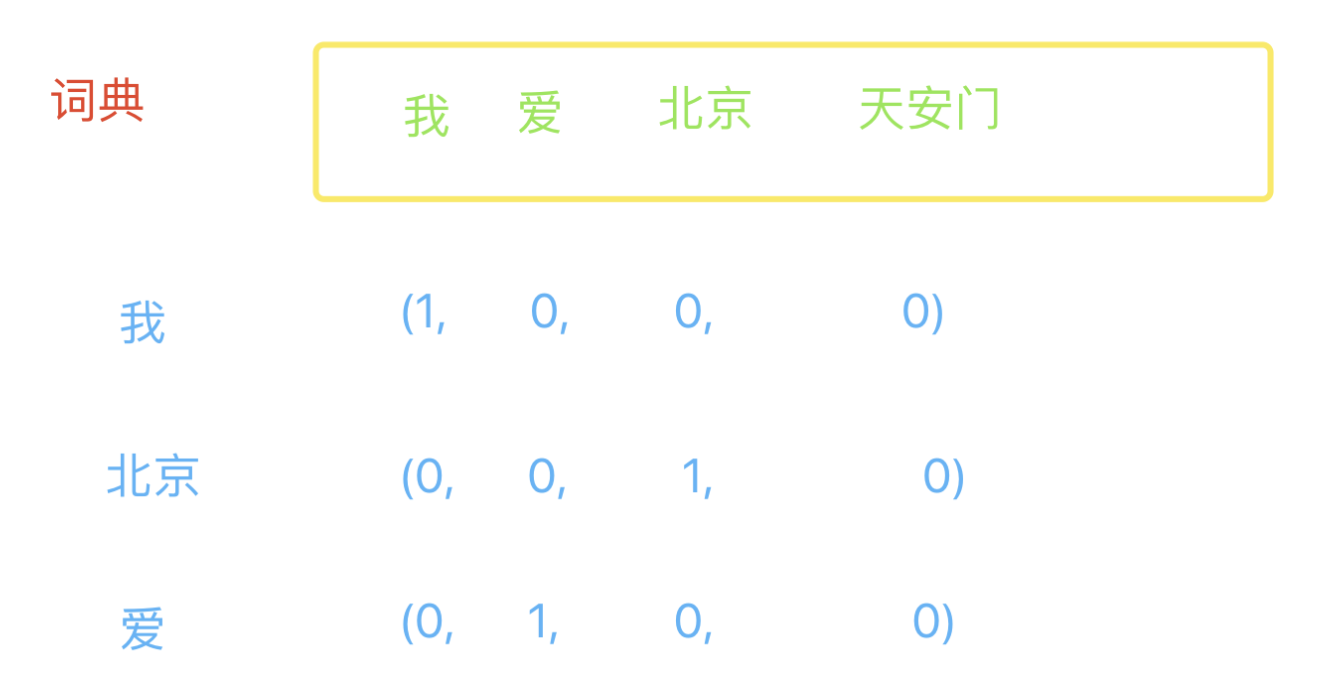
With this approach, if the dictionary has 1 billion words, each word is represented by a 1-billion-dimensional array in which one dimension is 1 and all the others are 0. Obviously, this approach makes the representation of a word extremely complex, and real-world applications certainly don’t work this way; I’m using it first to make things easier to understand.
3 A Small Word Vector Exercise
Given a dictionary and two words, write a program that represents these two words based on the word vector representation just introduced.
text_list = ['我', '爱', '北京', '天安门']
w1 = '我'
w2 = '天安门'

def get_vector(word):
    vector = []
    for i in text_list:
        if word == i:
            vector.append(1)
        else:
            vector.append(0)
    return vector

print(get_vector(w1))
print(get_vector(w2))
4 Representing a Sentence as a Vector
Representing a sentence is similar to representing a word vector: we just need to check whether each word of the sentence appears in the word vector, marking it 1 if it appears and 0 if it doesn’t. The code for representing sentences is as follows:
import jieba

text_list = ['我', '爱', '北京', '天安门']
w1 = '我爱你'
w2 = '我在天安门'
w3 = '我的家在北京'

def get_vector(word):
    word_list = list(jieba.cut(word))
    print(word_list)
    vector = []
    for i in text_list:
        if i in word_list:
            vector.append(1)
        else:
            vector.append(0)
    return vector

print(get_vector(w1))  # w1 is affected by the segmentation result
print(get_vector(w2))
print(get_vector(w3))
5 gensim, a Library for Automatic Word Vector Representation
For word vector representation, Python provides us with a library called gensim. It is used as shown in the code below:
import jieba
from gensim.models import word2vec

# Suppose there is a file a.txt whose content is: 我爱北京天安门
f1 = open('a.txt')

# Used to store the segmentation results
f2 = open('b.txt', 'a')

# Suppose the file contains multiple lines of text
lines = f1.readlines()
for line in lines:
    # Replace tabs, newlines and spaces
    line.replace('/t', '').replace('/n', '').replace(' ', '')
    segment = jieba.cut(line)
    # Join with spaces and write
    f2.write(' '.join(segment))

f1.close()
f2.close()

# Load the corpus
sentences = word2vec.Text8Corpus('b.txt')
# Train the model
model = word2vec.Word2Vec(sentences, min_count=1)  # The corpus is too small, so the min_count parameter must be set to 1
# Save the model
model.save('word2vec.model')

# Represent word vectors
print(model.wv['我'])
print(model.wv['天安门'])
print(model.wv['我', '天安门'])
# print(model.wv['上海'])  # A word must exist in the corpus to be represented as a vector; otherwise an error is raised
VIII. Computing Text Similarity
1 Euclidean Distance
Text similarity is mainly about computing the distance between different texts. It is computed much like the length of the hypotenuse of a right triangle, as shown in the figure:
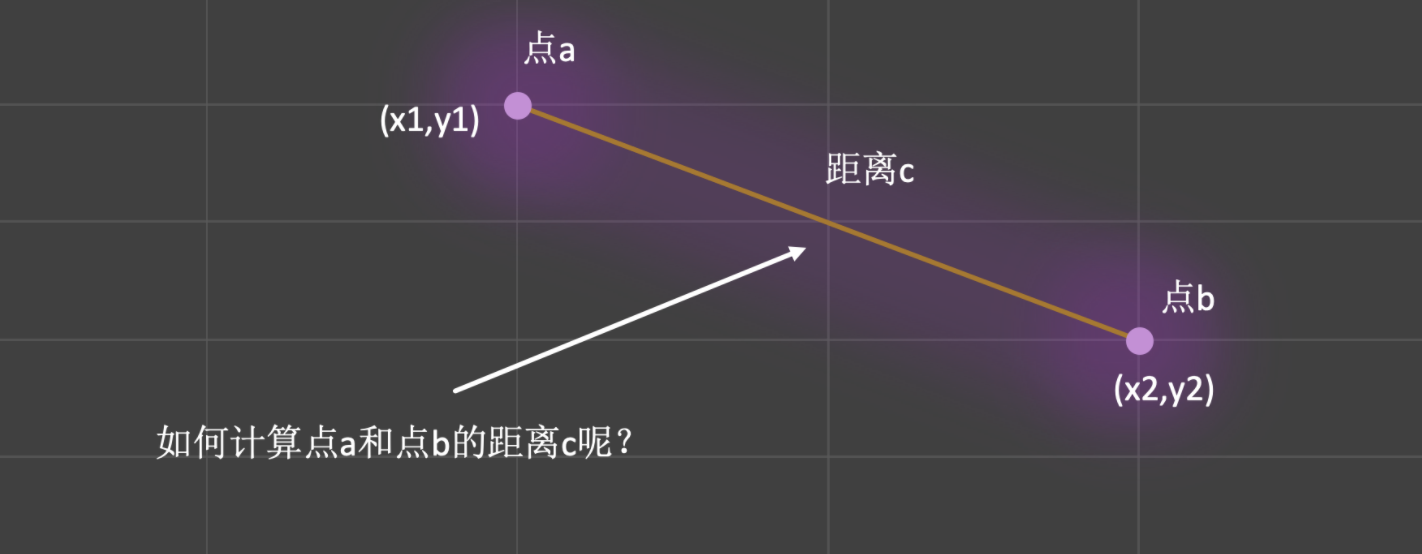
So the way to compute the distance between points a and b is:
This way of computing distance is called the Euclidean distance. Extended to n-dimensional space, it is computed as:
2 Manhattan Distance
The Manhattan distance is a distance measure fairly close to the Euclidean distance; it is also called the Manhattan block distance. It is very simple to compute: it is the sum of the relative distances between two points along the axes, as shown by the blue dashed line in the figure below:
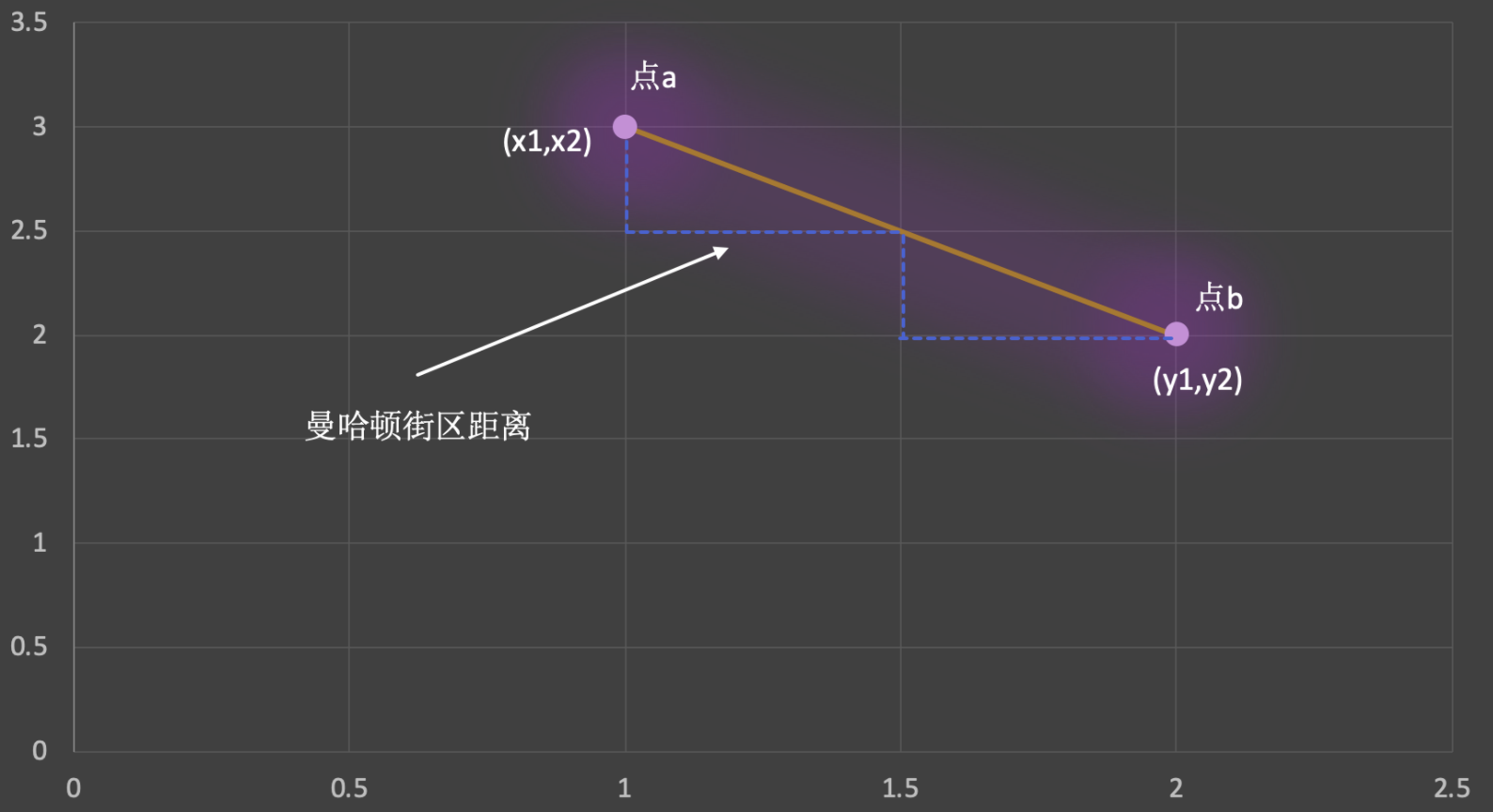
Manhattan distance formula: d(a,b)= |x1 - x2| + |y1 - y2|
In n-dimensional space: d(a,b)= |x1 - x2|+|y1 - y2|+ … |xn - yn|
In early computer graphics, using the Manhattan distance could greatly speed up computation with very little error. Today the Manhattan distance is often applied to complex graphics-related computations to improve efficiency. Here we’ll just give a brief introduction and won’t go into the details.
3 Cosine Similarity
Cosine similarity is a formula very widely used for computing text similarity. In essence, it computes the cosine of the angle between the vectors formed by two points, as shown in the figure below: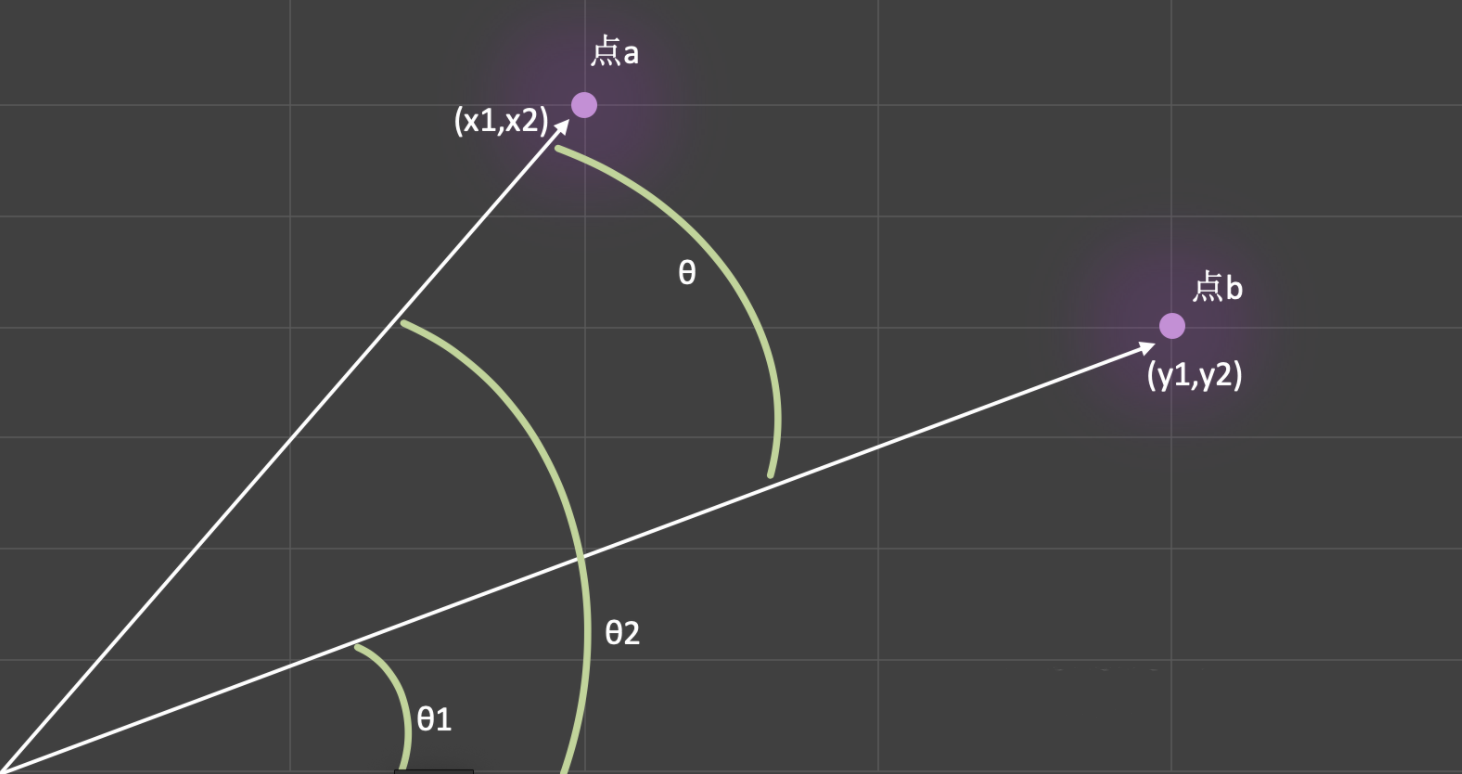
From the figure we can see: θ = θ1 - θ2. The smaller the value of θ, the closer the cosine is to 1, which means the two points are more similar. Cosine similarity also has its own specific formula; take the figure below as an example:
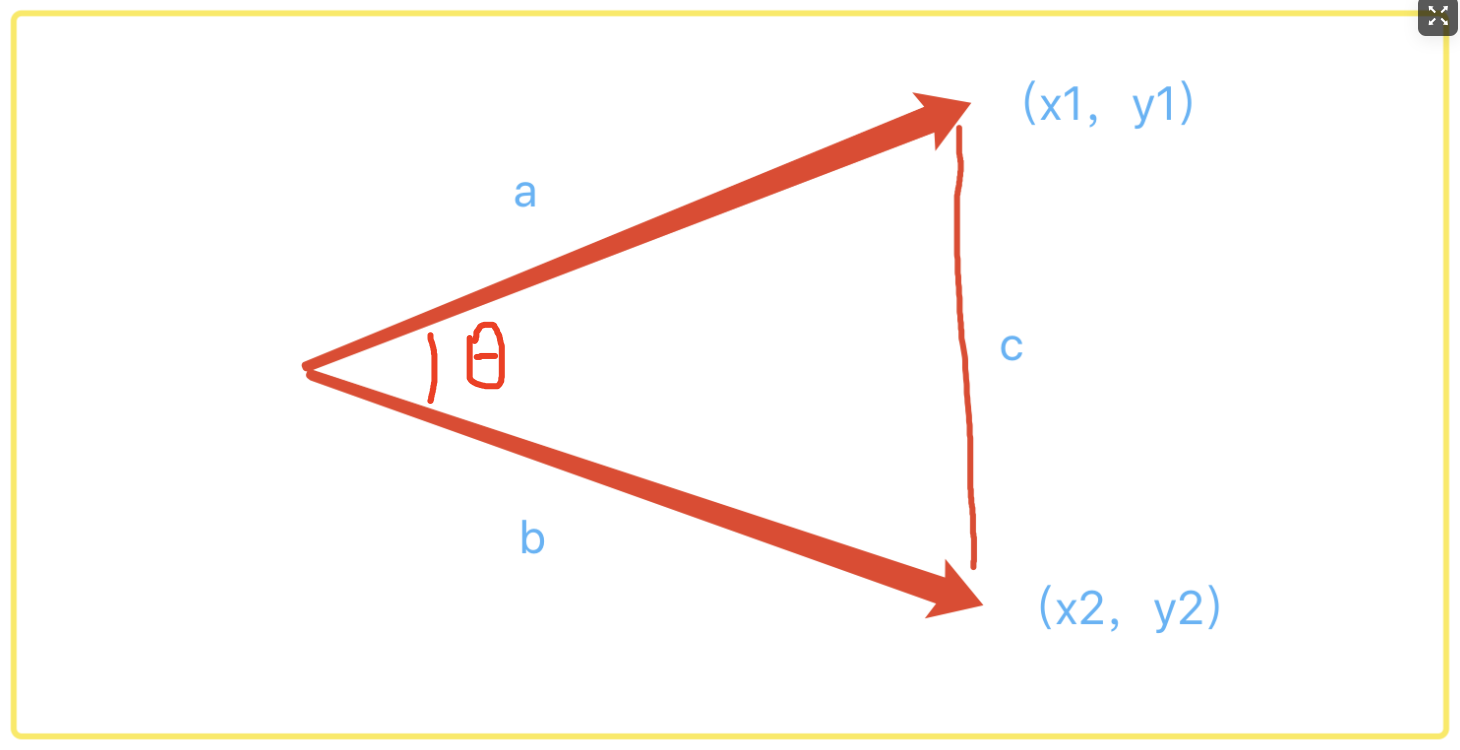
The arrow positions indicate the coordinates of the two points, and c is a virtual length.
The derivation is as follows:
The derivation is fairly simple. Students with a fear of math must overcome it here first. The best way to conquer fear is to face it and defeat it, then face the next fear and defeat that one too. After going through this six times, you’ll have the resolve to conquer anything.
4 Computing Text Similarity with gensim
Computing text similarity takes just one line of code, but there’s a small detail: the words we compute must appear in the corpus. Since we have very little text data, our results will deviate somewhat from reality, but that doesn’t affect our understanding. The sample code is as follows:
# 1 Get the similarity between two texts
sim1 = model.wv.similarity('我', '天安门')
# sim2 = model.wv.similarity('我们', '天安门')  # Error: "word '我们' not in vocabulary"
print(sim1)

# 2 Find the texts most similar to the given text, sorted
sim_text = model.wv.most_similar('我')
print(sim_text)

# 3 Compare the similarity of two sets of terms
sim3 = model.wv.n_similarity(['我', '天安门'], ['爱', '北京'])
print(sim3)
IX. Chatbot in Practice
First, I have a compressed file here that contains two txt files. fenci.txt stores a passage of text; you need to use a word segmentation library to split it into different words, which will serve as our corpus.
The content_file.txt file stores some titles and replies, taken from posts found online. We treat title as the related chat topic and reply as the answer.
Based on this corpus, you need to build a chatbot that can automatically reply to users. The code is as follows:
import json
import random
import jieba
from gensim.models import word2vec

"""
1、用户输入一段文本
2、对用户输入的文本进行分词
3、把用户输入的结果与content_file.txt文件中的title字段,一一的进行相似度运算
4、获取到最大的相似度。
5、由于reply中的内容是一个列表,所以随机产生一个答案进行回复。
"""
f1 = open('fenci.txt')
f2 = open('result.txt', 'a')
lines = f1.readlines()
for line in lines:
    line.replace('\t', '').replace('\n', '').replace(' ', '')
    segment = jieba.cut(line)
    f2.write(' '.join(segment))
f1.close()
f2.close()

sentences = word2vec.Text8Corpus('result.txt')
model = word2vec.Word2Vec(sentences, min_count=1)
model.save('chat-bot.model')

word2vec.Word2Vec.load('chat-bot.model')

# 3 Compare the similarity of two sets of terms
sim3 = model.wv.n_similarity(['我们', '最近'], ['因为', '不好'])
print(sim3)

while True:
    text = input("请输入>>:").strip()
    if text in ['拜拜', 88, 8, 'bye', '再见']:
        print("有缘再见")
        break

    # 1 Word segmentation
    words = jieba.cut(text)
    user_word_list = []
    for word in words:
        user_word_list.append(word)

    # 2 Load the reply file
    content_file = open('content_file.txt')
    json_content_file = json.load(content_file)

    max_sim_result = 0
    max_sim_response = []
    max_sim_title = ''

    for line in json_content_file:
        content_cut_word = jieba.cut(line['title'])
        content_list = []
        for w in content_cut_word:
            content_list.append(w)

        try:
            sim_result_value = model.wv.n_similarity(user_word_list, content_list)
        except:
            continue

        # 3 Check for the match with the highest similarity
        if sim_result_value > max_sim_result:
            max_sim_result = sim_result_value
            max_sim_response = line['reply']
            max_sim_title = line['title']

    print(max_sim_result)
    print(max_sim_title)

    if max_sim_response:
        print(max_sim_response[random.randint(0, len(max_sim_response) - 1)])
    else:
        print('对不起,请说人话')