Nearest Neighbor Algorithm
I. Basic Introduction to the Nearest Neighbor Algorithm
1 Basic Explanation
The nearest neighbor algorithm, also called the K-nearest neighbor algorithm or KNN (K-NearestNeighbor), is a very important algorithm in machine learning, but it is ridiculously simple. Its core idea is that the class of a sample is decided by a vote of its K nearest neighbors. Now suppose we already have a labeled dataset, meaning we already know the class each sample in the dataset belongs to. At this point we have an unlabeled data sample, and our task is to predict the class this sample belongs to. Clearly the nearest neighbor algorithm is a form of supervised learning (Supervised Learning). Its principle is to compute the distance between the sample to be labeled and every sample in the dataset, take the k samples with the smallest distances, and then the class of the sample to be labeled is determined by a vote of these k nearest samples. In this process, one step is labeling the dataset; in companies, there are generally dedicated people responsible for labeling data.
2 An Example
To understand the nearest neighbor algorithm more intuitively, look at the following example. There are two kinds of fruit that look very much alike: one is the boluo, the other is the fengli (two Chinese names for pineapple varieties). For a long time I thought they were the same fruit.
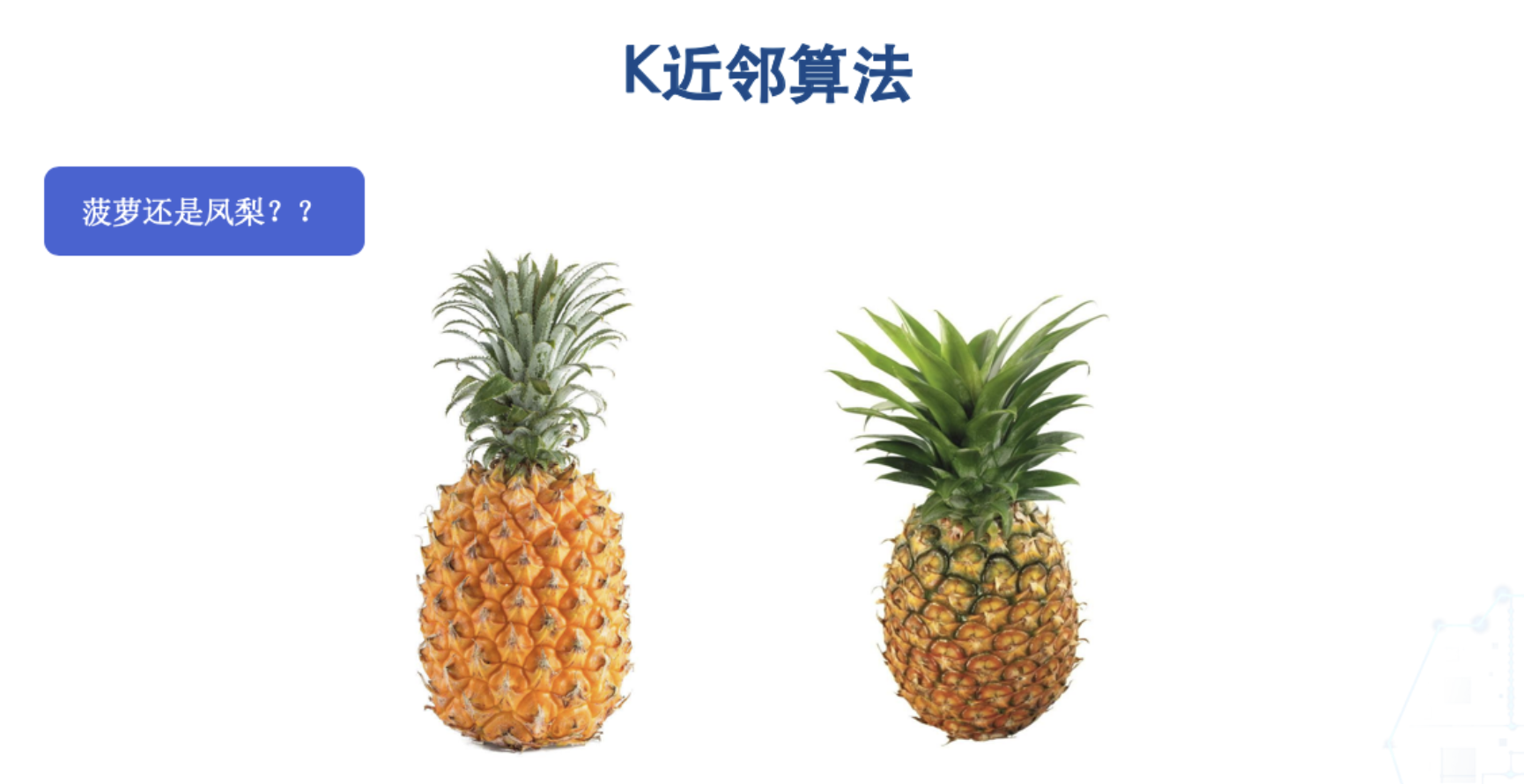
The key difference between boluo and fengli is that boluo leaves have thorns, while fengli leaves do not. The color in the grooves of a boluo is yellow, while the color in the grooves of a fengli is green. First, let’s extract two features of these two fruits (the color in the grooves and whether the leaves have thorns) and place them in a Cartesian coordinate system, as shown below:
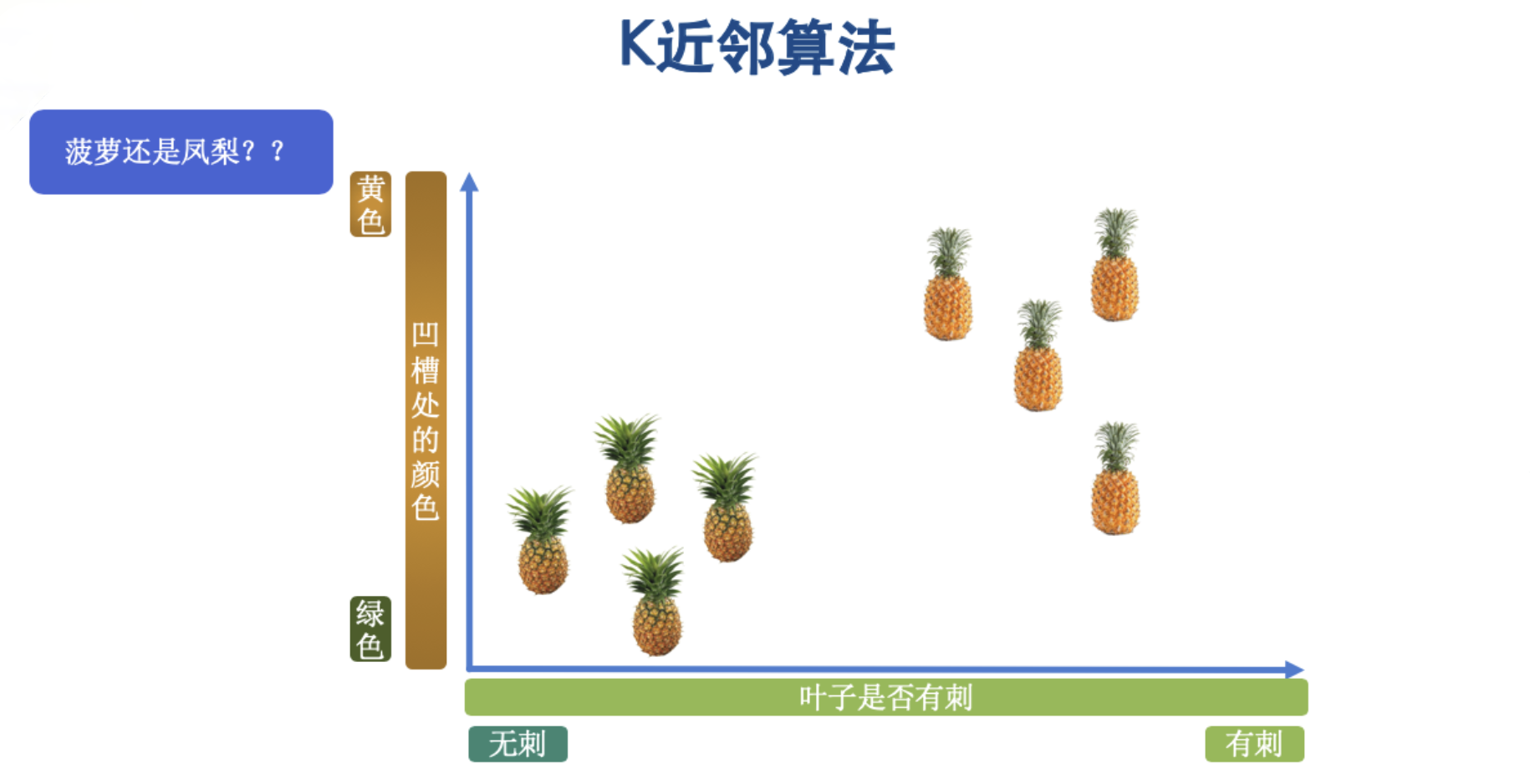
Based on the features of the two fruits, we have placed them in the Cartesian coordinate system. Following the algorithm’s principle described above, we now have an unlabeled sample, and we want to predict which fruit this sample actually is. As shown below, an unlabeled sample arrives—a fruit whose class we don’t know.
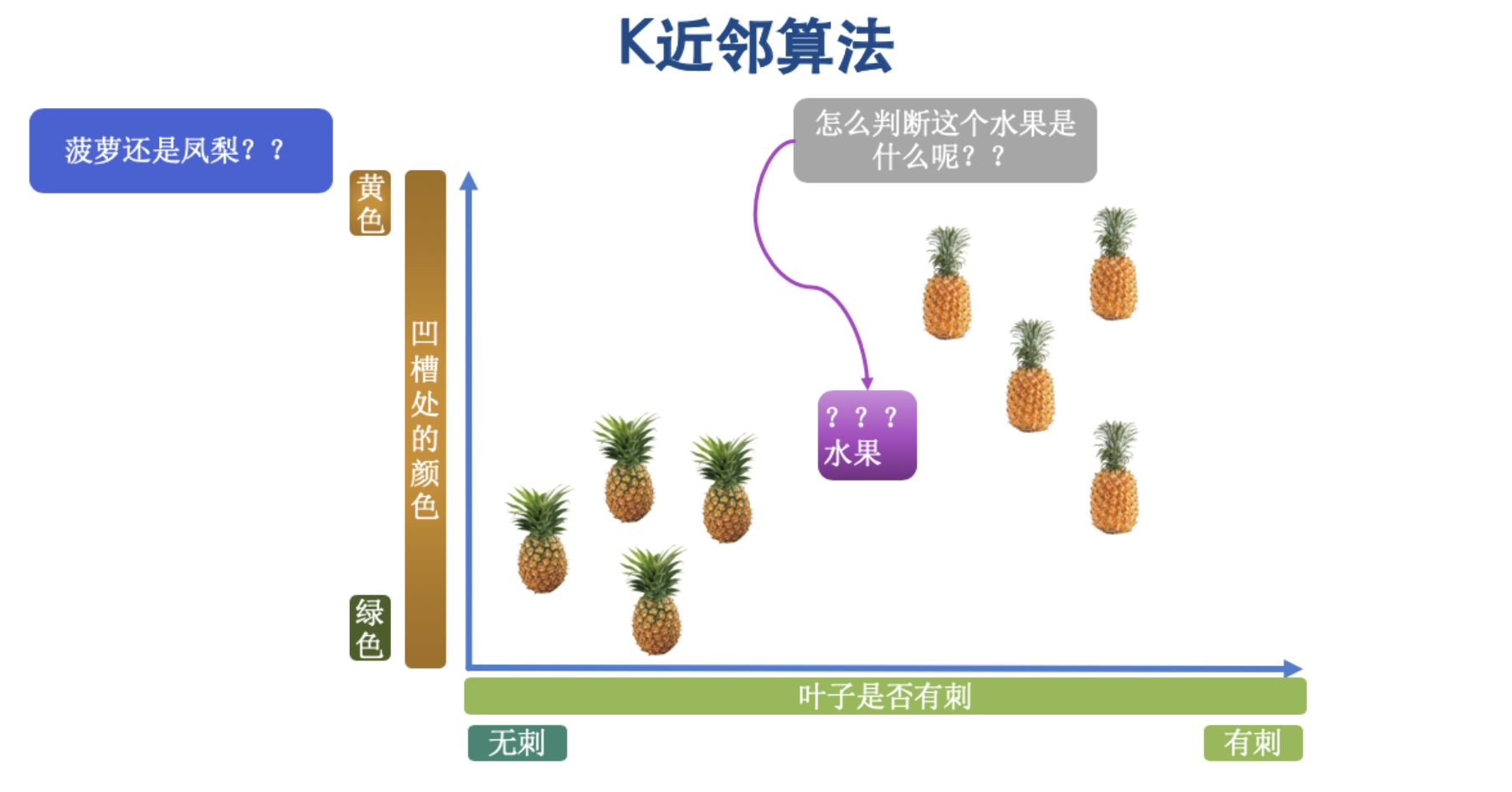
In the principle, we said that what this unlabeled fruit actually is gets decided by a vote of its K nearest neighbors. So now we set the value of K to 3, as shown below:
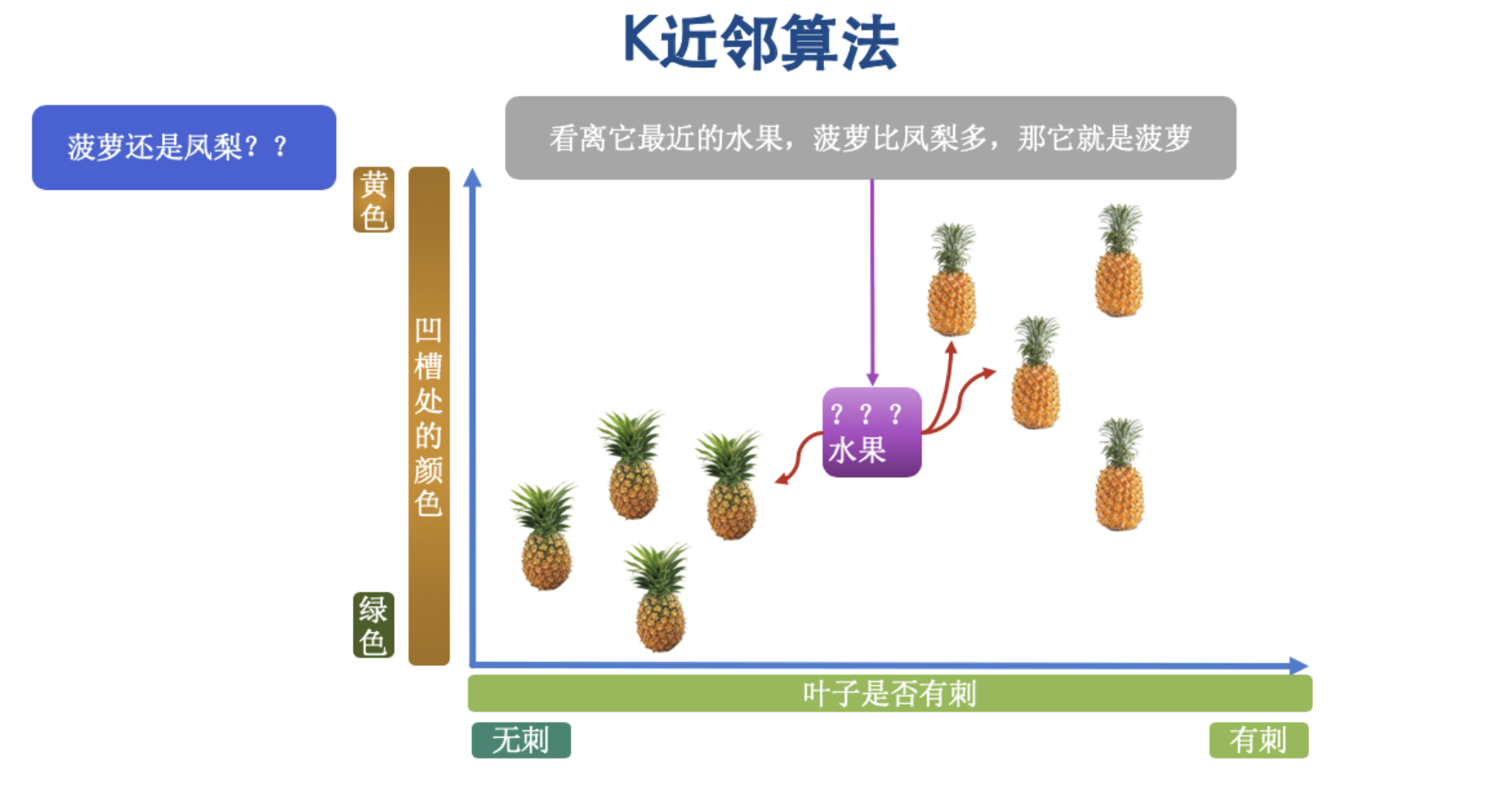
From the figure we can see that when K is 3, of the 3 nearest neighbors of the unlabeled sample, 2 are boluo and 1 is fengli, so we predict that this unknown fruit is a boluo.
3 Pseudocode
Let’s first look at how to implement this algorithm in pseudocode, so that we can write the code better later on.
- Step 1: let x_test be the data sample to be labeled and x_train be the labeled dataset.
- Step 2: iterate over all samples in x_train, compute the distance between each sample and x_test, and save the distances in the distance array.
- Step 3: sort the distance array, take the k nearest points, and denote them x_knn.
- Step 4: count the number of samples of each class in x_knn, i.e., how many samples of class0 (class 0) are in x_knn and how many samples of class1 (class 1) are in x_knn.
- Step 5: the class of the sample to be labeled is the class with the most samples in x_knn.
4 Pros and Cons
- Pros: high accuracy and good tolerance of outliers, because outliers are distributed alone in some corner of the coordinate system, and when taking k neighbors it is very unlikely that the outlier will be picked.
- Cons: heavy computation and high memory requirements, because every time it classifies an unlabeled sample, it has to compute all the distances.
- Key point: the choice of k. First, k must be odd, which ensures the votes for two classes can’t be tied. Second, the larger k is, the greater the model’s bias and the less sensitive it is to noisy data (erroneous or anomalous data); if k is too small, the model will overfit.
II. Code Practice for the Nearest Neighbor Algorithm
1 Preparing the Data
# Import the make_blobs method from the sample generator in sklearn's datasets module to help us generate data
from sklearn.datasets.samples_generator import make_blobs

# Declare three positions in the Cartesian coordinate system
centers = [[-2, 2], [2, 2], [0, 4]]

# Generate data: n_samples is the number of samples, centers are the center points, cluster_std is the standard deviation, indicating the degree of spread
x, y = make_blobs(n_samples=60, centers=centers, cluster_std=0.6)

# x is the generated data, y is the class (0, 1, 2) that each data point belongs to
print(x, y)
2 Using a Plot to Help Understand
import matplotlib.pyplot as plt
import numpy as np

plt.figure(figsize=(16, 10), dpi=144)
c = np.array(centers)
# x axis, y axis, c color, s sets the size of the points
plt.scatter(x[:, 0], x[:, 1], c=y, s=100, cmap="cool")
# Draw the center points
plt.scatter(c[:, 0], c[:, 1], s=100, marker="^", c="orange")
plt.show()
The plot is shown below:
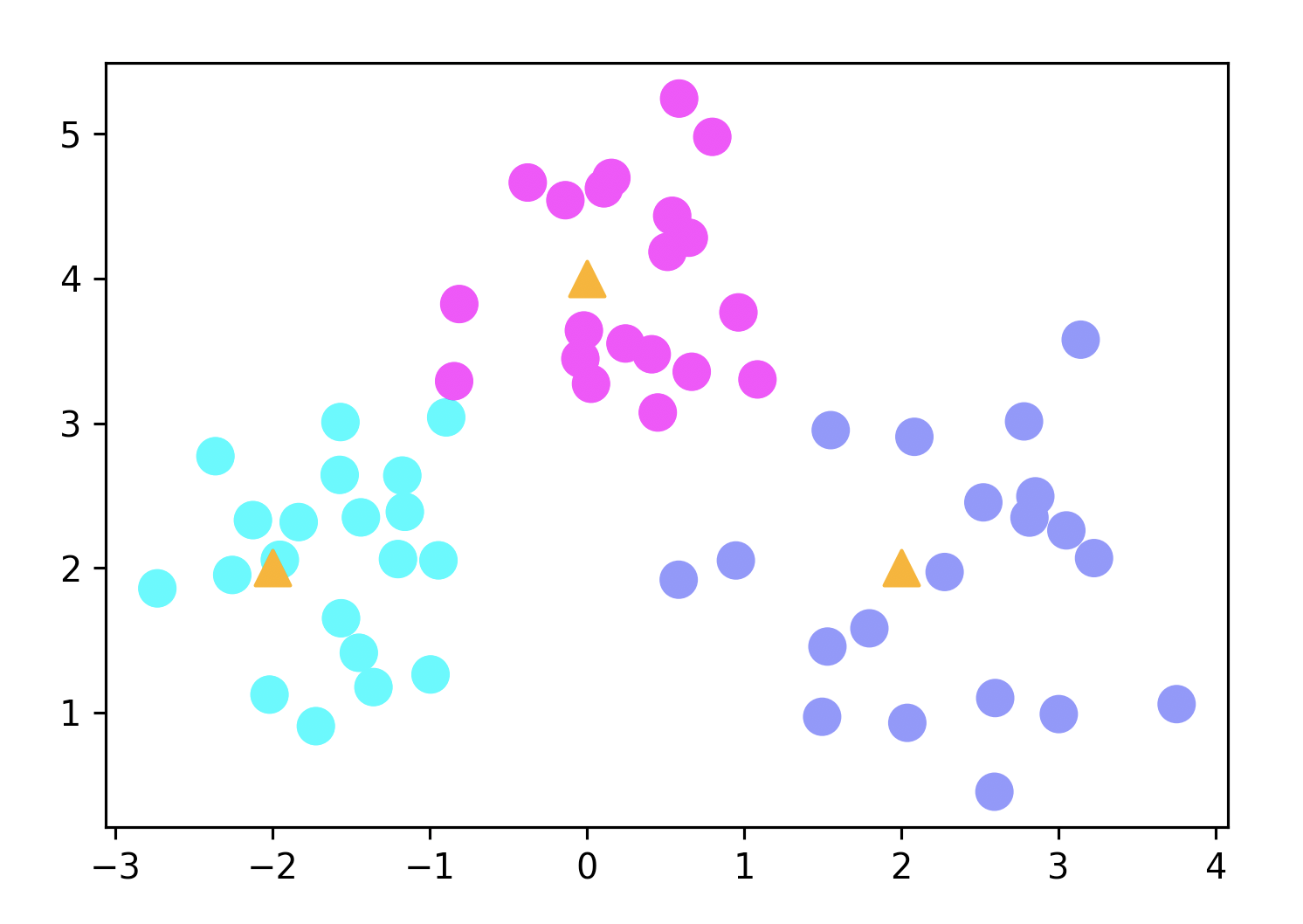
The three triangular points in the plot are the center points, and the round dots around them are the randomly generated data points.
3 Training the KNN Algorithm on the Data
# Import the K-neighbors classifier from sklearn: KNeighbosrClassifier
from sklearn.neighbors import KNeighborsClassifier

# Set the value of K
k = 5

# Declare a k-nearest neighbors classifier object
clf = KNeighborsClassifier(n_neighbors=k)

# Train the model
clf.fit(x, y)
4 Predicting Sample Data
# Define the sample data
x_sample = [[0, 2]]
# Use the model to make a prediction
neighbors = clf.kneighbors(x_sample, return_distance=False)
print(neighbors)

# Output: [[23 39 21 47 29]]
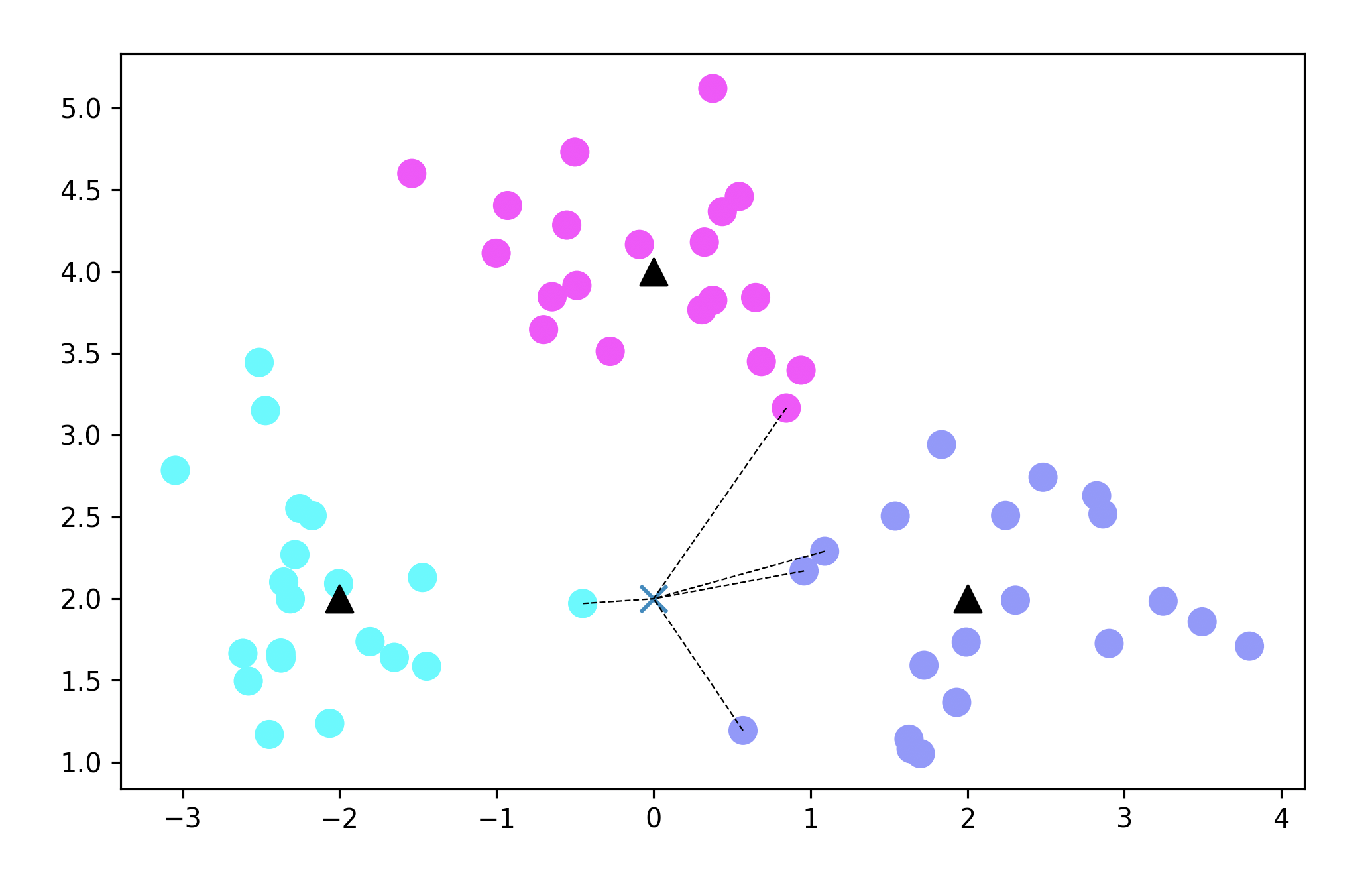
The x_sample variable is the sample we want to predict, and then we can use the clf.kneighbors method to make a prediction for this sample. As for the return_distance parameter of clf.kneighbors, it determines whether the computed distances are returned; the default is True, and here I changed it to False. If you want to see what it looks like with True, you can change it to True yourself. At this point you may be a bit confused: how is the prediction already done? And what does the output mean?
The output represents the 5 index values in the x training set obtained after computation; they are not direct positions.
5 Plotting the Prediction Result
To make the prediction result more intuitive, we also need to plot it with code.
# Mark the sample to be predicted and the 5 points nearest to it
plt.figure(figsize=(8, 5), dpi=144)  # dpi is the pixel density
plt.scatter(x[:, 0], x[:, 1], c=y, s=100, cmap='cool')  # Sample data
plt.scatter(c[:, 0], c[:, 1], s=100, marker='^', c='k')  # Center points

# The point to be predicted
plt.scatter(x_sample[0][0], x_sample[0][1], marker='x', s=100, cmap='cool')

# Draw lines connecting the predicted point to the 5 nearest samples
for i in neighbors[0]:
    plt.plot([x[i][0], x_sample[0][0]], [x[i][1], x_sample[0][1]], 'k--', linewidth=0.6)

plt.show()
The result is shown below:
III. Flower Recognition Project Practice
1 First, Meet Three Flowers
In this section we will consolidate the KNN algorithm we’ve covered through a flower recognition project. The training dataset is the very famous Iris dataset, which involves three species of flowers in total:
The first flower is Iris setosa, which looks like this

The second flower is the mallow, also called the iris mallow (Iris virginica)

The third flower is Iris versicolor

2 Importing the Dataset
We can import the Iris dataset directly from the datasets bundled with the sklearn library. In this dataset, we can use four attributes—sepal length, sepal width, petal length and petal width—to predict which class an unlabeled iris belongs to.
# 1 Import the Iris dataset
from sklearn.datasets import load_iris

# 2 Declare an Iris dataset object
iris = load_iris()

# 3 Get the Iris data
iris_data = iris.data

# 4 Get the species corresponding to the data
iris_target = iris.target

print(iris_data)
print(iris_target)
After viewing the data, you’ll see that each element in the iris_data variable has 4 values in total, corresponding to the 4 attributes sepal length, sepal width, petal length and petal width; the iris_target variable corresponds to the class each flower belongs to. There are 3 classes in total: 0 means Iris setosa, 1 is the iris mallow, and 2 is Iris versicolor.
3 Training the Model
from sklearn.datasets import load_iris
from sklearn.model_selection import train_test_split  # Split into training and test sets
from sklearn.neighbors import KNeighborsClassifier

iris = load_iris()
iris_data = iris.data
iris_target = iris.target

# Split the data into training and test sets; x denotes the features, y the targets, and test_size=0.25 means 25% of the data is used as the test set
x_train, x_test, y_train, y_test = train_test_split(iris_data, iris_target, test_size=0.25)

# Create a KNN instance; n_neighbors defaults to 5, and the optimal parameter can later be found via grid search
knn = KNeighborsClassifier(n_neighbors=5)

# Train on the training data
knn.fit(x_train, y_train)

# Get the prediction results
y_predict = knn.predict(x_test)

# Display the prediction results
labels = ['山鸢尾', '虹膜锦葵', '变色鸢尾']
for i in range(len(y_predict)):
    print('第%d次测试:预测值:%s 真实值:%s' %((i + 1), labels[y_predict[i]], labels[y_test[i]]))
print('准确率:', knn.score(x_test, y_test))
4 Finding the Optimal Value of k
The idea for choosing k is to first select a range of k values, obtain the error for every value in this range, and then choose the value with the smallest error as k.
from sklearn.datasets import load_iris
from sklearn.model_selection import cross_val_score
from sklearn.neighbors import KNeighborsClassifier
import matplotlib.pyplot as plt

# Display Chinese characters
plt.rcParams["font.family"] = 'Arial Unicode MS'

# Import the dataset
iris = load_iris()
x = iris.data
y = iris.target

# Limit the range of k values
k_range = range(1, 31)

# Record the error each time the value of k changes
k_error = []

for k in k_range:
    knn = KNeighborsClassifier(n_neighbors=k)

    # The cv parameter determines how the dataset is split; here the training and test sets are split 5:1
    scores = cross_val_score(knn, x, y, cv=6)
    print(scores)

    k_error.append(1 / scores.mean())

# Plot the results to see intuitively which k gives the smallest error; the x axis is k and the y axis is the error
plt.plot(k_range, k_error)
plt.xlabel('k值')
plt.ylabel('误差值')
plt.show()
The resulting plot is shown below:
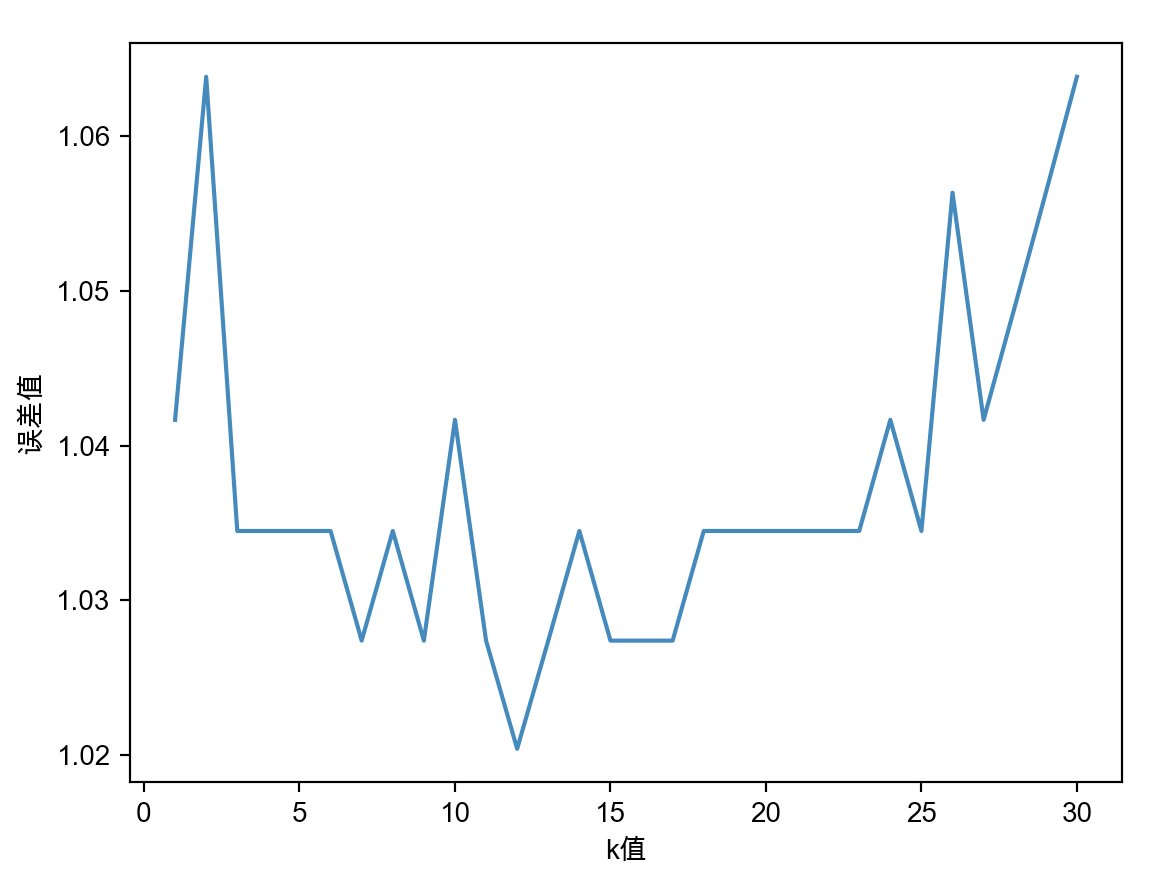
From this plot we can see that the error is smallest when k is around 12. If we then put 12 back into the earlier code, you may find that the accuracy doesn’t improve and may even drop. This is actually because the amount of data is relatively small, and it doesn’t affect our approach to solving the problem.
IV. KNeighborsClassifier Parameters in Detail
Through the previous exercises, I believe you have basically mastered how to use KNeighborsClassifier. Finally, here we’ll give a more detailed explanation of this method’s parameters.
# View the KNeighborsClassifier source code
NeighborsClassifier(
    n_neighbors=5,
    weights="uniform”,
    algorithm=”auto“,
    leaf_size=30,
    p=2,
    metric="minkowski",
    metric_params=None,
    n_jobs=None,
    **kwargs,
)- weights specifies the voting weights of neighboring samples. The default is uniform, meaning all neighboring samples have the same voting weight. If we set weights to distance, the voting weight is inversely proportional to distance; that is, the farther a neighboring sample is from the sample of unknown class, the smaller its weight, and vice versa.
- algorithm specifies the method for searching for neighboring samples. A value of ball_tree means using the ball tree search to find neighbors, kd_tree is the KD tree search, and brute means brute-force search. The default for algorithm is auto, meaning the KNN algorithm will automatically choose the best search method based on the characteristics of the data. I will explain the details of these search methods in future articles on machine learning; for now you only need to know that we are currently using the default, which automatically chooses the search method for us.
- leaf_size specifies the minimum number of samples contained in a leaf node of the ball tree or KD tree. It controls the conditions under which the tree grows and affects query speed; the default is 30. We won’t focus on this for now.
- The metric parameter specifies the distance metric; the default is the Minkowski distance.
- The p parameter takes effect depending on the metric parameter. When metric is the minkowski distance, p=1 means computing the Manhattan distance between points and p=2 means computing the Euclidean distance between points; the default is 2, computing the Euclidean distance.
- metric_params is a dictionary, empty by default, which adds keyword arguments for the distance metric specified by the metric parameter.
- n_jobs sets the number of CPUs used when the KNN algorithm runs in parallel. The default is 1, meaning only one CPU is used to run the algorithm, i.e., parallel computation is not enabled.
As before, there is a small exercise at the end; please click the link below to download it: