Chapter 2: Flow Control
This article is part of the General-Purpose Python Programming tutorial series, which has been fully completed. Its goal is to take you from zero to mastery of the Python programming language. This tutorial does not just skim over Python’s content; it explains it in a refined and in-depth way, across 5 stages and 25 chapters. So you need to study patiently to truly gain something. Although it does not involve using any frameworks, it gives a comprehensive explanation of operating systems and network communication, and even rewrites some open-source modules and servers. After finishing it, you will not only have mastered the Python programming language, but also gained the ability to learn other programming languages quickly, the ability to read all Python source code without obstacles, and a comprehensive understanding of computers and networks. For complete beginners, it is an excellent textbook for getting into the field of computing and mastering a programming language. For those who already have some Python foundation, I believe this tutorial will take your skills to the next level.
1 Operations
1. Arithmetic Operations
Since the purpose of programming is to control the computer so that it can work like a human brain, whatever the human brain can do, the program needs corresponding mechanisms to simulate. What the human brain does is nothing more than arithmetic and logical operations. Arithmetic operations are just addition, subtraction, multiplication and division, which are very simple, so let’s look at them first.
The core component of a computer is the CPU. The CPU has two functions: control and computation. Next, let’s look at how a computer performs computations; the control function of the computer will be explained in detail in Stage 5.
a = 10
b = 20
print(a + b)  # Addition (in Python, the computer ignores whatever comes after #, so it can be used to add comments to code, i.e. to explain the code)
print(a - b)  # Subtraction
print(a * b)  # Multiplication
print(a / b)  # Division
print(a % b)  # Modulo
print(a ** b)  # Exponentiation
print(a // b)  # Floor division
2. Comparison Operations
a = 10
b = 20
print(a == b)
print(a != b) # Not equal
# print(a <> b)  # Deprecated
print(a > b)
print(a < b)
print(a >= b)
print(a <= b)
3. Assignment Operations
a = 10
b = 20
a = b # Assign b to a
print(a)
a += b # Equivalent to a = a + b, i.e. assign the value of a+b to a; the same applies below
print(a)
a *= b
print(a)
a %= b
print(a)
a **= b
print(a)
a //= b
print(a)
4. Logical Operations
print(True and False) # AND operation: True AND False should be False
print(True or False) # OR operation: True OR False should be True
print(not (True and False))# NOT operation: negates the result, i.e. True becomes False and False becomes True
5. Identity Operations
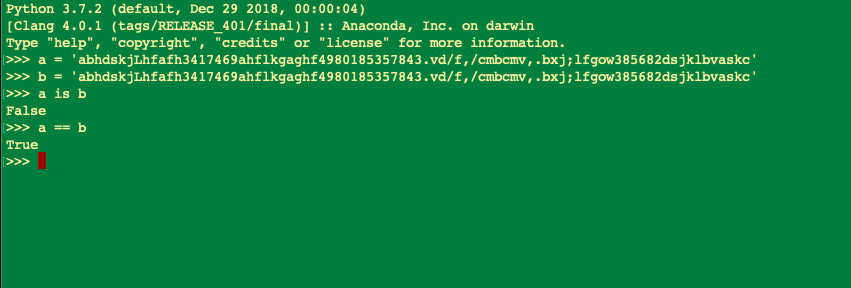
# is compares ids. In Python, id is a variable's memory address; the same id means the same address in memory, i.e. the same variable
# while == compares values
For two different variable names whose values are the same, their ids should be different; this was Guido’s original intention when designing the id feature. You can follow this link to see the official documentation. However, sometimes there are memory optimizations at the interpreter level or the IDE level (short strings get optimized; longer strings or strings with special characters don’t), with the result that the ids are the same. How this optimization is designed is a question for those people with little hair left; we only need to be aware of it and shouldn’t dig too deep, or the consequences will be serious.

2 Branch Statements
1. if, else
Logical operations correspond to people reacting differently according to changes in external conditions, for example
If: everything is God’s will, then: no one can escape
if "everything" is "God's will":
    print('everyone can not flee')
Perhaps this example is too abstract, so let’s take a simple one: you can only become a pilot if your height, weight and eyesight all meet the requirements.
height = 183
weight = 75
vision = 5.0
# You can fly a plane only if all three conditions are met at the same time
if height == 183 and weight == 70 and vision > 5.0:
    print('可以做飞行员')
else:
    print('不可以')
2. Nested if Statements
height = 183
weight = 75
vision = 5.0
# 1 As long as eyesight is below 5.0, you can't fly
if not vision >= 5.0:  # Just to try out not; of course, it can also be written as vison < 5.0
    print('视力太差,上天无望')
else:
    # 2 Height is a hard requirement; if you don't meet it, give up, kid
    user_height = input('请输入身高')
    user_height = int(user_height)
    if user_height == 183:
        # 3 Then check the user's weight
        user_weight = input('请输入体重')
        user_weight = int(user_weight)
        if user_weight == 75:
            print('恭喜你,你可以上天了')
        else:
            print('体重不合适,建议增重或减重后再来尝试')
    else:
        print('身高无望')
3. Using if, elif, else
If: score >= 90, then: excellent
If score >= 80 and < 90, then: good
If score >= 70 and < 80, then: average
Otherwise: poor
score=input('>>: ')# When execution reaches input(), the program pauses and requires you to enter information on the command line,
并将输入的信息以str的方式给到该函数的返回值,如果你输入50,
那么score就等于“50”(注意引号哦,表示str类型)
score=int(score)# Convert to int type
if score >= 90:
    print('优秀')
elif score >= 80:
    print('良好')
elif score >= 70:
    print('普通')
else:
    print('很差')
Template
if 条件1:
    缩进的代码块
elif 条件2:
    缩进的代码块
elif 条件3:
    缩进的代码块
else:
    缩进的代码块
3 Loop Statements
1. The while Loop
(1) The while Loop (Conditional Loop)
Why use loops? First, take a look at the following code
albert_age = 18
guess = int(input(">>:"))
if guess > albert_age :
    print("猜的太大了,往小里试试...")
elif guess < albert_age :
    print("猜的太小了,往大里试试...")
else:
    print("恭喜你,猜对了...")
# 2nd attempt
guess = int(input(">>:"))
if guess > albert_age :
    print("猜的太大了,往小里试试...")
elif guess < albert_age :
    print("猜的太小了,往大里试试...")
else:
    print("恭喜你,猜对了...")
# 3rd attempt
guess = int(input(">>:"))
if guess > albert_age :
    print("猜的太大了,往小里试试...")
elif guess < albert_age :
    print("猜的太小了,往大里试试...")
else:
    print("恭喜你,猜对了...")
Without a doubt, this is a lousy piece of code… because there’s far too much repeated code. This happens because in some scenarios we need to check a condition repeatedly. For example, when verifying a username and password, if the username and password entered by the user don’t match, we usually keep prompting the user to enter them until they’re correct. We can’t know after how many attempts the user will enter them correctly, so the code format above can’t be used. In this situation we can use a while conditional loop. The while loop is also called a conditional loop, meaning it executes only when the condition is met. The syntax is as follows:
albert_age = 18  # Albert is only 18? OMG~
guess = int(input(">>:"))
while guess != albert_age:  # If the guessed age doesn't match the actual age
	if guess > albert_age :
		print("猜的太大了,往小里试试...")
	elif guess < albert_age :
		 print("猜的太小了,往大里试试...")
	guess = int(input(">>:"))
print("恭喜你,猜对了...")
while 条件:
# Loop body
# If the condition is true, the loop body executes; after it finishes, the loop runs again and re-evaluates the condition.
# If the condition is false, the loop body does not execute and the loop terminatesNote: meeting the condition means the condition is true. We usually use True directly to indicate a true condition, or use a comparison like count <= 10 in the small exercise below. A false condition can be expressed like this:
False    None    0   ""    ()    []   {}
# To sum up: False, 0, or anything empty is False
(2) Small while Loop Exercises
# Print 0-10
count=0 # The initial value of count is 0
while count <= 10:# If count is less than or equal to 0
    print('loop',count) # loop1 loop2 ...
    count+=1# As mentioned earlier, this line is equivalent to count = count + 1
# Print the even numbers between 0 and 10
count=0
while count <= 10:
    if count%2 == 0: # == compares whether the values on both sides are equal; if count%2 equals 0, count is even
        print('loop',count)
    count+=1
# Print the odd numbers between 0 and 10
count=0
while count <= 10:
    if count%2 == 1:
        print('loop',count)
    count+=1
(3) Infinite while Loops
An infinite loop is a loop that runs forever, because the condition is always true
import time
num=0
while True:
    print('count',num)
    time.sleep(1)# Make the program sleep (pause) here for 1 second
    num+=1
(4) Nested while Loops and tag
tag is just a variable, but it’s a Boolean, with only True and False (you could also write 0 or 1). When we have multiple levels of loops, using tag lets us quickly exit all of them
tag=True
  while tag:
    ......
    while tag:
      ........
      while tag:
        tag=False # The loops check the condition level by level; when tag is false, the loops exit level by level
(5) break and continue in while Loops
This is a key point to understand. It will come up often in later Python exercises such as the shopping cart and the network disk, and it is also a fairly important piece of syntax in Python and other programming languages.
# break is used to exit the current loop
while True:
    print("123")
    break
    print("456")

# continue is used to exit the current iteration and continue with the next one
while True:
    print("123")
    continue
    print("456")
So the age-guessing program above can be rewritten like this
albert_age = 18
while True:
    guess = int(input(">>:"))
    if guess > albert_age :
        print("猜的太大了,往小里试试...")
    elif guess < albert_age :
        print("猜的太小了,往大里试试...")
    else:
        print("恭喜你,猜对了...")
        break  # Exit the loop when the user guesses correctly
(6) Combining while and else
Unlike other languages, where else is generally only paired with if, Python also has a while … else statement. The else after while means that when the while loop finishes normally without being interrupted by break, the statements after else are executed.
count = 0
while count <= 5 :
    count += 1
    print("Loop",count)
else:
    print("循环正常执行完啦")
print("-----out of while loop ------")

"""
输出
Loop 1
Loop 2
Loop 3
Loop 4
Loop 5
Loop 6
循环正常执行完啦
-----out of while loop ------
"""
# If the loop is interrupted by break during execution, the else statement will not be executed
count = 0
while count <= 5 :
    count += 1
    if count == 3:break
    print("Loop",count)
else:
    print("循环正常执行完啦")
print("-----out of while loop ------")

"""
输出
Loop 1
Loop 2
-----out of while loop ------
"""
2. The for Loop
(1) The for Loop (Iteration Loop)
The for loop is an iterative loop: for traverses each item in the object being looped over. For example, in the code below, for loops over each element in range(10), i.e. 0, 1, 2, 3…9. The syntax is as follows:
for i in range(10):
    缩进的代码块
Explanation:
- i is each object produced by the iteration; i is just a variable name and can be anything
- The keywords for and in are required
- range(10) is the object being iterated over; as long as something can hold multiple values, it can be iterated over. Writing a list directly works just the same
- You can think of an iteration loop this way: the object being iterated over is an old hen with plenty of eggs in her belly, and the objects produced by the iteration are the eggs
Compute the sum of 0 to 9:
sum_value = 0  # Set the initial value of the sum to 0
for i in range(10):
    sum_value += i  # This is the third time it has appeared! If you still don't get it~
print(sum_value)
(2) break and continue (same as in the while loop above)
(3) Using for Together with else
We often follow a for loop that traverses a sequence or dictionary with an else statement. Many beginners mistakenly think this is a condition that decides whether to execute the code after else. Actually, that’s not the case: there is no condition inside the for loop; once the traversal of the object is complete, the code after else is executed.
# Example 1
L = [1,2,3,4,5,6,7,8,9,10]
for i  in L:
    print(i)
else:
    print('ending')
"""
#输出
>>>
1
2
3
4
5
6
7
8
9
10
ending
"""

# Example 2

dir = {1:'kobe',2:'LBJ',3:'CP3',4:'TDK'}# Dictionary format: 1 2 3 4 are the keys, and Kobe LBJ... are the values corresponding to the keys
for k,v in dir.items():
    print (k,v)
else:
    print('ending')

"""
#输出
1 kobe
2 LBJ
3 CP3
4 TDK
ending
"""
4 Notes on Using Flow Control Statements
1. Avoid Deeply Nested Branches
If this article could be cut down to a single sentence, that sentence would definitely be “avoid nested branches by every means possible.” Overly deep branch nesting is one of the mistakes programming beginners most easily make. If a novice programmer writes many levels of nested branches, you might see layer upon layer of braces: if: if: if: ... else: else: else: ..., commonly known as “Nested If Statement Hell”. If it can be avoided, replace it with other approaches as much as possible. This kind of deep nesting is very bad for code readability, especially when there is a lot of code under one if branch.
2. Encapsulate Overly Complex Logical Conditions
If the expression in a conditional branch is too complex, with too many not/and/or, the readability of the code drops sharply. In that case, we can break it apart, or first negate it with not. Negation means that if the original value is True, it becomes False after not, and if the original value is False, it becomes True after not.
3. Watch Out for Duplicate Code in Different Branches
Duplicate code is the natural enemy of code quality, and conditional branch statements very easily become a hotbed of duplicate code. So when we write conditional branch statements, we need to pay special attention not to produce unnecessary duplicate code. When you write branch code, pay extra attention to duplicate code blocks produced by the branches; if you can eliminate them easily, don’t hesitate.
4. Use “De Morgan’s Laws”
When writing branch conditions, we sometimes write code like this:
# If the user's account has no balance or the user has no overdraft limit, refuse the purchase
# The following is pseudocode
if not “有余额” or not “有透支额度”:
    print("拒绝用户购买")
When you first see this code, don’t you need to think for a while to understand what it’s trying to do? That’s because the logical expression above contains 2 nots and 1 or. And we humans happen to be bad at handling too many “negations” and “or” logical relationships. This is where De Morgan’s laws come in. Put simply, De Morgan’s laws say that not A or not B is equivalent to not (A and B). With this transformation, the code above can be rewritten like this:
if not (“有余额” and “有透支额度”):
    print("拒绝用户购买")
5. Use all() / any() in Conditions
The two functions all() and any() are very well suited for use in conditions. Both functions accept an iterable object and return a Boolean value, where:
all(seq): returnsTrueonly if all objects inseqare truthy, otherwise returnsFalseany(seq): returnsTrueas long as any object inseqis truthy, otherwise returnsFalse
Suppose we have the following code:
def all_numbers_gt_10(numbers):
    # Return True only if all numbers in the sequence are greater than 10
    if not numbers:  # If numbers is empty; here numbers represents a list, in the format [1, 2, 3...]
        # For lists, the empty list [] is False; this line checks whether numbers is empty, and returns False if it is
        return False
    for n in numbers:  # Iterate over each element in numbers
        if n <= 10:
            return False  # If any element is less than or equal to 10, the function immediately returns False
    return True  # If all elements in the numbers list are greater than 10, return True
If we use the built-in function all() together with a simple generator expression, the code above can be written like this:
def all_numbers_gt_10_2(numbers):
   return bool(numbers) and all(n > 10 for n in numbers)
Simple and efficient, with no loss of usability.
6. Use the else Branch in try/while/for
Let’s look at this function:
def do_stuff():
   first_thing_successed = False
   try:
       do_the_first_thing()# Do the first thing
       first_thing_successed = True# The first thing succeeded, so set the flag to True
   except Exception as e: # If the two lines above (the two lines in try) raise an error, the first thing did not succeed, so execute the following statements
       print("Error while calling do_some_thing")
       return
   # Do the second thing only if first_thing completed successfully
   if first_thing_successed:
       return do_the_second_thing()
In the function do_stuff, we want to make the second function call only after do_the_first_thing() is called successfully (that is, without raising any exception). To do this, we need to define an extra variable first_thing_successed as a flag. Actually, we can achieve the same effect in a simpler way:
def do_stuff():
   try:
       do_the_first_thing()
   except Exception as e:
       print("Error while calling do_some_thing")
       return
   else:
       return do_the_second_thing()
After appending an else branch to the end of the try block, the do_the_second_thing() under that branch will only be executed after all the statements under try have completed normally (that is, with no exceptions, no return, break, etc.). Similarly, for/while loops in Python also support adding an else branch, which means: the code under the else branch is executed only after the iterable used by the loop has been exhausted normally, or after the condition variable used by the while loop becomes False.
7. Comparing with None
In Python, there are two ways to compare variables: == and is, and they are fundamentally different in meaning:
==: whether the values the two point to are the sameis: whether the two point to the same content in memory, that is, whetherid(x)equalsid(y)
None is a singleton object in the Python language. If you want to check whether a variable is None, remember to use is rather than ==, because only is can strictly tell whether a variable is None.
Otherwise, the following situation may occur:
class Foo(object):
    def __eq__(self, other):# Magic method, triggered when an instance of this class is the left operand in an == comparison
        return True

foo = Foo()
print(foo)
print(foo == None)
print(foo is None)
In the code above, the class Foo easily satisfies the == None condition by defining a custom __eq__ magic method.
So when you want to check whether a variable is None, use is rather than ==.
8. Watch Out for the Precedence of and and or
Look at the following two expressions and guess: do they have the same value?
(True or False) and False
True or False and False
The answer is: no, they don’t. Their values are False and True respectively. Did you guess right? The key to the problem is that the and operator has higher precedence than or. Therefore, Python actually sees the second expression above as True or (False and False), so the result is True rather than False. When writing expressions containing multiple ands and ors, pay extra attention to the precedence of and and or. Even if the order of evaluation happens to be exactly what you need, you can add extra parentheses to make the code clearer.