Chapter 13: The Three Major Features
This article is part of the General-Purpose Python Programming series, which has been fully completed. The goal is to take you from zero to mastery of the Python programming language. This tutorial does not skim over Python in broad strokes; instead, it explains things in a refined and in-depth way, across 5 stages and 25 chapters. So you need to study patiently to really gain something. Although it does not involve the use of any frameworks, it gives a global explanation of operating systems and network communication, and even rewrites some open-source modules and servers. When you finish, you will not only have mastered the Python programming language, but also have the ability to learn other programming languages quickly, the ability to read any Python source code without obstacles, and a comprehensive understanding of computers and networks. For complete beginners, it is an excellent textbook for entering the field of computing and mastering a programming language. For those who already have some Python foundation, I believe this tutorial will take your skills to the next level.
1. Inheritance
We keep saying that object-oriented programming is highly extensible, but we never knew where that extensibility actually shows up. Next we are going to introduce its three major features: inheritance, polymorphism and encapsulation. These features are also the techniques we will use whenever we work with object orientation later on. The first one we will talk about is inheritance.
1. Basic Introduction to Inheritance
What is inheritance
Inheritance is a way of creating a new class. All the classes I defined before were just the class keyword plus the class name. Python supports multiple inheritance, which means one son can inherit from several dads; this is different from some other languages.
Understood literally, it means you inherit your dad’s stuff, and he inherits his dad’s stuff. Inheritance is like a hereditary relationship: if your dad is rich, you are rich too; if you are not rich, maybe you were a freebie your dad got for topping up his phone bill. If your dad has a house, you can go live in it for a while; of course, if you have your own house, you will definitely prefer to live in your own.
A class created through inheritance is called a subclass or derived class, and the class being inherited from is called the parent class, base class or superclass. A subclass inherits the attributes of its parent class.
If your dad had left you a hundred million, would you still need to slog away learning Python here like the other students? You could just take that money and spend it, without earning money yourself or building things yourself. But in fact your dad didn’t leave you a cent, so you have to rely on yourself.
Why use inheritance
So the purpose of using inheritance is to reduce code redundancy.
How to use inheritance
Inheritance needs a dad and a son. Let’s write some code.
class ParentClass1:
    pass
class ParentClass2:
    pass
# Single inheritance: previously we put a colon right after the class name; now we can first add parentheses and write the parent class inside them
class SubClass1(ParentClass1):
    pass
# Python supports multiple inheritance
class SubClass2(ParentClass1, ParentClass2):
    pass
# base means foundation; this attribute shows the parent classes
print(SubClass1.__bases__)
print(SubClass2.__bases__)
Output
(<class '__main__.ParentClass1'>,)
(<class '__main__.ParentClass1'>, <class '__main__.ParentClass2'>)
The parent classes are displayed as a tuple.
So far we roughly know what inheritance is about. Next, let’s add a small piece of knowledge, which will be explained in detail later.
在Python2 中有经典类与新式类之分,
在Python3 中全都为新式类
(In Python 2 there is a distinction between classic classes and new-style classes; in Python 3 all classes are new-style classes.)
The mainstream today is Python 3, and in Python 3 all classes are new-style, so in Python 3 there is no need to think about this. But we also need to know how it works in Python 2. How exactly to tell them apart will be covered in detail later; for now, just be aware of the concept.
2. How to Find Inheritance Relationships
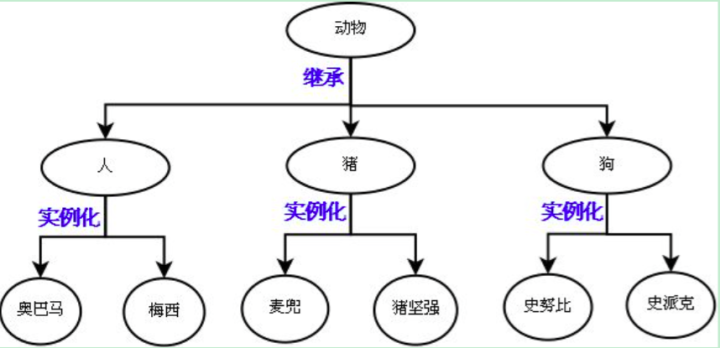
Inheritance is a relationship between classes. To find such a relationship, you first abstract and then make it concrete. What is abstraction? It means extracting the parts that are similar. When we first learned object orientation, we extracted similar features from objects and summarized them into classes; likewise, extracting what classes have in common gives us a parent class.
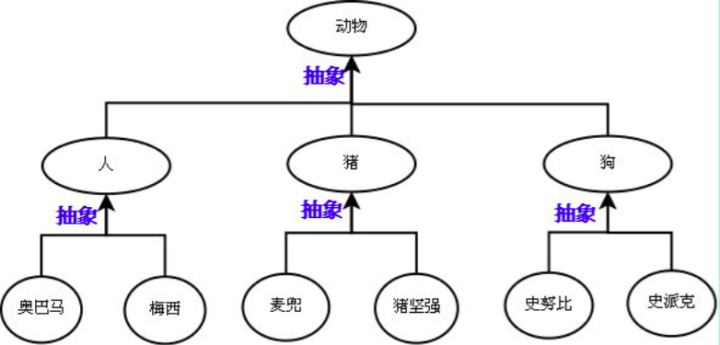
This diagram makes it very clear: different people are abstracted into the human class, and humans, dogs and pigs can in turn be abstracted into the animal class. After abstraction, the inheritance relationship exists: humans, dogs and pigs all inherit from animals, and instantiating each of them gives their respective objects.
Suppose there is now a requirement involving teachers and students: students can freely choose courses to study, and teachers can grade students’ scores. Following our old way of thinking, I would write the code like this:
class DeepshareTeacher:
    school = 'deepshare'
    def __init__(self, name, age, gender):
        self.name = name
        self.age = age
        self.gender = gender
    def modify_score(self):
        print('teacher %s is modifying score' % self.name)
class DeepshareStudent:
    school = 'deepshare'
    def __init__(self, name, age, gender):
        self.name = name
        self.age = age
        self.gender = gender
    def choose(self):
        print('student %s is choosing course' % self.name)
By the time the code gets here you should notice that there is duplicated code in it. To avoid code redundancy, we should use inheritance to optimize our code.
class DeepsharePeople:
    school = 'deepshare'
    def __init__(self, name, age, gender):
        self.name = name
        self.age = age
        self.gender = gender
class DeepshareTeacher(DeepsharePeople):
    def modify_score(self):
        print('teacher %s is modifying score' % self.name)
class DeepshareStudent(DeepsharePeople):
    def choose(self):
        print('student %s is choosing course' % self.name)
tea1 = DeepshareTeacher('albert',18,'male')
stu1 = DeepshareStudent('张二狗',18,'female')
Before we run the code to instantiate the objects, notice that neither the teacher class nor the student class has the init instantiation function, yet the program reports no error, which means instantiation really did complete. How can we prove it?
print(tea1.name,tea1.age,tea1.gender)Output
albert 18 maleThis shows that when the subclass has no init function, it goes and looks in the parent class; in other words, the subclass inherits the attributes of the parent class. At this point you will find that our code has become more concise, while the functionality it implements has not decreased at all.
3. Attribute Lookup
Now that we have inheritance relationships, let’s talk about attribute lookup. We said before that when an object looks up an attribute, it first looks in its own namespace, and if it can’t find it there, it looks in its class. But now you find that a class can also have its own parent class. So imagine: if an object doesn’t have the attribute in its own namespace, and neither does its class, whom should it look to next?
That’s right, its dad. And if its parent class doesn’t have it and there is yet another parent class above? Its grandpa.
class DeepsharePeople:
    school = 'deepshare'
    def __init__(self, name, age, gender):
        self.name = name
        self.age = age
        self.gender = gender
class DeepshareTeacher(DeepsharePeople):
    def modify_score(self):
        print('teacher %s is modifying score' % self.name)
tea1 = DeepshareTeacher('albert', 18, 'male')
print(tea1.__dict__)
print(tea1.name)
print(DeepshareTeacher.__dict__)
print(DeepsharePeople.__dict__)
print(tea1.school)
Output
{'name': 'albert', 'age': 18, 'gender': 'male'}
albert
{
    '__module__': '__main__',
    'modify_score': <function DeepshareTeacher.modify_score at 0x106db17b8>,
    '__doc__': None
}
{
    '__module__': '__main__',
    'school': 'deepshare',
    '__init__': <function DeepsharePeople.__init__ at 0x1092a2488>,
    '__dict__': <attribute '__dict__' of 'DeepsharePeople' objects>,
    '__weakref__': <attribute '__weakref__' of 'DeepsharePeople' objects>,
    '__doc__': None}
deepshare
From the first and second prints we can see that if the object’s own namespace has the attribute, its own namespace is searched first. From the third, fourth and fifth prints we can see that the teacher object’s own namespace doesn’t have it, so it first looks in its own class; finding that its class doesn’t have it either, it goes to its parent class, finds it there, and so gets a result.
Let’s look at another example.
print(tea1.modify_score)Output
<bound method DeepshareTeacher.modify_score of <__main__.DeepshareTeacher object at 0x10482cdd8>>It is found directly in the object’s own class, so the lookup goes no further.
Next, let’s look at a slightly more complex example.
class Foo:
    def f1(self):
        print('Foo.f1')
    def f2(self):
        print('Foo.f2')
        self.f1()
class Bar(Foo):
    def f1(self):
        print('Bar.f1')
obj = Bar()
obj.f2()
I won’t paste the output yet; everyone take a guess first, then read on.
Analysis:
obj is an object of Bar. When it calls the f2 method, it first looks for the f2 attribute in its own namespace. It certainly isn’t there, because we didn’t give obj any custom attributes of its own. Let’s take a look:
print(obj.__dict__)Output
{}So next it looks in its own class’s namespace. Its own class’s namespace doesn’t have it, so it goes to the parent class Foo, finds it, and prints Foo.f2; there is no doubt about that. So which f1 should the next line, self.f1(), print: Foo.f1, which is closer to it, or Bar.f1, which is farther away?
Actually this has nothing to do with distance. Many students misunderstand this easily, so I’m bringing it up here as a deliberate counter-example. When the code reaches the line self.f1(), we first have to figure out who self is: it is the obj object, and following the attribute lookup order
对象自己的名称名空间====>对象所在的类的名称空间====>对象的所在的类的父类的名称空间(the object’s own namespace ====> the namespace of the object’s class ====> the namespace of the parent class of the object’s class)
4. Derivation
We have just finished talking about inheritance. The benefit of inheritance is that a subclass can reuse the parent class’s code. But the question is: should a subclass just be exactly the same as its parent class? If so, what is the point of writing a subclass? When the subclass has something, the subclass’s version takes precedence. So here we introduce another concept called derivation.
In fact, we already mentioned this concept at the beginning of this chapter: if your dad has a house, you can go live in it for a while, but if you have your own house, you will definitely prefer to live in your own.
Derivation means having your own new things on top of inheritance; if you have your own new things, your own new things will certainly take precedence.
派生:子类定义自己新的属性,如果与父类同名,以子类自己的为准
class DeepsharePeople:
    school = 'deepshare'
    def __init__(self, name, age, gender):
        self.name = name
        self.age = age
        self.gender = gender
    def f1(self):
        print('爹的f1')
class DeepshareTeacher(DeepsharePeople):
    def modify_score(self):
        print('teacher %s is modifying score' % self.name)
    def f1(self):
        print('儿子的f1')
tea1 = DeepshareTeacher('albert', 18, 'male')
tea1.f1()
(Derivation: the subclass defines new attributes of its own; if one has the same name as in the parent class, the subclass’s own version takes precedence. '爹的f1' means “dad’s f1” and '儿子的f1' means “son’s f1”.)
Output
儿子的f1Let’s look at another example.
class DeepsharePeople:
    school = 'deepshare'
    def __init__(self, name, age, gender):
        self.name = name
        self.age = age
        self.gender = gender
    def f1(self):
        print('爹的f1')
class DeepshareTeacher(DeepsharePeople):
    def __init__(self,name,age,gender,level,salary):
        self.name = name
        self.age = age
        self.gender = gender
        self.level = level
        self.salary = salary
    def modify_score(self):
        print('teacher %s is modifying score' % self.name)
    def f1(self):
        print('儿子的f1')
tea1 = DeepshareTeacher('albert', 18, 'male','10 ','3.1')
print(tea1.name,tea1.age,tea1.gender,tea1.level,tea1.salary )
When tea1 instantiates an object, it actually goes to its class to find the init function; if it didn’t have one itself, it would certainly go to the parent class, but now it has its own, so it uses its own. This is an application of derivation: customizing the subclass’s own attributes so as to override the parent class. A subclass defines its unique features separately, while the things everyone shares can still be used from the parent class.
Did you notice from the derivation above that although we achieved the functionality, the subclass contains some duplicated code? We must get rid of the duplicated code while making sure that this duplicated code can still be used. How should we do that?
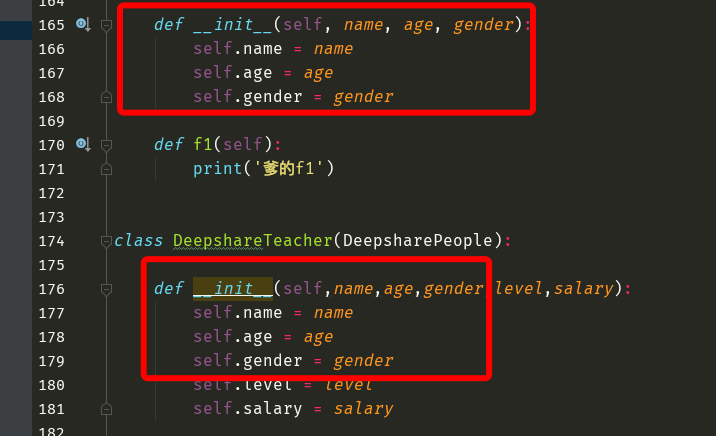
We have to come up with a way to reuse a piece of the parent class’s functionality in a method derived in the subclass.
First idea
class DeepsharePeople:
    school = 'deepshare'
    def __init__(self, name, age, gender):
        self.name = name
        self.age = age
        self.gender = gender
    def f1(self):
        print('爹的f1')
class DeepshareTeacher(DeepsharePeople):
    def __init__(self,name,age,gender,level,salary):
        # self.name = name
        # self.age = age
        # self.gender = gender
        self.__init__(name,age,gender)
        self.level = level
        self.salary = salary
    def modify_score(self):
        print('teacher %s is modifying score' % self.name)
    def f1(self):
        print('儿子的f1')
tea1 = DeepshareTeacher('albert', 18, 'male','10 ','3.1')
Here the object repeatedly calls its own init function, which is a recursion. Running the code produces an error saying two arguments are missing. What we actually want to call is not our own init but the parent class’s init. Calling it through the object doesn’t work, so let’s call it through the parent class.
Derivation approach 1 (calling the parent class explicitly by name):
class DeepsharePeople:
    school = 'deepshare'
    def __init__(self, name, age, gender):
        self.name = name
        self.age = age
        self.gender = gender
    def f1(self):
        print('爹的f1')
class DeepshareTeacher(DeepsharePeople):
    def __init__(self,name,age,gender,level,salary):
        # self.name = name
        # self.age = age
        # self.gender = gender
        # When called through the class there is no automatic passing, so self must be written explicitly
        DeepsharePeople.__init__(self,name,age,gender )
        self.level = level
        self.salary = salary
    def modify_score(self):
        print('teacher %s is modifying score' % self.name)
    def f1(self):
        print('儿子的f1')
tea1 = DeepshareTeacher('albert', 18, 'male','10 ','3.1')
print(tea1.name,tea1.age,tea1.gender,tea1.level,tea1.salary )
So far we have achieved reusing the parent class’s functionality in the subclass. But does this approach have anything to do with inheritance? Could we explicitly call, by name, a class that has no inheritance relationship at all with our current class? Of course we could.
Now let’s add something to the parent class.
class DeepsharePeople:
    school = 'deepshare'
    def __init__(self, name, age, gender):
        self.name = name
        self.age = age
        self.gender = gender
    def info(self):
        print("""
        =====个人信息=====
        姓名:%s
        年龄:%s
        性别:%s
        """%(self.name,self.age,self.gender))
class DeepshareTeacher(DeepsharePeople):
    def __init__(self,name,age,gender,level,salary):
        # self.name = name
        # self.age = age
        # self.gender = gender
        DeepsharePeople.__init__(self,name,age,gender )
        self.level = level
        self.salary = salary
    def modify_score(self):
        print('teacher %s is modifying score' % self.name)
    def f1(self):
        print('儿子的f1')
tea1 = DeepshareTeacher('albert', 18, 'male','10 ','3.1')
tea1.info()
The teacher also has his own level and salary, so let’s add them in the subclass.
class DeepsharePeople:
    school = 'deepshare'
    def __init__(self, name, age, gender):
        self.name = name
        self.age = age
        self.gender = gender
    def info(self):
        print("""
        =====个人信息=====
        姓名:%s
        年龄:%s
        性别:%s
        """%(self.name,self.age,self.gender))
class DeepshareTeacher(DeepsharePeople):
    def __init__(self,name,age,gender,level,salary):
        # self.name = name
        # self.age = age
        # self.gender = gender
        DeepsharePeople.__init__(self,name,age,gender )
        self.level = level
        self.salary = salary
    def modify_score(self):
        print('teacher %s is modifying score' % self.name)
    def info(self):
        print("""
        =====个人信息=====
        姓名:%s
        年龄:%s
        性别:%s
        """%(self.name,self.age,self.gender))
        print("""
        等级:%s
        薪资:%s
        """%(self.level,self.salary))
tea1 = DeepshareTeacher('albert', 18, 'male','10 ','3.1')
tea1.info()
There is still duplicated code. We do the same thing again; the principle is identical.
class DeepsharePeople:
    school = 'deepshare'
    def __init__(self, name, age, gender):
        self.name = name
        self.age = age
        self.gender = gender
    def info(self):
        print("""
        =====个人信息=====
        姓名:%s
        年龄:%s
        性别:%s
        """%(self.name,self.age,self.gender))
class DeepshareTeacher(DeepsharePeople):
    def __init__(self,name,age,gender,level,salary):
        # self.name = name
        # self.age = age
        # self.gender = gender
        DeepsharePeople.__init__(self,name,age,gender )
        self.level = level
        self.salary = salary
    def modify_score(self):
        print('teacher %s is modifying score' % self.name)
    def info(self):
        # Note: calling through the class does not pass self automatically, so we have to write it by hand
        DeepsharePeople.info(self)
        print("""
        等级:%s
        薪资:%s
        """%(self.level,self.level))
tea1 = DeepshareTeacher('albert', 18, 'male','10 ','3.1')
tea1.info()
Derivation approach 2 (calling with super( )):
super()的返回值是一个特殊的对象,该对象专门用来调用父类中的属性(The return value of super() is a special object that is used specifically to call attributes of the parent class.)
Let’s modify our code using super.
class DeepsharePeople:
    school = 'deepshare'
    def __init__(self, name, age, gender):
        self.name = name
        self.age = age
        self.gender = gender
    def info(self):
        print("""
        =====个人信息=====
        姓名:%s
        年龄:%s
        性别:%s
        """%(self.name,self.age,self.gender))
class DeepshareTeacher(DeepsharePeople):
    def __init__(self,name,age,gender,level,salary):
        # self.name = name
        # self.age = age
        # self.gender = gender
        # DeepsharePeople.__init__(self,name,age,gender )
        super().__init__(name,age,gender)  # This calls the init of the parent class; super() is an object
        self.level = level
        self.salary = salary
    def modify_score(self):
        print('teacher %s is modifying score' % self.name)
    def info(self):
        # DeepsharePeople.info(self)
        super().info()  # Likewise, super() returns an object, no self needed; the info called is the info of the parent class
        print("""
        等级:%s
        薪资:%s
        """%(self.level,self.level))
tea1 = DeepshareTeacher('albert', 18, 'male','10 ','3.1')
tea1.info()
Output
=====个人信息=====
        姓名:albert
        年龄:18
        性别:male

        等级:10
        薪资:10
(The labels in the output are: 个人信息 = personal information, 姓名 = name, 年龄 = age, 性别 = gender, 等级 = level, 薪资 = salary.)
Calling via super is different from the first derivation approach: it strictly depends on the inheritance relationship. Both approaches can be used, and neither is better or worse, but never mix the two, or nobody will be able to save you.
Supplement:
In Python 2 you need to use it as super(YourOwnClassName, self).
Example:
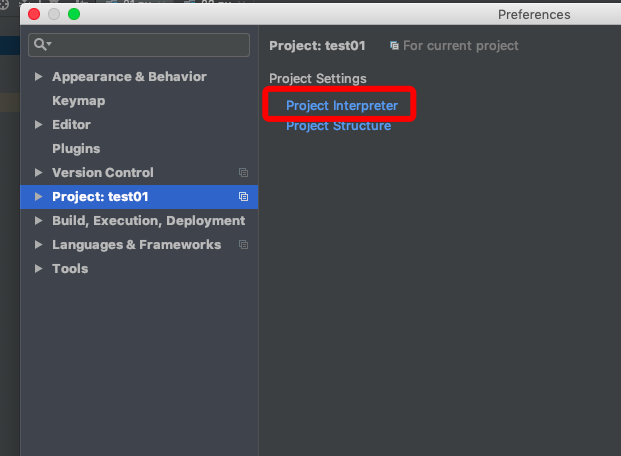
Switch the interpreter like this, and then write the code like this:
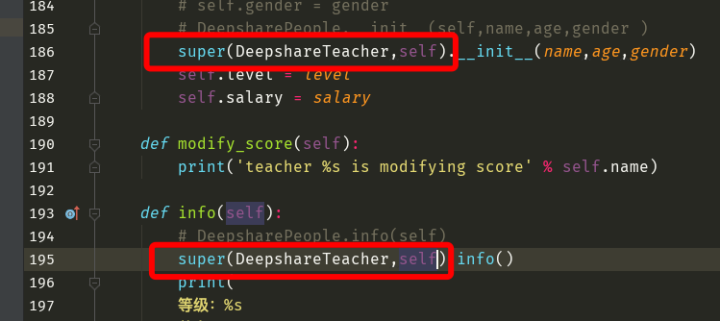
5. Classic Classes and New-Style Classes
We introduced this concept right at the beginning; now let’s understand it.
新式类:继承object的类,以及该类的子类孙子类,都是新式类
经典类:没有继承object的类,以及该类的子类,孙子类,都是经典类
(New-style class: a class that inherits from object, as well as its subclasses and grandchild classes, are all new-style classes. Classic class: a class that does not inherit from object, as well as its subclasses and grandchild classes, are all classic classes.)
Let’s first take a look at what on earth object is.
print(object)Output
<class 'object'>object is also a class; it is the ancestor of all classes. In Python 3 it defines a large number of features, all of which are triggered automatically, to help round out the functionality of the classes you write. Classes in Python 3 are all new-style classes, so they must inherit from object. Let’s take a look.
class Foo:
    pass
print(Foo.__bases__)
Output
(<class 'object'>,)This shows that in Python 3, if a class doesn’t specify a parent class, it inherits from the object class by default, so all classes in Python 3 are new-style classes.
But what about in Python 2 (the interpreter has been switched to Python 2)?
class Foo:
    pass
print(Foo.__bases__)
Output
()This shows that this class does not inherit from object, so it is a classic class. But what if I make it inherit?
class Foo(object):
    pass
print(Foo.__bases__)
Output
(<type 'object'>,)This shows that it is a new-style class. Now switch the interpreter back to Python 3, and the output is
(<class 'object'>,)Clearly, in Python 3 it makes no difference whether you add object or not, which shows that Python 3 only has new-style classes, while Python 2 has both classic and new-style classes. In fact, even programmers who use Python 2 rarely use classic classes anymore. So in some older programmers’ code or in some older projects, you’ll see object added after the class name when a class is defined. There are three possible reasons for this: first, the project was written in Python 2; second, it’s an old programmer’s habit, since they always had to add it when they used Python 2; third, to give the project code a certain compatibility so that it runs normally in both Python 2 and Python 3.
6. Attribute Lookup with Multiple Inheritance
Now that we understand classic classes and new-style classes, next we need to be clear about where they differ. The difference lies in attribute lookup. We know Python supports multiple inheritance; everything we studied before was single inheritance, so now let’s study multiple inheritance.
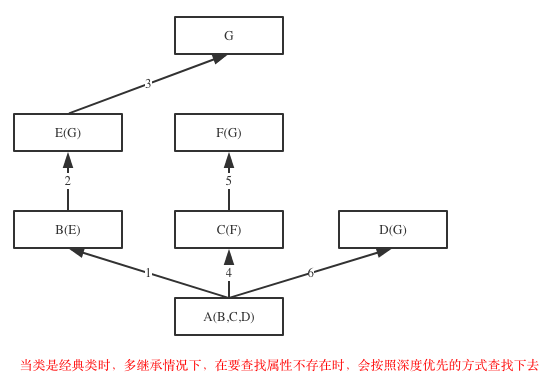
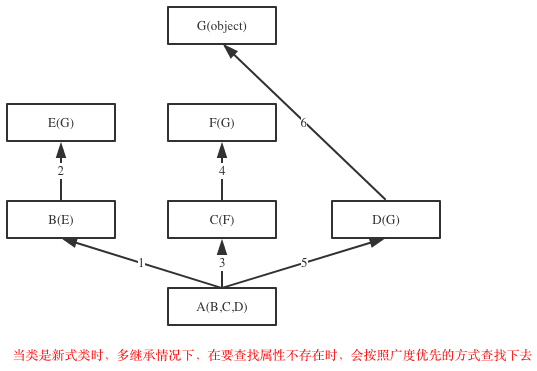
Let me state the conclusion first. Look at the diagram below: when the inheritance relationship forms a diamond structure, there are two ways of looking up attributes, namely depth-first and breadth-first.
Note:
Classic classes and new-style classes are only distinguished when the inheritance relationship forms a diamond structure, that is, when at least two classes at the end inherit from the same class. In other words, if only one of the three classes E, F and D inherits from class G, or none of them does, it is not a diamond structure, and attribute lookup for that inheritance relationship simply goes from left to right: B=>E=>(G=>)C=>F=>D. On this point there is no difference between new-style classes and classic classes.
When the inheritance relationship is a diamond structure, depth-first means going all the way down one path to the end: B=>E=>G=>C=>F=>D
Breadth-first means probing first and then circling back: B=>E=>C=>F=>D=>G
This is Python’s internal implementation mechanism; it is computed using the C3 algorithm.
Next, let’s verify it with code.
class A(object):
    def test(self):
        print('from A')
class B(A):
    def test(self):
        print('from B')
class C(A):
    def test(self):
        print('from C')
class D(B):
    def test(self):
        print('from D')
class E(C):
    def test(self):
        print('from E')
class F(D,E):
    # def test(self):
    #     print('from F')
    pass
f1=F()
f1.test()
We won’t spend a lot of space verifying it here; you can verify it yourselves. One more thing to add: new-style classes provide a dedicated attribute lookup method, mro.
f1=F()
f1.test()
print(F.__mro__)
print(F.mro())
Output:
from D
(<class '__main__.F'>, <class '__main__.D'>, <class '__main__.B'>, <class '__main__.E'>, <class '__main__.C'>, <class '__main__.A'>, <class 'object'>)
[<class '__main__.F'>, <class '__main__.D'>, <class '__main__.B'>, <class '__main__.E'>, <class '__main__.C'>, <class '__main__.A'>, <class 'object'>]
It stores the lookup order as a list or a tuple, because these data types are ordered.
7. Inheritance Lookup with super( )
Next comes what is special about inheritance lookup with the super() object. If the code looks like this, there is naturally no problem:
class X:
    def test(self):
        print('x')
    def f1(self):
        print('XF')
class A(X):
    def test(self):
        print('1 打印一下,代码先经过这里')
        super().f1()
        print('3 再打印一下,代码最后经过这里')
class B:
    def f1(self):
        print('2 再经过这里from B')
class C(A, B):
    pass
c = C()
c.test()
print(C.mro())
输出:
# 1 打印一下,代码先经过这里
# XF
# 3 再打印一下,代码最后经过这里
# [<class '__main__.C'>, <class '__main__.A'>,
   <class '__main__.X'>, <class '__main__.B'>, <class 'object'>]
(The printed strings mean: “1 print something, the code passes here first”, “2 then passes here from B”, and “3 print again, the code passes here last”; 输出 means “Output”.)
But if the super() object takes part in the inheritance lookup and the class that super() refers to doesn’t have the method (either the object class or the X class in the code above will do), then the inheritance order of the mro list will conflict with our intuition. The lookup strictly follows the mro list, continuing onward from the position currently reached. The mro mechanism holds that as long as a class at the same level as the current class has the method being looked for, never mind anything else, just call it dad. So even though A and B originally have no direct inheritance relationship, A will treat B as its dad, and finally come back to the current position and continue executing the code below, as if poisoned by super(). This is not what we would originally expect, namely looking for the method on the super() object, failing to find it, then looking in its parent class, the object class or the X class, and then raising an error.
Example:
class X:  # It works the same even without class X
    def test(self):
        print('x')
    # def f1(self):
    #     print('XF')
class A(X):
    def test(self):
        print('1 打印一下,代码先经过这里')
        super().f1()
        print('3 再打印一下,代码最后经过这里')
class B:
    def f1(self):
        print('2 再经过这里from B')
class C(A, B):
    pass
c = C()
c.test()
print(C.mro())
Output
from B
[<class '__main__.C'>, <class '__main__.A'>,
 <class '__main__.X'>, <class '__main__.B'>,
 <class 'object'>]
We know two ways of reusing a parent class’s method in a subclass: one is to call the parent class explicitly by name, and the other is to use super. Which one is better has long been debated in the Python community; each has its pros and cons. With super, it’s actually not very explicit where an attribute is looked up, whereas with the explicit by-name approach you can immediately see which class the thing being called lives in, but that approach doesn’t have much to do with inheritance. So in the future you can use either, just don’t mix them.
8. Composition
Strictly speaking, composition has no direct relationship with inheritance, but both composition and inheritance are solutions to code redundancy between classes, and from an object-oriented point of view they belong to the same category, so we cover them together here. The difference is that inheritance describes a subordinate relationship between classes, that is, an “is-a” relationship, while composition describes a cross relationship between classes, that is, a “has-a” relationship.
一个类产生的对象,该对象拥有一个属性,这个属性的值是来自于另外一个类的对象(An object produced by one class has an attribute whose value is an object of another class.)
Still using our earlier code with teachers and students, I want teacher objects to have a date-of-birth attribute, and student objects to have this attribute too. How should we do that?
class Date:
    def __init__(self,year,mon,day):
        self.year = year
        self.mon = mon
        self.day = day
    def tell_birth(self):
        print('出生年月日<%s-%s-%s>' % (self.year, self.mon, self.day))
class DeepsharePeople:
    school = 'deepshare'
    def __init__(self, name, age, gender):
        self.name = name
        self.age = age
        self.gender = gender
class DeepshareTeacher(DeepsharePeople):
    def __init__(self,name,age,gender,level,salary):
        super().__init__(name,age,gender)
        self.level=level
        self.salary=salary
    def change_score(self):
        print('teacher %s is changing score' %self.name)
class DeepshareStudent(DeepsharePeople):
    def __init__(self,name,age,gender,course,):
        super().__init__(name,age,gender,)
        self.course=course
    def choose(self):
        print('student %s choose course' %self.name)
tea1=DeepshareTeacher('albert',18,'male',10,3.1)
date_obj=Date(2000,1,1)
date_obj.tell_birth()
tea1.birth=date_obj
print(tea1.birth)
tea1.birth.tell_birth()
tea1.change_score()
stu1=DeepshareStudent('张三',16,'male','AI')
stu1.birth=Date(2002,3,3)
stu1.birth.tell_birth()
At this point we find that there are two solutions to the code reuse problem: one is called inheritance and the other is called composition. In this week’s project we will use composition extensively, because from a software design perspective, composition is actually better than inheritance.
In the scenario just shown, inheritance could also do the job, but inheritance amounts to tight coupling between classes, whereas composition is essentially decoupling. At work, with software extensibility in mind, the higher the coupling of the code, the harder it is to extend. Of course, inheritance is still indispensable. In later course content we will guide you through reading some classic source code written in Python, which makes heavy use of composition and inheritance. This section is very important, which is why I spent so much space explaining it.
2. Encapsulation
1.Basic Introduction to Encapsulation
What is encapsulation
Let’s start with the literal meaning (the Chinese term means “seal and pack”): encapsulation is sealing the opening and packing things up so they can’t get out, and from the outside you don’t know what’s inside. But if you get packed in along with them, you’ll certainly know; just don’t expect to get out.
Packing means storing the attributes, and sealing means hiding those attributes.
封装但从字面意思看等同于隐藏,但绝对不是单纯意义的隐藏(Literally, encapsulation is equivalent to hiding, but it is definitely not hiding in the simple sense.)
How to use encapsulation
class Foo:
    x = 111
    def f1(self):
        print('Foo.f1')
obj = Foo()
print(obj.x)
In the code above, I want to hide the x attribute.
class Foo:
    __x = 111  # Note: this starts with __ but does not end with __; names that start and end with double underscores are methods triggered automatically in certain situations
    def f1(self):
        print('Foo.f1')
obj = Foo()
print(obj.x)
print(obj._x)
print(obj.__x)
Now no matter how you access it, you can’t get to it; the hiding is done. Likewise:
class Foo:
    __x = 111  # Note: this starts with __ but does not end with __; names that start and end with double underscores are methods triggered automatically in certain situations
    def __init__(self,y):  # Note: this is not encapsulation
        self.__y = y
    def __f1(self):
        print('Foo.f1')
obj = Foo(222)
print(obj.x)
print(obj.__x)
print(obj.f1)
print(obj.__f1)
print(obj.y)
print(obj.__y)
The x, y and f1 attributes can no longer be found. If I don’t tell you, can you use what you’ve learned to find these attributes? (Reportedly 9 out of 10 people can find them.)
为一个属性名加__开头,会在类定义阶段将属性名变形:_属性名 ==> _类名__属性名
复习:类定义阶段执行类体内的代码(类体内的函数只检测语法,不执行)
(Prefixing an attribute name with __ causes the name to be transformed during the class definition stage: _attribute_name ==> _ClassName__attribute_name. Review: during the class definition stage, the code in the class body is executed; functions in the class body are only syntax-checked, not executed.)
How do we prove it? This is also the answer to the question above.
查看类的名称空间(Look at the class’s namespace.)
Change the way you access them
print(obj._Foo__x)
print(obj._Foo__f1)
print(obj._Foo__y)
Output
111
<bound method Foo.__f1 of <__main__.Foo object at 0x104e63f98>>
222
In fact, this kind of hiding is just a syntactic transformation; it doesn’t necessarily restrict your access. If you insist on accessing it, you can. But it’s your own hiding, and if you insist on accessing it from outside anyway, I have no idea what you’re thinking.
If you’re at all normal, you should access it from the inside.
class Foo:
    __x = 111  # Note: this starts with __ but does not end with __; names that start and end with double underscores are methods triggered automatically in certain situations
    def __init__(self,y):
        self.__y = y
    def __f1(self):
        print('Foo.f1')
    def get__y(self):  # This get__y attribute can definitely be accessed
        print(self.__y)
obj = Foo(222)
obj.get__y()
Why can get__y access the value of the __y attribute? The reason is simple. I’ll give you a chance to think about it yourself; it’s left as a small question in the homework.
This syntactic transformation happens only once, during the class definition stage. Attributes starting with a double underscore that are added after the class is defined don’t get transformed. Proof:
obj.__aaaaaaaaaaaaa = 1
Foo.__bbbbbbbbbbbb = 2
print(Foo.__dict__)
print(obj.__dict__)
If a parent class doesn’t want subclasses to override its method, it can start the method name with a double underscore. The code is as follows:
class Foo:
    def __f1(self): #_Foo__f1
        print('Foo.f1')
    def f2(self):
        print('Foo.f2')
        self.__f1() #obj._Foo__f1()
class Bar(Foo):
    def __f1(self): #_Bar__f1
        print("Bar.f1")
obj=Bar()
obj.f2()
"""
解释:因为__f1函数在两个类中发生了不同的形变
"""
(The docstring says: “Explanation: because the __f1 function is transformed differently in the two classes.”)
Why use encapsulation
Think about the process of turning on a computer. For the user, it only takes pressing a button, but the machine goes through many steps. There is no need at all to show you those steps (you wouldn’t understand them if you saw them anyway); you only need to be given an interface, which is this button. Anyone can press it, and pressing this button controls the startup.
class People:
    def __init__(self,name,age):
        self.__name = name
        self.__age = age
    # This is the encapsulated interface
    def tell_info(self):
        print(self.__name,self.__age)
p = People('albert',18)
# Let the user call this interface
p.tell_info()
The purpose of encapsulating data attributes: we need to open up a dedicated interface for users outside the class, so that we can add any control logic on top of the interface and thereby strictly control what visitors do with the attributes. Encapsulation is not about not letting you use something, but about not letting you use it however you like, so as to achieve control. As follows:
class People:
    def __init__(self,name,age):
        self.__name = name
        self.__age = age
    # This is the encapsulated interface
    def tell_info(self):
        u = input('user>>:').strip()
        p = input('pwd>>:').strip()
        if u == 'albert' and p == 'abc':
            print(self.__name,self.__age)
p = People('albert',18)
# Let the user call this interface
p.tell_info()
Next, let’s talk about encapsulating function attributes. When you withdraw money from a bank ATM, you only need to insert your bank card, enter your password, and then enter the amount to withdraw. As for what process happens inside, we don’t need to think about it.
class ATM:

    def put_your_card(self):
        print('1 插卡')

    def input_password(self):
        print('2 输密码')

    def input_money(self):
        print('3 输入取款金额')

    def __sent_request(self):
        print('向银行系统发请求(不让你看)')

    def __dedcut_money(self):
        print('扣钱(不让你看)')

    def __update_user_balance(self):
        print('更新用户余额(不让你看)')

    def withdraw(self):
        self.__sent_request()
        self.__dedcut_money()
        self.__update_user_balance()

obj = ATM()
obj.put_your_card()
obj.input_password()
obj.input_money()
obj.withdraw()
(The printed strings mean: “1 insert card”, “2 enter password”, “3 enter withdrawal amount”, “send a request to the bank system (hidden from you)”, “deduct money (hidden from you)”, “update user balance (hidden from you)”.)
The purpose of encapsulating function attributes is to isolate complexity.
封装终极奥义:目的就是为了明确的区分内外,对外部是隐藏的,对内部是开放的(The ultimate essence of encapsulation: its purpose is to clearly separate the inside from the outside; things are hidden from the outside and open to the inside.)
2. Encapsulation: the Property Method
Calculating the BMI index: note that BMI is not a fixed value. As people grow older, children’s height and weight change accordingly, and adults’ weight may also change, so you can’t write it into the object’s init function. You have to write a separate feature to calculate it, that is, define a separate function. But it is clearly an attribute, just like the object’s name or height, so we want to get the attribute value with object.attribute_name.
'''
BMI指数
成人的BMI数值:
过轻:低于18.5
正常:18.5-23.9
过重:24-27
肥胖:28-32
非常肥胖, 高于32
  体质指数(BMI)=体重(kg)/身高^2(m)
  EX:70kg /(1.75×1.75)=22.86
'''
(BMI index. Adult BMI values: underweight: below 18.5; normal: 18.5-23.9; overweight: 24-27; obese: 28-32; very obese: above 32. Body mass index (BMI) = weight (kg) / height^2 (m). EX: 70kg / (1.75×1.75) = 22.86)
Without the Property method
class People:
    def __init__(self,name,weight,height):
        self.name=name
        self.weight=weight
        self.height=height
    def bmi(self):
        return self.weight / (self.height * self.height)
albert=People('albert',75,1.80)
print(albert.bmi())
Calling it as a function would normally be understood as triggering a feature, and that feature is certainly an action, so this isn’t proper. We want to get the object’s bmi without parentheses after bmi, just like accessing the object’s name; the difference is that bmi changes dynamically. Modify it with property:
class People:
    def __init__(self,name,weight,height):
        self.name=name
        self.weight=weight
        self.height=height
    @property
    def bmi(self):
        return self.weight / (self.height * self.height)
albert=People('albert',75,1.80)
print(albert.name)
print(albert.bmi)
# print(albert.bmi())
In fact, the underlying principle of property is also encapsulation, except that someone else has already encapsulated it for us. We talked about decorators before: you put @decorator_name directly above the object being decorated. This decorator has already been written by Guido. It effectively disguises a function attribute of an object as a data attribute, and its power lies in the fact that the value can change dynamically, as follows:
class People:
    def __init__(self,name,weight,height):
        self.name=name
        self.weight=weight
        self.height=height
    @property
    def bmi(self):
        return self.weight / (self.height * self.height)
albert=People('albert',75,1.80)
print(albert.bmi)
albert.weight = 70
print(albert.bmi)
Modifying and deleting a disguised attribute
class People:
    def __init__(self,name):
        self.__name = name
    @property
    def name(self):
        print('访问'.center(50,'='))
        return self.__name
p = People('albert')
print(p.name)
# p.name = 'ALBERT'
del p.name
A disguised attribute can be viewed, but there is also a need to modify and delete it, which we can’t do yet, because it is essentially a function. Modify it as follows:
class People:
    def __init__(self,name):
        self.__name = name
    @property
    def name(self):
        print('访问'.center(50,'='))
        return self.__name
    @name.setter
    def name(self,x):
        print('修改'.center(50,'='))
        self.__name = x
    @name.deleter
    def name(self):
        print('删除'.center(50,'='))
        # print('就不让你删')
        # You can add any authentication mechanism; even after passing it, still refuse to delete, just to mess with them
        del self.__name
p = People('albert')
print(p.name)
# p.name = 'ALBERT'
# print(p.name)
# del p.name
# print(p.name)
(访问 = access, 修改 = modify, 删除 = delete; '就不让你删' means “I just won’t let you delete it”.)
When other developers use the name attribute, accessing, modifying and deleting it each go into a different function, but they don’t know that; everything is under our control.
3. Polymorphism
1. Polymorphism and Polymorphic Behavior
Put simply, polymorphism means one kind of thing having many forms. Water takes the forms of liquid water, steam and ice, but as long as it’s water, a water molecule is made of two hydrogen atoms and one oxygen atom. Mediocre programmers and awesome programmers are both programmers and can both write code, but will the code they write be the same? How is this achieved in a program?
Maybe you’ve already guessed: this is a subordinate relationship, expressed with inheritance.
class Animal:
    def eat(self):
        print('eat')
        pass
    def drink(self):
        pass
    def run(self):
        pass
    def bark(self):
        pass
class Cat(Animal):
    pass
class Dog(Animal):
    pass
class Pig(Animal):
    pass
c = Cat()
d = Dog()
p = Pig()
c.eat()
d.eat()
p.eat()
As long as it’s an animal, I don’t need to care what animal it is; I can call the animal’s methods directly, without considering separately how each animal eats.
多态性:可以在不用考虑的对象具体类型的前提下,而直接使用对象下的方法(Polymorphic behavior: you can use an object’s methods directly without having to consider the object’s concrete type.)
Even so, each animal can still have its own differences, which is done through derivation.
class Animal:
    def eat(self):
        print('eat')
        pass
    def drink(self):
        pass
    def run(self):
        pass
    def bark(self):
        pass
class Cat(Animal):
    def bark(self):
        print('喵喵叫')
class Dog(Animal):
    def bark(self):
        print('汪汪叫')
class Pig(Animal):
    def bark(self):
        print('哼哼叫')
c = Cat()
d = Dog()
p = Pig()
c.bark()
d.bark()
p.bark()
(喵喵叫 = meow, 汪汪叫 = woof, 哼哼叫 = oink.)
Each animal now has its own characteristics, and calling them still requires no changes at all. How nice it would be if everyone wrote code like this. But there are always some self-taught, undisciplined programmers who don’t listen and think their English is pretty good.
class Cat(Animal):
    def speak(self):
        print('喵喵叫')
class Dog(Animal):
    def talk(self):
        print('汪汪叫')
class Pig(Animal):
    def say(self):
        print('哼哼叫')
c = Cat()
d = Dog()
p = Pig()
c.speak()
d.talk()
p.say()
This works too, but you have to remember each animal’s method for making sounds, which makes development very inefficient. Imagine this scenario: you are now the architect or project manager. From a program design perspective, you have defined the four methods of the animal class above (eat, drink, run and bark) and want to make them a standard. You certainly won’t write the remaining low-level code for each animal yourself; you hand it to the people under you. But they just don’t use the methods you defined and don’t follow the standard you set, writing it like this instead. What do you do? Isn’t it hopeless?
import abc  # abstract class
class Animal(metaclass=abc.ABCMeta):
    @abc.abstractmethod
    def eat(self):
        pass
    @abc.abstractmethod
    def drink(self):
        pass
    @abc.abstractmethod
    def run(self):
        pass
    @abc.abstractmethod
    def bark(self):
        pass
class Cat(Animal):
    def speak(self):
        print('喵喵叫')
class Dog(Animal):
    def talk(self):
        print('汪汪叫')
class Pig(Animal):
    def say(self):
        print('哼哼叫')
# obj=Animal() # The abstract base class itself cannot be instantiated
# c = Cat()
# d = Dog()
# p = Pig()
This way their classes can’t be instantiated, let alone call their own crappy methods.
class Animal(metaclass=abc.ABCMeta):
    @abc.abstractmethod
    def eat(self):
        pass
    @abc.abstractmethod
    def drink(self):
        pass
    @abc.abstractmethod
    def run(self):
        pass
    @abc.abstractmethod
    def bark(self):
        pass
# obj=Animal() # The abstract base class itself cannot be instantiated
class Cat(Animal):
    def eat(self):
        print('cat eat')
    def drink(self):
        print('cat drink')
    def run(self):
        print('cat run')
    def bark(self):
        print('喵喵喵')
class Dog(Animal):
    def eat(self):
        print('dog eat')
    def drink(self):
        print('dog drink')
    def run(self):
        print('dog run')
    def bark(self):
        print('汪汪汪')
class Pig(Animal):
    def eat(self):
        print('pig eat')
    def drink(self):
        print('pig drink')
    def run(self):
        print('pig run')
    def bark(self):
        print('哼哼哼')
c = Cat()
d = Dog()
p = Pig()
c.bark()
d.bark()
p.bark()
Unless they write the code like the above. Note: the code they write must meet two conditions: 1. the function names are the same; 2. none of the four functions can be missing.
Next, let’s upgrade it once more.
# Appended at the end
def BARK(animal):
    animal.bark()
BARK(c)
BARK(d)
BARK(p)
Now it’s defined as a unified interface: no matter who calls it, it’s the same. You actually learned this idea long ago; you just didn’t know it was called polymorphism.
Python中一切皆对象
s='hello'
l=[1,2,3]
t=(4,5,6)
s.__len__()
l.__len__()
t.__len__()
# Defined by ourselves
# def LEN(obj):
#     return obj.__len__()
#
# print(LEN(s))
# print(LEN(l))
# print(LEN(t))
print(len(l))  # Encapsulated inside Python
print(len(s))
print(len(t))
(The first line says: “In Python, everything is an object.”)
2. Duck Typing
Now imagine again that you’ve become the architect. After your training, the undisciplined programmers working under you have all fallen in line. Now there’s a new project, and you no longer need to go to the trouble of writing extra code to restrict them.
The polymorphism we used above actually used inheritance to tightly couple classes together. The syntactic style of the Python language doesn’t really restrict you; what Python advocates is not hard restrictions. In Python, the true embodiment of polymorphism isn’t achieved this way. We use polymorphism for the sake of standards: if everyone follows them, we can define two unrelated classes and agree to use the same methods, meaning the internal conventions are the same.
class Foo:
    def f1(self):
        print('from foo.f1')
    def f2(self):
        print('from foo.f2')
class Bar:
    def f1(self):
        print('from bar.f1')
    def f2(self):
        print('from bar.f2')
obj1 = Foo()
obj2 = Bar()
obj1.f1()
obj1.f2()
obj2.f1()
obj2.f2()
The two classes are completely decoupled, with no hard restrictions. Python advocates this style, and it’s called duck typing.
If you walk like a duck and look like a duck, then you’re a duck. The name is rather peculiar. I once had the good fortune to work with people from Microsoft, and they used this approach too; in English it’s Duck Type. It sounds a bit corny, but it’s very handy.
Here’s another example of unified standards. The Linux operating system has a core design philosophy: everything is a file. Hard disks are files, processes are files (you’ll learn about processes later), files themselves are files; everything is a file.
class Disk:
    def read(self):
        print('disk read')
    def write(self):
        print('disk write')
class Txt:
    def read(self):
        print('txt read')
    def write(self):
        print('txt write')
class Process:
    def read(self):
        print('process read')
    def write(self):
        print('process write')
obj1 = Disk()
obj2 = Txt()
obj3 = Process()
obj1.read()
obj2.read()
obj3.read()
As long as it looks alike, it counts, even if it isn’t. This approach both removes coupling and unifies the standard.
3. Methods Bound to the Class
复习:
绑定方法:
    在类内部定义的函数,默认就是给对象来用,而且是绑定给对象用的,称为对象的绑定方法
    绑定对象的方法特殊之处:
        应该由对象来调用,对象来调用,会自动将对象当作第一个参数传入
(Review: bound methods. Functions defined inside a class are by default meant for objects, and they are bound to objects; they are called the object’s bound methods. What is special about methods bound to objects: they should be called by the object, and when called by the object, the object is automatically passed in as the first argument.)
First, let’s look at a familiar scenario.
class People:
    def __init__(self,name,age):
        self.name = name
        self.age = age
    def tell(self):
        print('%s %s' %(self.name,self.age))
p = People('albert',18)
p.tell()
Next, instead of passing values by hand, we’ll read them from a configuration file.
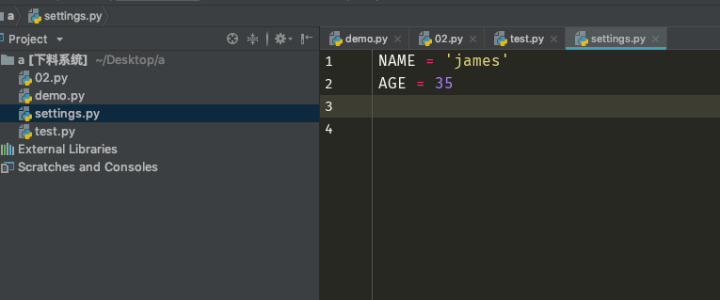
import settings
class People:
    def __init__(self,name,age):
        self.name = name
        self.age = age
    def tell(self):
        print('%s %s' %(self.name,self.age))
p = People(settings.NAME,settings.AGE)
p.tell()
If I need to create multiple objects, I have to read data from the configuration file every time and keep repeatedly looking at what’s in it, which is error-prone. Let’s think of a better way.
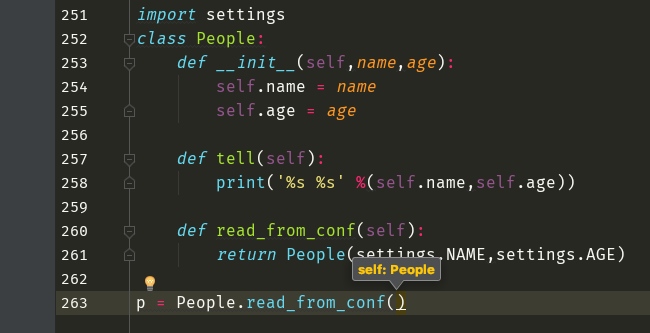
Now a method is called through the class, so there’s no automatic passing of values. The function needs an argument only because it has a self that PyCharm added automatically, and we don’t use this self, so let’s remove it.
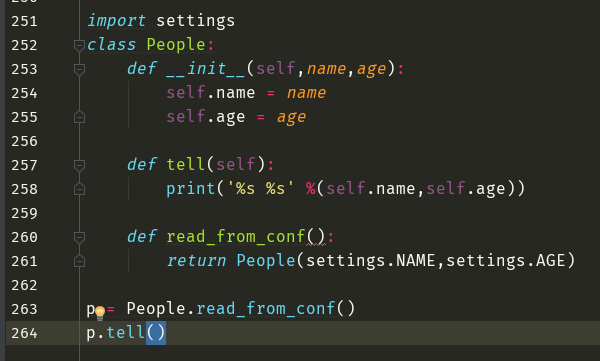
That works now, but if this class is renamed, it won’t work anymore, because line 261 of your code is hard-coded. So we still need to pass in an argument.
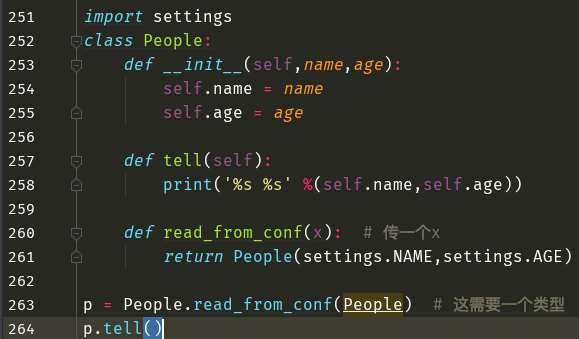
Now it’s flexible, but clumsy. On line 263 the class makes the call and passes itself in as the first argument. What does that remind you of? It’s just like the object’s bound methods. So how do we solve it?
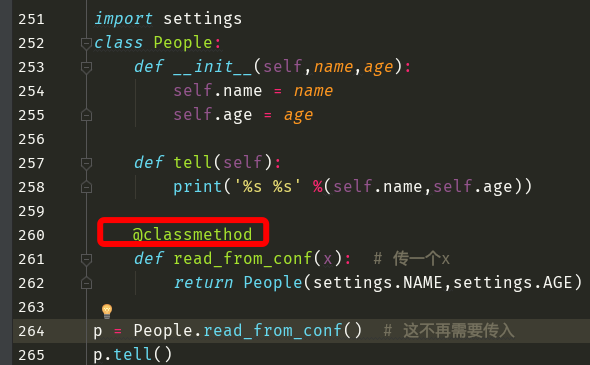
After adding @classmethod on line 260, the class is automatically passed in as the first argument. Look at the following two screenshots to verify whether this is a method bound to the class.
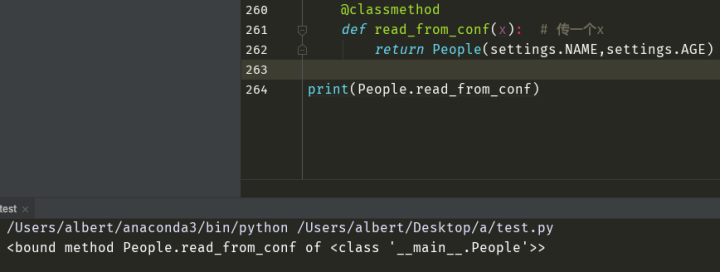
Now let’s see what happens without classmethod.
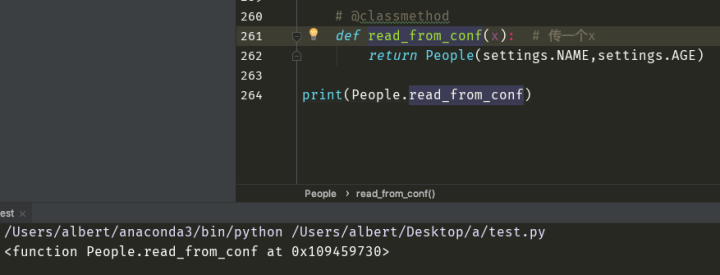
Conclusion:
类的绑定方法:应该由类来调用,并会自动将类当作第一个参数传入(Methods bound to the class: they should be called by the class, and the class is automatically passed in as the first argument.)
On line 261 of the code, naming the parameter x isn’t good. We want it to represent the class, but class is already taken, so let’s call it cls. When you add the classmethod decorator in PyCharm, it adds it for you automatically.
4. Unbound Methods
Still using the code above, suppose we now want to give every user an id number. When adding this feature, we don’t need any automatic passing of values, that is, we don’t need any kind of bound method. How should we solve this?
import settings
import hashlib
import time
class People:
    def __init__(self, name, age):
        self.name = name
        self.age = age
    def tell(self):
        print('%s %s' % (self.name, self.age))
    @classmethod
    def read_from_conf(cls):
        return People(settings.NAME, settings.AGE)
    def create_id():  # This one does not need self, so we remove self by hand and define it as a function with no parameters
        m = hashlib.md5()
        m.update(str(time.clock()).encode('utf-8'))
        return m.hexdigest()
p = People('albert', 18)
print(People.create_id())
print(People.create_id)
print(p.create_id)
Output:

From the results we can see that although no argument is passed, it’s still a method bound to the object. But binding it to the object isn’t reasonable, since that’s not needed at all; likewise, binding it to the class isn’t reasonable either. The solution is as follows:
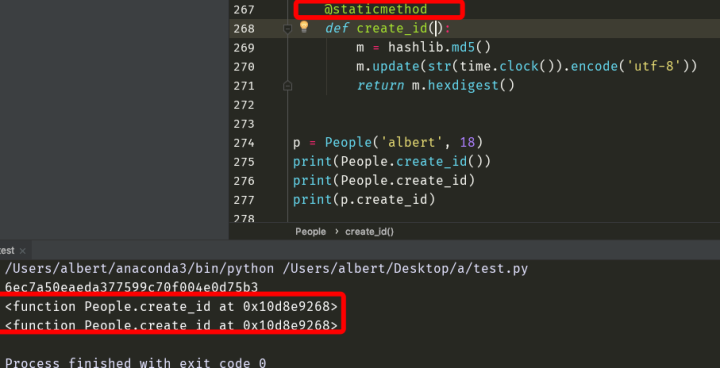
Adding the staticmethod decorator turns it into an ordinary function in every case. This is called an unbound method, or a static method.