Chapter 18: Implementation Flow
This article is part of the Python General Programming tutorial series, which has been fully completed. Its goal is to take you from zero to mastery of the Python programming language. This tutorial does not talk about Python in vague generalities; instead it gives refined, in-depth explanations across 5 stages and 25 chapters. So you need to study patiently to really gain something. Although it does not involve using any frameworks, it gives a holistic explanation of operating systems and network communication, and even rewrites some open-source modules and servers. After finishing it, you will not only have mastered the Python programming language, but also gained the ability to learn other programming languages quickly, to read any Python source code without obstacles, and a comprehensive understanding of computers and networks. For complete beginners, it is an excellent textbook for entering the computer field and mastering a programming language. For those who already have some Python foundation, I believe this tutorial will take your skills to the next level.
I. TCP Data Transmission
1. TCP Three-Way Handshake to Establish a Connection
In the previous chapters we learned the basic principles of network communication. Next we will learn about transport layer protocols. There are two transport layer protocols, TCP and UDP, and we will learn TCP first.
The transport layer is responsible for transmitting data. Its data comes from the application layer: the application layer produces data and hands it to the operating system, that is, first to the transport layer, which is responsible for transmitting it to the outside. Data in the application layer is controlled by application software, while data in the transport layer and below is controlled by the operating system. The complete data transmission process is: the application layer of the client or server produces data and gives it to its operating system; the operating system sends the data to the target machine through the transport layer, network layer, data link layer and physical layer in order; the target machine then unpacks the data in the reverse order and finally delivers it to the application software at the target machine’s application layer. After studying the previous chapters, I believe you are already clear on this flow. The whole series of steps looks complicated, like a long winding passage that you walk to the end of before communication is finally complete. So do we have to walk through this entire flow every time we communicate and transmit data?
The answer is of course no. Taking client machine C and server machine S as an example, it is best to establish one path from C’s transport layer to S’s transport layer and one path from S to C (note: there must be two paths), and from then on data can simply travel along these two paths whenever it needs to be transmitted. So next we need to establish a bidirectional path between the transport layers of both sides.
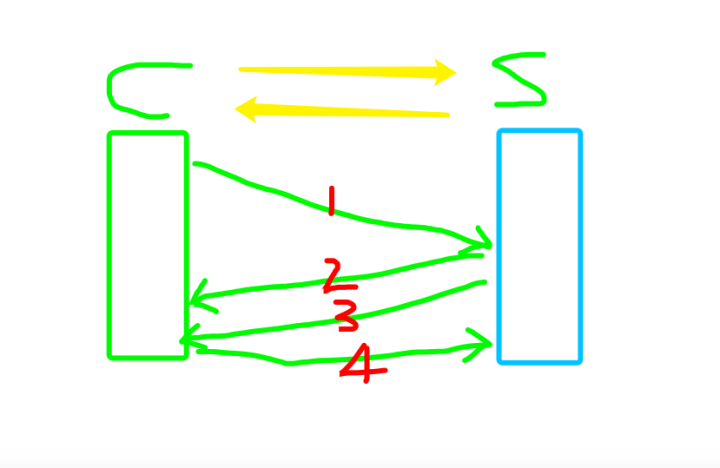
It’s just like two people falling in love: the client and the server need to establish two yellow paths. For example, let’s think of James as the client and Wade as the server.
James says to Wade: “I like you.” This is red line number one
Wade says: “Mm, I know.” That counts as a response to James; this is red line number two. At this point, the first path from left to right is established;
Then Wade goes on to say: “Actually, I like you too.” This is red line number three
Finally, James also gives Wade a response: “Mm-hm, I know, little Wade, then let’s be together.”
At this point, the second yellow path from right to left is also established, which is how we got the “LeBron-Wade connection” we saw in the NBA. This is exactly how a bidirectional path at the transport layer is established.
This is the communication process of the TCP protocol. We usually call sending one message one handshake. You will notice that building this bidirectional path took 4 handshakes, but in fact the second and third handshakes can be merged into one: while the server responds to the client, it can also send the client a connection request. So establishing a connection takes three handshakes, which is TCP’s three-way handshake to establish a connection. From then on, when you want to send data, you don’t need to find where the other side is; you just use the connection that has already been established.
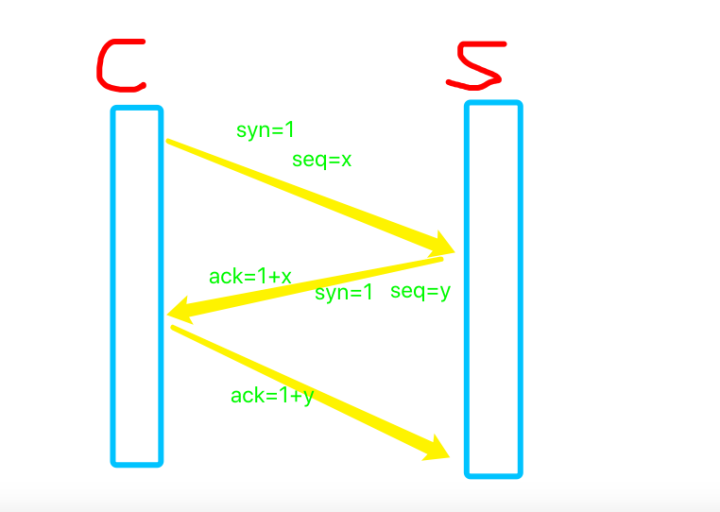
Just now we described the process of establishing a connection with a metaphor. During this process, request messages and acknowledgment messages are sent. Since a server is connected to more than one client, it must also make sure the response corresponds to the connection request just made. So when the client sends a request it includes syn=1, which is the request message, and seq = x, which can be understood as this client’s request number, represented by x. When the server responds, it replies with ack=1, indicating the request has been received. But how does it indicate that what it received is this particular client’s request? By giving a response corresponding to the request number: ack= 1 + x. Then the server also sends the client a request, likewise: syn= 1, seq = y, and the client responds: ack= 1 + y.
Before sending data with TCP, both communicating parties must establish a connection with each other. The so-called “connection” is really a piece of information about the other party stored in the memory of the client and the server, such as the IP address and port number. TCP can be viewed as a byte stream; it handles packet loss, duplication and errors at the IP layer or below. During connection establishment, both sides need to exchange some connection parameters. These parameters can be placed in the TCP header. TCP provides a reliable, connection-oriented, byte-stream, transport-layer service, and uses a three-way handshake to establish a connection.
2. Vulnerabilities in the TCP Protocol
Sending data via TCP requires the client to send a request first, the server to reply with a corresponding request, and then the bidirectional connection is established following the process above. A server can establish connections with one client, and also with many or even countless clients. Establishing a connection consumes resources. Choosing between the application and the operating system, the resources it consumes are certainly the operating system’s: connections live at the transport layer and below and are maintained by the operating system, so they consume operating system resources.
With TCP, whenever a client sends the server a request, the server must reply to the client with a response, so TCP is also called the “nice-guy protocol”: no matter who sends a request, it will always reply. This vulnerability is a design-level vulnerability. Designing it this way greatly reduces network pressure, but because it replies to the client whether the client is good or bad, it gives lawbreakers an opening. There is an attack called syn flood (commonly known as a syn flood attack): fake clients simulate a large number of syn requests and send packets to the server machine. Every time a packet is sent, the server replies, but the IP is fake and won’t wait to receive the server’s response. When the server’s response gets no reply, the server will reply again. By default the server replies the first time after 5 seconds, the second time after 3 seconds, and then after 2 seconds and 1 second. Of course, as a server developer, you can tune this default timing on the Linux operating system, but the problem is that no matter how you tune it, the fake client will never receive the response, so it keeps occupying system resources. At the same time, real client machines also need to send syn requests, but with a large number of fake requests coming in, normal requests may be blocked (it’s like someone maliciously stuffing a lot of Chinese cabbage into your meat grinder so it gets clogged; any meat you put in afterwards will be stuck outside). In fact, syn flood attacks can be mitigated by adjusting Linux kernel parameters; here it is enough to just be aware of it.
Syn flood attacks are launched by hackers, but even without hackers, when a large number of real clients send requests (a meat grinder fed only meat can still get clogged), the server may also be paralyzed. Sina Weibo claims it can withstand eight “star affairs” at once (one star affair means one celebrity cheating), yet it couldn’t withstand one celebrity couple getting married; Taobao and Tmall’s servers also go down at the peak of transactions on Double Eleven; and China’s most awesome website, 12306, bar none, has world-class technical capability—its concurrency is something even Facebook can hardly match. Technical capability is one aspect, but financial strength is also indispensable.
3. The Half-Open Connection Pool
A server machine certainly cannot let a flood of connection requests wreck it; the machine itself should have some protection mechanisms. For the server, accepting every syn request the moment it arrives, and then the next one immediately too—if that were really the case, memory would be occupied without limit. So even when normal client machines connect, there should be a limit. This limit is called the backlog (in Chinese, the half-connection pool). An incoming syn request is first placed in this half-open connection pool. The number of requests in the pool is fixed; once that number is reached, further requests are kept outside the pool, and only the fixed number in the pool are processed at the same time, which is also the number the server’s operating system can handle.
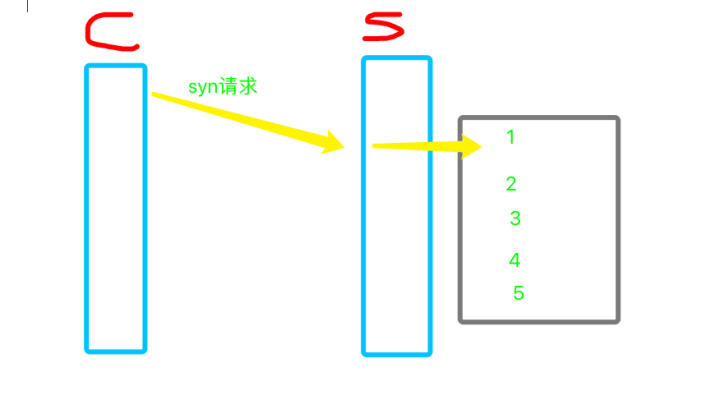
As shown in the figure, the gray box represents the half-open connection pool. The server’s operating system takes a connection out of the pool and responds to it, within the range it can handle. At the same time, the pool has one fewer connection request, so a new connection request can come in. If the server machine has a lot of memory, the pool can hold more connection requests. In fact, the pool doesn’t hold many connection requests, but the server responds very quickly, which achieves the purpose of buffering.
Buffers like this can be seen everywhere in daily life. When you go home for the Spring Festival and pick up your boarding pass and check in your luggage (this is economy class; I’ve never flown first class, so I don’t know what it’s like), there is often a long line behind you, but usually only a few people are being served at the counter. Even though there is still room at the counter, security won’t let you go over, partly to protect passengers’ privacy, and partly to keep order so the service desk can work efficiently.
We just talked about the concept of a half-open connection pool. Why is it called that? Because for the requests in the half-open connection pool, only the syn request has been sent to the server; the full connection process has not been completed.
4. Connection Request States
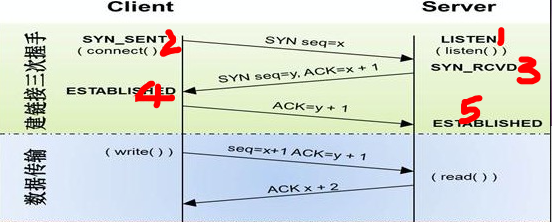
In the three-way handshake, each position has a corresponding state. First the server enters the LISTEN state, which is the server’s listening state, waiting for clients to send connection requests. As soon as the client sends a connection request, it enters the SYN_SENT state; next the server enters the SYN_RCVD state; then the client enters the ESTABLISHED state, indicating the connection was established successfully, meaning the path from the client to the server has been established. After that the client replies with a response, and the fifth line, the path from the server to the client, is established successfully. If the server machine serves a large number of client machines at the same time, this is called concurrency (concurrency is what we will study in the next stage of the course). If your server machine is under a syn flood attack, a large number of SYN_RCVD states will appear on the server (the server has three states, 1, 3 and 5; the client has two states, 2 and 4). Otherwise, the server machine switches rapidly among 1, 3 and 5, and you won’t see the SYN_RCVD state.
5. Four-Way Handshake to Close a Connection
We establish connections in order to send data, and the connection occupies operating system resources, so when the connection is no longer used, the operating system needs to reclaim it. We establish a connection when we need to send data, so how do we reclaim it?
It’s simple: the connection can only be reclaimed after the data has been sent. We have two connections, the client-to-server connection and the server-to-client connection. These two connections were established one at a time, so they are certainly closed one at a time as well. The client sends data to the server and the server also sends data to the client; whichever side actively sending data finishes first will close that connection.
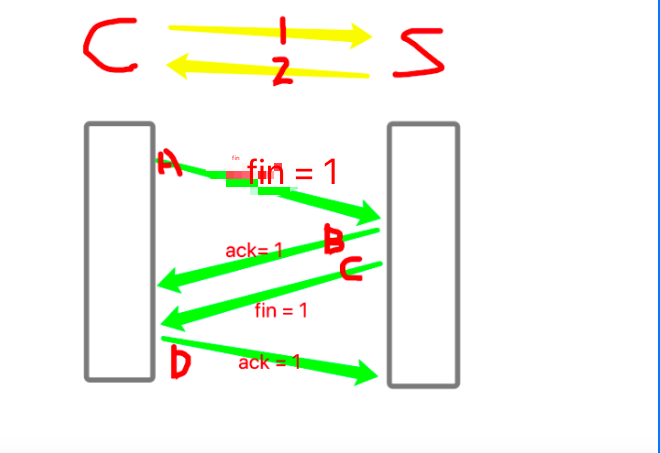
The client and server have established paths 1 and 2. When the client finishes sending its data, it sends the server a request A to close the connection, with the message fin= 1 (there is of course also a seq, otherwise the server wouldn’t know which connection to close; I didn’t draw it here, and the same goes below). After the server receives this request, it replies with a response B, ack=1, indicating it has received the close request. At this point, connection path 1 from the client to the server is closed. When the server also finishes sending its data to the client, it sends the client a close request C, Fin = 1, and then the client gives a response D, ack= 1. At this point, connection path 2 from the server to the client is closed.
What differs from establishing a connection is that steps B and C cannot be merged into one step, because the connection is already established and cannot be closed while data is still being sent. So closing a connection takes four steps, which is the four-way handshake to close a connection.
Actually, this is just like being in a relationship too: at first two people hit it off right away and get together, but when it comes to breaking up, it’s often not that simple.
Wade says to James: “I’m going to retire, so let’s not do this LeBron-Wade connection thing anymore.”
James says: “I know. Retire in a couple of years; I still owe you one more championship.”
Wade says: “I know. Then I’ll wait one more season for you, but after that, there will be no more LeBron-Wade connection on the NBA court.”
James says (one season later): “I can’t give you this championship anymore. You’re old, and I’m not young anymore either. Let’s break up.”
Wade: “OK.”
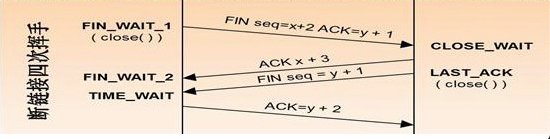
Connections are usually initiated by the client, while closing a connection is usually initiated by the server first, because the server serves many users at the same time and really wants to close connections in order to serve other users. So the server enters the FIN_WAIT_1 state first and sends the close request to the client; then the client enters the CLOSE_WAIT state and sends a response to the server, and the server enters the FIN_WAIT_2 state. When the client finishes sending its data, the client also sends a close request to the server. After the server receives this request it enters the TIME_WAIT state, then sends a response to the client, and at this point the connection is successfully closed.
For the server, of the three states above, the one most likely to stall is TIME_WAIT, because it waits until the client has finished sending its data before entering this state. So if a large number of TIME_WAIT states appear on the server machine, it means the server is under high concurrency. You need to promptly monitor whether the machine has enough memory (mainly memory) and what the CPU usage is. If you find memory usage above 70%, you should be on high alert; if the concurrency is allowed to continue, the server machine may be paralyzed.
6. TCP Is a Reliable Protocol
Once the connection is established, there is still the transmission process in between. TCP is also called the “reliable protocol.” How does it guarantee reliable data transmission? For example, when you send a package and the recipient receives it, they call you or send a text message, which confirms that the delivery really reached the specified address. TCP works the same way: when the client sends data and the server receives it, the server replies to the client with a response.

II. UDP Data Transmission
UDP data transmission is relatively simple. It is called the “unreliable transport protocol.” It doesn’t establish a connection; it also sends based on IP and port. As long as it knows the other side’s IP and port, it sends accordingly, and it sends this way every time, never waiting for the other side to confirm—it just sends and that’s it. So its efficiency is definitely higher than TCP’s, because it doesn’t need acknowledgment messages and doesn’t need to consider the receiver’s situation; it just keeps sending to you. So:
TCP协议的好处是数据安全,但是效率低
UDP协议的好处是效率高,但是数据不安全
So should we use TCP or UDP?
Our choice differs for different situations. For example, in your QQ chat messages, if you say a couple of things like “Hi there, can I shoot the breeze with you,” it doesn’t matter if such small talk gets lost. Packet loss happened often in early QQ chats, and still happens now. But if it involves a money transfer—say you transfer 1,000 yuan to the barbecue shop owner and then turn around and leave, and whether he receives it is purely up to fate—you might well end up on the grill yourself. For situations like this, we must use TCP. So to ensure data safety, we use TCP more often, while UDP is used for small amounts of query-related information.