Chapter 3: Data Types
This article is part of the Python General Programming tutorial series, which has been fully completed. Its goal is to take you from zero to mastery of the Python programming language. This tutorial does not skim over Python superficially; instead, it offers refined, in-depth explanations across 5 stages and 25 chapters. So you need to study patiently to really gain something. Although it does not involve the use of any framework, it gives a global explanation of operating systems and network communication, and even rewrites some open-source modules and servers. After finishing it, you will not only have mastered the Python programming language, but also gained the ability to learn other programming languages quickly, read any Python source code without difficulty, and a comprehensive understanding of computers and networks. For complete beginners, it is an excellent textbook for entering the field of computing and mastering a programming language. For those who already have some Python foundation, I believe this tutorial will take your skills to the next level.
While reading this course series, you should type and run the teacher’s course code in your own Python environment to deepen your understanding.
1. Numeric Types
1. Numeric types int and float
In Chapter 1 on user interaction, we briefly introduced the basic data types. This chapter mainly covers how to use the different data types and studies them in depth.
数字类型即变量的值,如age=18,18则是我们保存的数据。
变量的是用来反映/保持状态以及状态变化的,毫无疑问针对不同的状态就应该用不同类型的数据去标识
A numeric type can only store one value and is an immutable type (immutable types are hashable; hashing will be explained in later chapters).
#int integer type
定义:age=10  # age=int(10)
用于标识:年龄,等级,身份证号,qq号,个数
#float floating-point type
定义:salary=3.1 #salary=float(3.1)
用于标识:工资,身高,体重,
2. Common methods of the int type
The bin(), oct() and hex() used in the code below are frequently used in base conversion; take a look at them:
# Common operations + built-in methods
print(bin(3)) #convert decimal to binary, 0b11
print(oct(8)) #convert decimal to octal, 0o10
print(10) #10
print(hex(16)) #convert decimal to hexadecimal, 0x10
When writing user-interaction programs, we often use .isdigit() to check whether the user’s input is a number before taking the next step, which keeps the program from crashing. Note, however, that user input is a string by default; this is the method we use to check whether a string is a number.
age = input(“your age>>:”)
if age.isdigit():
    age = int(age)# If you type code in PyCharm, the line under the if statement is indented automatically; in a plain text editor,
    敲下'Tab'键就可以缩进
    age +=1
print(age)
3. Other numeric types in Python (for reference)
#int (integer)
在32位机器上,整数的位数为32位,取值范围为-2**31~2**31-1,即-2147483648~2147483647
在64位系统上,整数的位数为64位,取值范围为-2**63~2**63-1,即-9223372036854775808~9223372036854775807
#long (long integer)
跟C语言不同,Python的长整数没有指定位宽,即:Python没有限制长整数数值的大小,
但实际上由于机器内存有限,我们使用的长整数数值不可能无限大。
注意,自从Python2.2起,如果整数发生溢出,Python会自动将整数数据转换为长整数,
所以如今在长整数数据后面不加字母L也不会导致严重后果了。
注意:在Python3里不再有long类型了,全都是int
>>> a= 2**64 # >>> means input in interactive command-line mode
>>> type(a)  #type() is the function for checking a data type
<type 'int'># int type
>>> b= 2**60
>>> type(b)
<type 'int'>
#complex complex-number type
>>> x=1-2j
>>> x.imag
-2.0
>>> x.real
1.0
2. String Type
1. Introduction to the string type
In Python, characters enclosed in quotes are of the string type. Strings are used to represent descriptive content such as name, gender, nationality and ethnicity. They are defined like this:
name='Albert' # name=str('Albert')String formatting:
name = input('请输入名字>>:')
print('你好,%s' % name)# %s can be understood as a placeholder; on output it is replaced by the value of the variable after the % that follows the string
2. The difference between single, double and triple quotes
#So what is the difference between single, double and triple quotes? Let me tell you loud and clear: there is no difference at all between single and double quotes,
只有下面这种情况 你需要考虑单双的配合
msg = "My name is Albert , I'm 18 years old!"
#What are triple quotes for? Multi-line strings must use triple quotes
msg = '''
今天我想写首小诗,
歌颂我的同桌,
你看他那乌黑的短发,
好像一只炸毛鸡。
'''
print(msg)
# Write multi-line content inside triple quotes
3. String concatenation
#Numbers support addition, subtraction, multiplication and division. What about strings? Let me tell you loud and clear: they can too! What? Yes, but only "addition" and "multiplication".
>>> name='albert'
>>> age='18'
>>> name+age #addition is simply concatenation
'albert18'
>>> name*5
'albertalbertalbertalbertalbert'
#Note 1:
字符串1+字符串3,并不会在字符串1的基础上加字符串3,而是申请一个全新的内存空间存入字符串1和字符串3,
相当字符串1与字符串3的空间被复制了一次
#Note 2: you can only add a string to a string, not a string to another type
字符串拼接(只能在字符串之间进行,且只能相加或相乘)
The string type can only store one value; it is an immutable type and is hashable.
4. Common methods of the string type
(1) Getting values by index
A string is an immutable type, so its value cannot be changed. When getting values, you can pass up to three parameters: the start position, the end position and the step. You can take values forward or backward (when the start position is greater than the end position, or there is no start or end position and the step is -1, it starts from the last element, and the step is negative).
hobbies = "music basketball"
print(hobbies[0])
print(hobbies[1])
print(hobbies[5])
print(hobbies[0:5])
print(hobbies[:5])
print(hobbies[0:5:2]) # from element 0 to element 4, taking every other element
print(hobbies[0:5:-2])# gets nothing, because it means going from element 0 to element 4 in reverse order (-2 is negative), taking every other element,
第零个元素前面没有元素了,所以什么都取不出来
print(hobbies[11:5:-2])# from element 11 to element 6, in reverse order, taking every other element
print(hobbies[-1])# take the last character
print(hobbies[-2])# take the second-to-last character
(2) Length
print(len('name'))# can be used to get the length of a string, a list, and so on(3) Membership
print('a' in 'Albert')# checks whether a is in Albert; returns True if it is, otherwise False
# False
print('a' not in 'Albert')
# True
(4) Removing whitespace
print('   name'.lstrip())  # remove whitespace on the left
print('name  '.rstrip())  # remove whitespace on the right
print('  name  '.strip())  # remove whitespace on both sides
(5) Splitting
What splitting is for: say you are given a piece of data “Kobe 24 Lakers” and need to extract Kobe’s number and team. You can split it as follows, which returns a list.
print('Kobe 24 Lakes'.split(' '))
print('n a me'.split(','))
print('n,a me'.split(','))
print('n,/a /me'.split('/',1)) # the number is how many times to split; by default it splits everywhere
print('n,a /me'.split('/'))
print('a|b|c'.rsplit('|',1)) # split starting from the right
(6) Joining
print('a'.join('1234'))
print('a'.join('bcde'))
tag = ' '
print(tag.join(['I', 'say', 'hello', 'world']))  # the items of the iterable must all be strings
(7) Replacing
print('abc name id'.replace('a', 'card')) # replace every a in the preceding string with ‘card’
name = 'albert say :i have a dream,my name is albert'
# Note that the original value of name is not changed here; a new, replaced value is produced instead
print(name.replace('albert', 'Albert', 1))# replace albert in name with Albert, only once; by default all occurrences are replaced
(8) Other string operations
# find,rfind,index,rindex,count
name='albert say hello'
print(name.find('o',1,3))  # includes the start but not the end; returns -1 without raising an error if not found, otherwise shows the index
# print(name.index('e',2,4))  # same as above, but raises an error if not found
print(name.count('e',1,3))  # includes the start but not the end; searches everything if no range is given
# center,ljust,rjust,zfill
name='albert'
print(name.center(30,'-'))
print(name.ljust(30,'*'))
print(name.rjust(30,'*'))
print(name.zfill(50))  # pad with 0

# expandtabs
name='albert\thello'
print(name)
print(name.expandtabs(1))

# captalize,swapcase,title
print(name.capitalize())  # capitalize the first letter
print(name.swapcase())  # swap upper and lower case
msg='albert say hi'
print(msg.title())  # capitalize the first letter of every word

# the is-number family
# in python3
num1=b'4'  # bytes
num2=u'4'  # unicode; in python3 a string is unicode without adding u
num3='四'  # Chinese numeral
num4='Ⅳ' #Roman numeral

# isdigit:bytes,unicode
print(num1.isdigit())  # True
print(num2.isdigit())  # True
print(num3.isdigit())  # False
print(num4.isdigit())  # False

# isdecimal:uncicode
# the bytes type has no isdecimal method
print(num2.isdecimal())  # True
print(num3.isdecimal())  # False
print(num4.isdecimal())  # False

# isnumberic: unicode, Chinese numerals, Roman numerals
# the bytes type has no isnumberic method
print(num2.isnumeric())  # True
print(num3.isnumeric())  # True
print(num4.isnumeric())  # True

# none of the three can recognize floating-point numbers
num5='4.3'
print(num5.isdigit())
print(num5.isdecimal())
print(num5.isnumeric())

'''
总结:

    最常用的是isdigit,可以判断bytes和unicode类型,这也是最常见的数字应用场景

    如果要判断中文数字或罗马数字,则需要用到isnumeric
'''

# other is-methods
print('===>')
name='alb123ert'
print(name.isalnum())  # the string consists of letters or digits
print(name.isalpha())  # the string consists of letters only
print(name.isidentifier())
print(name.islower())
print(name.isupper())
print(name.isspace())
print(name.istitle())
3. Lists
1. Basic introduction to the list type
Inside [], values are separated by commas, and a list can hold n values of any type. Lists are used when you need to store multiple values, for example when a person has several hobbies. A definition looks like this:
students=['albert','james','kd',]
# or students=list(['albert','james','kd',])
A list can store multiple values; it is ordered, mutable, and not hashable.
2. Common methods of the list type
(1) Adding elements
The append method appends an element to the end of the list
l1 = ['a', 'b', 'c', 'd', ]
l1.append('e')
print(l1)
print(l1.append('e'))
# appends at the end, with no return value

# ['a', 'b', 'c', 'd', 'e']
# None
The insert method inserts an element into the list
l1 = ['a', 'b', 'c', 'd', ]
l1.insert(3,'x') # 3 specifies inserting at index 3, the position of “d”, pushing ‘d’ back
print(l1)

# insert lets you specify the insertion position

# ['a', 'b', 'c', 'x', 'd']
The extend method adds multiple elements to a list at once; how to use extend and how it differs from append
append adds its argument as a whole
l1 = [1, 2, 3, 4, 5, ]
l1.append([6, 7, 8, 9, ])
# l1.append(*[6, 7, 8, 9, ])  # raises an error
print(l1)
l1.extend([6, 7, 8, 9])
print(l1)
It accepts only one argument. If the list is unpacked with *, it is still treated as multiple arguments, because the program executes from left to right and top to bottom; by the time * appears the list has already been unpacked, so the program sees it as being passed multiple arguments.
extend adds elements one by one
l1 = [1, 2, 3, 4, 5, ]
l1.extend([6, 7, 8, 9])
print(l1)
l1.extend('abc')
print(l1)
l1.extend('a')  # also an iterable
print(l1)
# l1.extend(1)  # raises an error, not iterable
print(l1)
When extend adds elements, the argument passed in must be an iterable; iterating over it solves the problem of passing multiple values at once. If you do not know what an iterable is yet, don’t worry, you will find out very soon.
(2) Deleting elements
pop deletes and has a return value; by default it deletes the last element of the list, or you can specify the index to delete
l1 = [1, 2, 3, 4, 5, 6, ]
print(l1.pop())  # remove an element from the list, the last one by default; this has a return value,
因为这是一个可迭代类型和我们前面的extend一类
print(l1)
print(l1.pop(2))  # 2 specifies the index in the list
print(l1)
remove deletes without a return value and without a default; you specify the element to delete
l1 = [1, 2, 3, 4, 5, 6, ]
print(l1.remove(2)) # note that this 2 is the element 2 of the list, not an index; distinguish this clearly from pop above,
pop移除的是索引值所对应的元素
# print(l1.remove())  # raises an error
print(l1)
clear deletes the contents: it keeps the list name and empties its values
l1 = ['a', 'b', 'c', 'd', 'e', 'b', 'c']
l1.clear()
print(l1)
del deletes; it is a general-purpose deletion but is rarely used
l1 = [1, 2, 3, 4, 5, 6, ]
del l1[2]  # by index: l1[0] = 1, l1[1]=2, l1[2]=3
print(l1)
l1 = [1, 2, 3, 4, 5, 6, ]
del l1  # deletes l1 from memory, as if l1 had never been defined
# print(l1)  # raises an error
(3) Modifying elements
Note the difference from insert: both use the original position as the reference, but insert pushes elements aside and is essentially adding, whereas this is replacing
l1 = [1, 2, 3, ]
l1[2] = 4# replace the element at index 2 with 4
print(l1)
(4) Finding elements
Find by index or by a given element in the list
l1 = ['a', 'b', 'c', 'd', 'e', 'b', 'c']
print(l1.index('a'))  # returns the index of a in l1
print(l1.index('b',1,4))  # the two numbers are the start and end positions
print(l1[0:5])  # getting values by index works the same as with strings
print(l1[:5])
print(l1[0:5:2])
print(l1[:-1])
print(l1[:-2])
print(l1[5:1:-2])
Looking up a list in segments
l1 = ['a', 'b', 'c', 'd', 'e', 'b', 'c']
a = int(len(l1)/2)
print(l1[:a])  # starting from the middle, list all elements before it
print(l1[a:])  # starting from the middle, list all elements after it
Enumerating a list with enumerate
l1 = ['a', 'b', 'c', 'd', 'e']
for i, x in enumerate(l1, 100):  # 100 specifies the number the enumeration starts at
    print(i, x)
(5) Getting the length
print(len([1,2,3,4,]))(6) Counting occurrences of an element
print(['a','b'].count('a'))(7) Sorting
reverse reverses the order
l1 = ['a', 1, 'b', 'c', 'd', 'e', 'b', 'c']
l1.reverse()
print(l1)
sort sorts by ASCII code
l1 = ['a', '1', 'b', 'c', 'd', 'e', 'b', 'A', 'Z', 'c']
l1.sort()
print(l1)
l1.sort(reverse=True)
print(l1)
(8) Copying a list
l1 = ['a', '1', 'b', 'c', 'd', 'e', 'b', 'A', 'Z', 'c']
print(l1.copy())
(9) The difference between assignment, shallow copy and deep copy in Python
Assignment
The simplest form of copying is assignment, which creates a new reference to an object: the new target and the original target point to the same memory address. Assignment merely adds a reference; it does not allocate new memory. As shown in the figure below
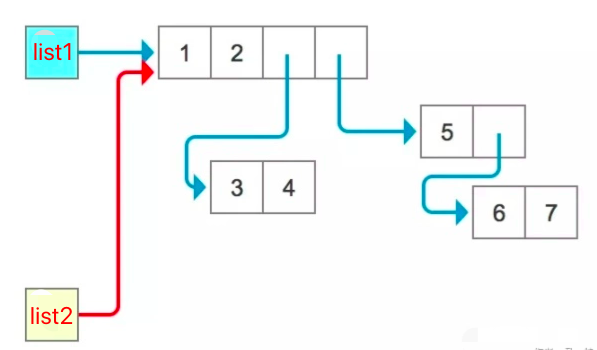
Verify it with id and you will see that list1 and list2 are still the same thing. Naturally their elements are also the same, so modifying one changes the other as well:
list1 = [1, 2, [3, 4], [5, [6, 7]]]
print('list1:', id(list1))
print([id(i) for i in list1])
list2 = list1
print('list2:', id(list2))
print([id(i) for i in list2])
print(list1 is list2)
print(list1[0] is list2[0])
print(list1[2] is list2[2])
list2[0] = -1
print(list1)
list2[2][1] = -1
print(list1)
That is why some people call this operation “old wine in an old bottle”: it just adds one more label, which does not achieve our goal. To get a “copy” of an object, we need to use the copy method.
Shallow copy
As the name suggests, a shallow copy copies only shallowly. We can think of assignment as creating a new reference to an object, pointing a new variable at the data in the original object’s memory, so the same block of memory is pointed to by two variables. A shallow copy is different from assignment: since it is a copy, it allocates a new block of memory, and what it copies are the references to the element objects inside the copied object; for as many element objects as there are, it copies that many references. Some people call this operation “old wine in a new bottle”. However, if the old bottle has another bottle nested inside it, you need to be careful. Therefore, any modification (including adding, changing and deleting) to the elements inside a mutable element of either the copy or the original will cause the other to change too. But if you modify a first-level element of the object directly as a whole (in which case, for a mutable element, you can only delete its elements), then although their elements share memory addresses, the references inside the copy and the original are independent: if you delete a reference in one of them, the reference in the other still exists.
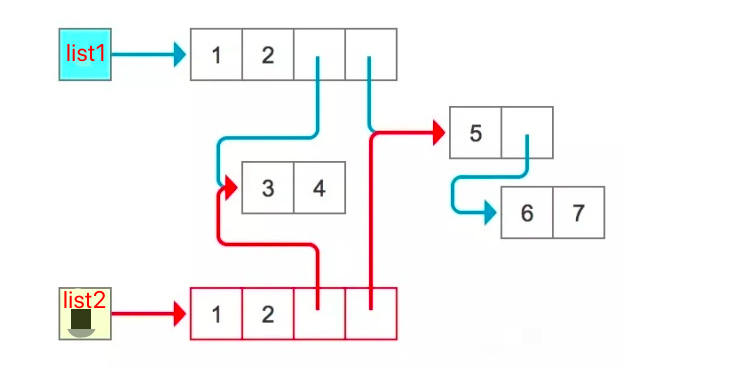
from copy import copy

list1 = [1, 2, [3, 4], [5, [6, 7]]]
print('list1:', id(list1))
print([id(i) for i in list1])
list2 = copy(list1)
print('list2:', id(list2))
print([id(i) for i in list2])

# 1 Checking the reasoning
print(list1 is list2)  # the ids differ, so naturally they are not the same; id is used here to represent the memory address
print(list1[0] is list2[0])  # corresponding elements of the two point to the same address
print(list1[2] is list2[2])

# 2 Demonstrating modification of first-level elements as a whole (here even mutable elements can only be modified as if immutable)
list1[0] = -1  # modifying list 1 or list 2 changes only that list
print(list1)
print(list2)

list2[1] = -2
print(list1)
print(list2)

list1[2] = -3
print(list1)
print(list2)

list2[2] = -30
print(list1)
print(list2)

# 3 Adding elements to the object
list1.append('add1')
print(list1)
print(list2)

list2.append('add2')
print(list1)
print(list2)

# 4 Deleting
list1.pop()
print(list1)
print(list2)

list2.pop()
print(list1)
print(list2)

list1.pop()
print(list1)
print(list2)

# 5 Only modifications (including adding, changing and deleting) to the elements inside a mutable element of the object change both in sync
list2[-1][0] = '5->55'
print(list1)
print(list2)

# # The same holds for list1, but you need to comment out some of the code above so the index positions are correct
# list1[3][0] = '5->55000'
# print(list1)
# print(list2)
Deep copy
A deep copy is fundamentally different from a shallow copy: it does not copy any references. The data of all elements in the object, their children, grandchildren, great-grandchildren and so on, is all copied, which is why this operation is called “new wine in a new bottle”. It is implemented with recursion: as long as any element still has child elements, the data of those children is copied into new memory addresses. That being the case, after a deep copy, changes to the original object do not cause any change to the copy.
import copy

list1 = [1, 2, 3, 4, 5, [6, 7, 8, ]]
list2 = copy.deepcopy(list1)
print(list1)
print(list2)

list1[5].append(9)
print(list1)
print(list2)

list1.append(6)
print(list1)
print(list2)

list1.pop()
print(list1)
print(list2)
Summary of assignment and shallow/deep copies:
- Assignment: creates a new reference to the original object’s memory address; the object itself does not get new memory;
- Shallow copy: creates new references to the memory addresses of the original object’s first-level child elements; the object itself gets new memory;
- Deep copy: copies the data of all N-level child elements of the original object; all of the data gets new memory.
4. Tuples
Tuples are very similar to lists, except that [] is replaced by (). They are used to store multiple values. Compared with lists, tuples are immutable (they can be used as dictionary keys) and cannot be changed; they are mainly for reading.
age=(11,22,33,44,55)
# essentially age=tuple((11,22,33,44,55))
A tuple can store multiple values; it is ordered, immutable, and hashable. For common tuple methods, refer to the common list methods; note that with tuples you can only read values, not change them.
5. Dictionaries
1. Basic introduction to the dictionary type
Suppose we want to store a person’s information: name, gender and age. These are clearly multiple values, and since we are storing multiple values, we could perfectly well store them in the list we just learned about, like this:
# In that case, why do we still need dictionaries?
info=['albert','male',18]
# The purpose of defining a list is not only storage but also retrieval; if I want to get this person's age, I can use
info[2]
# But this relies on our already knowing that the age is stored in the 3rd position, which is how we know index 2 is the age, i.e.:
#      # name, sex, age
info=['albert','male',18]
"""
而这完全只是一种假设,并没有真正意义上规定第三个位置存放的是年龄,
于是我们需要寻求一种,即可以存放多个任意类型的值,又可以硬性规定值的映射关系的类型,
比如key=value,这就用到了字典
"""
Dictionaries are used to store multiple values, where each value has a unique corresponding key, which makes retrieving values more convenient and efficient. A dictionary is defined as follows:
# Inside {}, separated by commas, you can store multiple key:value pairs; the key is usually a string and the value can be of any type
info={'name':'albert','age':18,'sex':18}
# info=dict({'name':'albert','age':18,'sex':18})
A dictionary can store multiple values; it is unordered, mutable, and not hashable.
2. Common methods of the dictionary type
(1) Adding elements
Using key-value pairs
l1 = {
    'name': 'albert',
    'age': 18,
    'gender': 'male'
}
l1['hobbies'] = "music"
print(l1)
Building a dictionary with fromkeys
"""
第一个参数迭代循环的字典的key,第二个参数表示value,
可以多个key循环对应这个value,也可以只有一个key,也可以没有value
"""
a = l1.fromkeys(l1,'I am Albert')
print(a)

b = dict.fromkeys('name')  # there must be an iterable to serve as the dictionary keys
print(b)

b = dict.fromkeys('e')  # this can be iterated too
print(b)
# b = dict.fromkeys(1) #raises an error: numbers are not iterable

b = dict.fromkeys([1,2,3,])
print(b)
(2) Deleting elements
del deletes by dictionary key
l1 = {
    'name': 'albert',
    'age': 18,
    'gender': 'male'
}

del l1['name']
print(l1)
Deleting with pop or popitem
l1 = {
    'name': 'albert',
    'age': 18,
    'gender': 'male'
}

res = l1.pop('name')  # delete the value of the given key and get a return value
print(res)
print(l1)

res2 = l1.popitem()  # removes and returns an arbitrary key-value pair from the dictionary (usually the last pair).
# If the dictionary is already empty when this method is called, a KeyError exception is raised.
print(res2)
print(l1)
(3) Modifying elements
Using key-value pairs
l1 = {
    'name': 'albert',
    'age': 18,
    'gender': 'male','3':3,
}

l1['name'] = '马一特'
print(l1)
Using setdefault or update; how to use them and how they differ:
setdefault only adds, it does not modify
d1 = {
    'name': 'albert',
    'age': 18,
}

d1.setdefault('name', 'Albert')
d1.setdefault('gender', 'male')
print(d1)
update both adds and modifies
d1 = {
    'name': 'albert',
    'age': 18,
}

d1.update({'name': 'Albert', 'gender': 'male'})  # note the different way of passing arguments
print(d1)
(4) Finding elements
Looking up by key
l1 = {
    'name': 'albert',
    'age': 18,
    'gender': 'male'
}

a = l1['name']
print(a)
Looking up with the get method
l1 = {
    'name': 'albert',
    'age': 18,
    'gender': 'male'
}

a = l1.get('hobbies')   # no error if not found
print(a)
Enumerating with enumerate
d1 = {
    'name': 'albert',
    'age': 18,
    'gender': 'male',
    '3':3,
}

for a in enumerate(d1):
    print(a)
Using methods such as .keys(), .values() and .items()
d1 = {
    'name': 'albert',
    'age': 18,
    'gender': 'male',
    '3':3,
}

a = d1.keys()
print(a)
print(list(a)[0])

a = d1.values()
print(a)
print(list(a)[0])

a = d1.items()
print(a)
print(list(a)[0])
Iterating with a for loop
d1 = {
    'name': 'albert',
    'age': 18,
    'gender': 'male',
    '3':3,
}

for k,v in d1.items():
    print(k,v)
(5) Membership and length
Refer to the list operations. Membership is based on the dictionary’s keys, not its values; for length, the list operations can serve as a reference as well.
6. Set Type
Inside curly braces, multiple elements are separated by commas. Sets store multiple values and are unordered, so these values cannot be retrieved individually, but we can use sets for deduplication (such as removing duplicate elements from a list) and for relational operations.
# The elements of a set follow three principles:
             1: 每个元素必须是不可变类型(可作为字典的key)
             2: 没有重复的元素
             3: 无序
# Note that the purpose of a set is to put different values together and to perform relational operations between different sets; there is no need to fuss over individual values in a set
The set type can store multiple values; it is unordered, mutable, and not hashable.
Relational operation exercise
有如下两个集合,piano是报名钢琴课程的学员名字集合,violin是报名小提琴课程的学员名字集合
  piano={'albert','孙悟空','周星驰','朱茵','林志玲'}
  violin={'猪八戒','郭德纲','林忆莲','周星驰'}
  1. 求出即报名钢琴又报名小提琴课程的学员名字集合
  2. 求出所有报名的学生名字集合
  3. 求出只报名钢琴课程的学员名字
  4. 求出没有同时这两门课程的学员名字集合
Reference answer
# Find the set of names of students who signed up for both piano and violin
print(piano & violin)
# Find the set of names of all students who signed up
print(piano | violin)
# Find the names of students who signed up only for piano
print(piano - violin)
# Find the set of names of students who did not sign up for both courses
print(piano ^ violin)
7. Boolean Type
A computer is commonly called an “electronic brain” in Chinese; that is, when we write programs for a computer to run, the computer should come as close as possible to the human brain, or put another way, whatever the human brain can do, the computer should be able to do. The main functions of the human brain are data processing and logical reasoning, and the Boolean type here models human logical reasoning: when a condition holds, it is marked True; when it does not, it is marked False.
#Boolean values: one True and one False
>>> a=3
>>> b=5
>>> a > b #if it does not hold it is False, i.e. false
False
>>> a < b #if it holds it is True, i.e. true
True
# Next we can do different things depending on the result of the condition:
if a > b:
   print(a is bigger than b )
else:
   print(a is smaller than b )
# The above is pseudocode, but it means the computer can already, like the human brain, perform different actions depending on the result of a judgment.
Key points about the Boolean type
#Every data type has its own Boolean value
1、None,0,空(空字符串,空列表,空字典等)三种情况下布尔值为False
2、其余均为真
Mutable types and immutable types (important)
# 1. Mutable types: if the value can change while the id stays the same, the type is called mutable, e.g. lists and dictionaries
# 2. Immutable types: once the value changes, the id changes too, so the type is called immutable (a changed id means new memory has been allocated)
8. collections Container Data Types
1. namedtuple: named tuples
from collections import namedtuple # import namedtuple from the collections library (importing an external library)
# Create a named tuple object
point = namedtuple('p', ['x', 'y'])  # p is the name, and "x" and "y" are the contents
p = point(1, 2)
print(p)
print(p.x)  # 1
print(p.y)  # 2
2. deque: a super list
The double-ended queue, a commonly used data structure, can be implemented in Python with deque.
from collections import deque
# A list-like container that supports fast appends and pops at both ends
d = deque('abcd')
for i in d:
    print(i)
print(d[0])
print(d[1])
d.append('e')  # add on the right
print(d)
d.appendleft('x')  # add on the left
print(d)
d.pop()  # pop from the right
print(d)
d.popleft()  # pop from the left
print(d)
deque(reversed(d))  # reverse the order
print(d)
# d = list(d)  # convert to a list
# d = list(reversed(d))
# print(d)
d.extend('xyz')  # add on the right
print(d)
d.extendleft('nba')  # add on the left
print(d)
d.rotate(1)  # move the rightmost element to the far left
print(d)
d.rotate(-1)  # move the leftmost element to the far right
print(d)
d.clear()  # clear
# d.pop()  # raises an error
3. ChainMap: chained mappings
from collections import ChainMap
"""
一个 ChainMap 类是为了将多个映射快速的链接到一起,这样它们就可以作为一个单元处理。
它通常比创建一个新字典和多次调用 update() 要快很多。
这个类可以用于模拟嵌套作用域,并且在模版化的时候比较有用。
"""
# How to use a chained mapping
dict1 = {'name': 'Albert', 'age': 18}
dict2 = {'weight': 65, 'height': 180}
res = list(ChainMap(dict1, dict2))
print(res)
4. Counter: a counting dictionary
from collections import Counter
# Counting
cnt = Counter()
for word in ['red', 'blue', 'red', 'green', 'blue', 'blue']:
    cnt[word] += 1# increment the count for word
print(cnt)
# Counter({'blue': 3, 'red': 2, 'green': 1})
# Arithmetic
c = Counter(a=3, b=1)
d = Counter(a=1, b=2)
print(c + d)  # add the common parts
# Counter({'a': 4, 'b': 3})
print(c - d)  # subtract the common parts
# Counter({'a': 2})
print(c & d)  # take the minimum of the common parts
# Counter({'a': 1, 'b': 1})
print(c | d)  # take the maximum of the common parts
# Counter({'a': 3, 'b': 2})
There are 9 Collections container types in total. Besides the 4 introduced above, there are also OrderedDict, defaultdict, UserDict, UserList and UserString. Their usage is not exactly the same, but none of them is complicated to use. For more on the Collections container data structures, see the official documentation: Collections container data types.