Chapter 17: Principles of Communication
This article is part of the General Python Programming tutorial series, which has been fully completed. Its goal is to take you from zero to mastery of the Python programming language. This tutorial does not talk about Python in vague, general terms; instead it explains things in a refined, in-depth way, across 5 stages and 25 chapters. So you need to study patiently to really get something out of it. Although it does not involve using any frameworks, it gives a holistic explanation of operating systems and network communication, and even rewrites some open-source modules and servers. After finishing it, you will not only have mastered the Python programming language, but also gained the ability to learn other programming languages quickly, the ability to read any Python source code without obstacles, and a comprehensive understanding of computers and networks. For complete beginners, it is an excellent textbook for getting started in the computing field and mastering a programming language. For those who already have some Python foundation, I believe this tutorial will take your skills to the next level.
1 Server Hardware Basics
Our client software ends up installed on users’ phones or computers, while the server software is deployed on our servers. So first, let me introduce what a server is.
1. Redundant Configuration
A server is also a computer, but it has no monitor, mouse or keyboard. We put our project on a server so that when users visit, it can provide them with the data they want, which is why it is called a server. Precisely because of this, the most basic requirement for a running server is stability. So how do we achieve stability? For example, suppose you spent 100,000 yuan on a super powerful server, but one day its network card suddenly breaks; no matter how expensive your server was, it is now useless. So the most basic way to ensure server stability is to have a second copy of the same components: two network cards, two sets of hard drives, two sets of memory. Besides that, what if the server is running without any problems and suddenly State Grid cuts off your power?
2. Dual Power Supply
Every Double Eleven, a joke circulates online: Jack Ma says this year’s Double Eleven sales will exceed so many billions, and State Grid says, “I’ll cut your power.” In fact this is just everyone’s fantasy and will never happen, but if it really did happen, would Jack Ma just have to wait for State Grid’s verdict?
That’s not how it works. To keep servers running, servers are usually connected to a dual power supply. One supply is the regular AC power we normally use, and the other is a backup supply that provides uninterrupted power, called a UPS in English, powered directly by equipment such as batteries and generator sets. As soon as a power outage occurs, the UPS starts automatically to ensure the power supply. With the servers running normally, and since most of the sales from user shopping are completed on mobile devices, if there really were a power outage on Double Eleven, the transaction volume might be affected, but not in the way some people imagine. Besides a dual power supply, running servers also has requirements for the ambient temperature and humidity, because servers are constantly running at high speed while working and are very loud. Creating suitable operating conditions for servers ourselves is quite expensive, so most small and medium-sized enterprises host their servers in IDC data centers run by China Unicom or China Telecom; if an earthquake, fire or other emergency occurs, you just go to them for compensation.
2 Principles of Communication
1. MAC Address Learning in Switches
From the above, we now understand what a server is. Next, we can use one of our own computers as a server and another computer as a client. Now consider this scenario: in my office (the same LAN), computer A communicates with computer D.
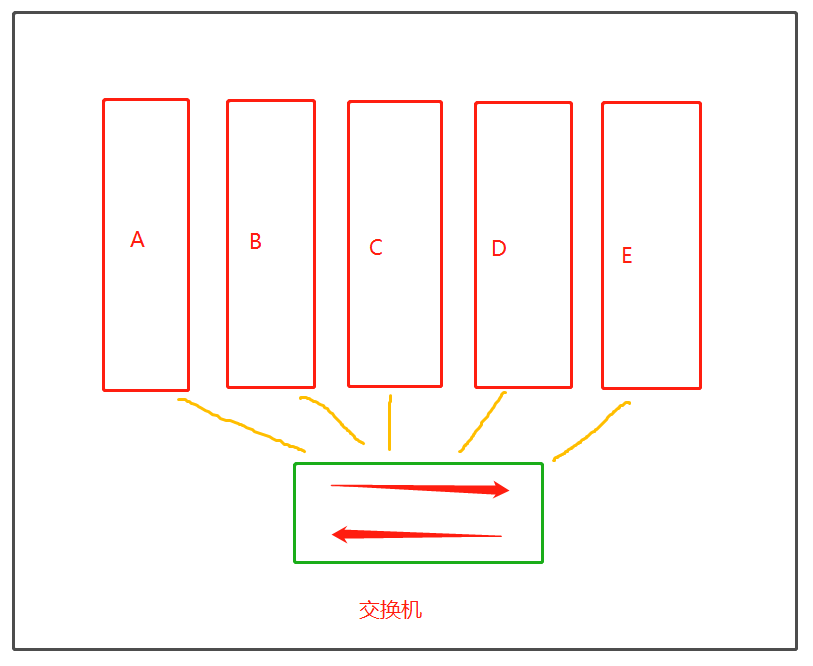
Computer communication relies on broadcasting. Computer A sends a packet to all computers; computer D looks at the packet, finds that the destination address is itself, so it opens the packet and reads the data inside. At this point computer D wants to send a packet back to A, and it does not, as we originally assumed, broadcast again by sending a packet to all computers. A switch has a MAC address learning function: the switch has a MAC address table recording which MAC address corresponds to each network port (some people also call it a port; note that it is not the same thing as a transport-layer port). When these computers are first connected to the switch, its table is empty. When computer A broadcasts a packet for the first time, the packet has a source MAC address and a destination MAC address, and the table starts empty (you can imagine it as a dictionary). Suppose the source address’s network port is port 18; the switch will record that the MAC address on port 18 is xx-xx-xx-xx-xx-xx. The destination is computer D; suppose its network port is 21, then the switch will also record that the MAC address on port 21 is xx-xx-xx-xx-xx-xx. If the computer on your port 18 is replaced, the MAC address changes too, and the switch will relearn and update the MAC address for port 18 (like updating the value for the key port 18 in a dictionary). If the switch has no record of the MAC address for a certain port, it will learn and record that address (like in the Stage 1 project: when the shopping cart doesn’t have a key, we add a new key).
When computers communicate, if the address is found in the switch’s MAC address table, there is no more broadcasting. Also, because the switch has the MAC address learning function, as more and more machines send packets and all machines participate, later communication doesn’t need broadcasting. Broadcasting is only necessary at the very beginning of communication, during which the switch learns all the MAC addresses on its network ports, or when the computer on some port is replaced; then the switch relearns and updates its MAC address table.
2. Finding MAC Addresses with the ARP Protocol
What we discussed above is based on an assumption: that we know the other side’s MAC address. But in fact, we only know our own MAC address and cannot directly know the other side’s MAC address. So how do we find the other side’s MAC address?
We find the other side’s MAC address through the IP address and the ARP protocol. ARP is the Address Resolution Protocol: it resolves IP addresses into MAC addresses and resolves MAC addresses back into IP addresses. Besides a fixed MAC address, each computer also has a changeable IP address (IP addresses within a LAN cannot be the same). Before communicating, the other side’s MAC address cannot be obtained, but we must have the other side’s IP address. Within the same subnet (a LAN is also called a subnet), to communicate we need the MAC address. So how do we get the MAC address from the IP address?
Function of the ARP protocol: send packets by broadcasting to obtain the MAC address of the target host.
How it works:
Suppose my computer (MAC address: 5c:f9:38:aa:e6:ce, IP address: 192.168.0.106) now wants to send some data to a target machine (MAC address: unknown, IP address: 192.168.0.105)
When sending the packet, the destination MAC address is first set to FF:FF:FF:FF:FF:FF (12 uppercase F’s), i.e. it is sent out like this:
(5c:f9:38:aa:e6:ce,FF:FF:FF:FF:FF:FF)(192.168.0.106,192.168.0.105)
       源mac地址         暂定目标mac           源ip地址      目标ip地址
交换机mac地址表
1:5c:f9:38:aa:e6:ce
2:空
3:空
4:空After it is sent to the switch, the switch first learns the source MAC address and adds it to the MAC address table. It also has to deliver the packet to the target machine according to the destination MAC address. When the switch sees that the destination MAC is twelve F’s, which is not a specific MAC address, it understands that the source machine wants to find the MAC address of the machine whose IP address is 192.168.0.105. So the twelve F’s represent a broadcast MAC address, and the packet should be sent to everyone. Next, every machine receives a copy, and as a receiver it understands that someone wants its MAC address. If it is not the intended receiver of the packet, it certainly won’t return its MAC address; but if a receiver finds that this IP address is exactly its own IP address, it returns its MAC address to the machine that sent the packet. At this point the switch also learns this MAC address, and the direction of packet sending is reversed.
(原来接收者的mac地址,5c:f9:38:aa:e6:ce,)(192.168.0.105,192.168.0.106)
      源mac地址          接收者mac             源ip地址      目标ip地址
交换机mac地址表
1:5c:f9:38:aa:e6:ce
2:新学习的mac地址
3:空
4:空Each machine has an ARP cache, which records the machine’s own MAC address and the MAC addresses of the machines it has exchanged packets with, so if it sends packets again within a short time, it doesn’t need to go through this process again.
3. Subnet Masks
Just now we assumed that the server machine and the client machine are in the same subnet, so communication between them is done with MAC addresses, and we can resolve the MAC address using the IP address plus the ARP protocol. But in real scenarios, the server machine and the client machine can’t be in the same subnet. Through broadcast packets (broadcast communication is limited to the same subnet, as covered in the previous chapter) we can’t get the other side’s MAC address, and even if we did, broadcast communication doesn’t work outside the LAN; MAC addresses can only be used within a LAN. So outside the LAN, if I want to communicate, I have to rely on IP addresses.
IP addresses are a network-layer specification. The network layer has the IP protocol, which specifies that IP addresses are in dotted decimal notation: split by dots into four parts, each part decimal, with each part ranging from 0 to 255. That is, the smallest IP address is 0.0.0.0 and the largest is 255.255.255.255. Each position has 256 possibilities and there are 4 positions in total, so there are 256****4=2****32 possibilities in total. The result is shown below:
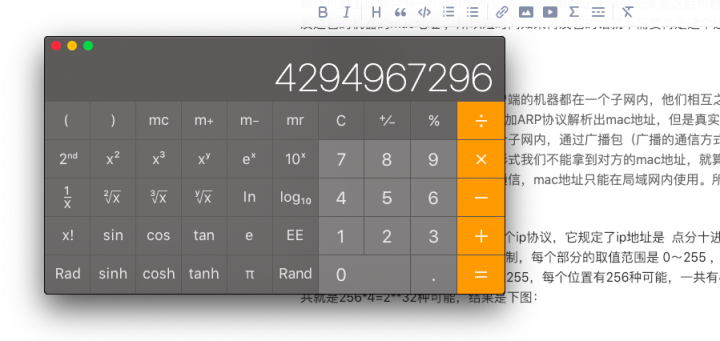
This number is a little under 4.3 billion. Its range is very limited and it is already becoming somewhat insufficient, so IPv6, another way of representing IP addresses, is now being promoted. For now we just need to know that most addresses in use are IPv4. Chinese Internet giants like Alibaba and Tencent are already upgrading their entire Internet ecosystems and will switch everything to IPv6. Don’t worry that you won’t be able to do this job, because it won’t be your turn anyway. In what follows, we will still study IPv4.
A bare IP address is meaningless; it is paired with a subnet mask. A subnet mask is also in dotted decimal. For example, suppose we have an IP address 172.16.10.1 and a subnet mask 255.255.255.0. Translating the subnet mask into binary gives 11111111.11111111.11111111. 00000000; counting from left to right, there are 24 ones in total, so we can write the IP address and subnet mask as 172.16.10.1/24. The subnet mask has the same format as an IP address, so what is it for?
The subnet mask (a string of code that masks the subnet) and the IP address together identify a network address, also called the LAN address or subnet address. If we visit Baidu’s website, we must first find the subnet where its server is located, and then find the host inside it. Our subnet mask can be translated into binary, and naturally so can the IP address:
ip地址翻译成二进制
172.16.10.1:10101100.00010000.00001010.000000001
子网掩码翻译成二进制
255255.255.255.0:11111111.11111111.11111111.00000000
We perform a bitwise AND operation on the IP address and the subnet mask: only when both bits are 1 is the result 1
10101100.00010000.00001010.00000001
11111111.11111111.11111111.00000000
运算结果
10101100.00010000.00001010.00000000
After getting the result of the operation, we translate it back into decimal, which gives its LAN address: 172.16.10.0
Let’s look at another example
172.16.10.2:10101100.00010000.00001010.00000001
255.255.255.0:11111111.11111111.11111111.00000000
运算结果
10101100.00010000.00001010.00000000
翻译成十进制
172.16.10.0
Note: as we learned in Chapter 1, what computers like to see most is binary. In computer memory, the LAN address can be obtained from the IP address and subnet mask. The subnet mask and the binary form are used to mask the LAN, so that you can’t tell its LAN at a glance. Calculating in binary like this is not uncommon. Those who have studied C may know that in C, integer subtraction is computed by adding the two’s complements of the two numbers; the purpose is to replace subtraction with addition, thereby simplifying the hardware circuits.
By comparing them, you will find that the two subnet addresses are the same, which means they are in the same LAN, so the subsequent communication works as described above. Next, let’s talk about how the ARP protocol really works.
4. How the ARP Protocol Works
To communicate, we first need our own machine’s IP address and subnet mask (every computer has them, and you can check them yourself), as well as the other machine’s IP address and subnet mask. Once these are available, the ARP protocol starts working automatically. Before communication, the ARP protocol converts your IP address and subnet mask into dotted binary and performs a bitwise AND to get a network address, which is the source host’s LAN address. Likewise, the other side’s IP address and subnet mask can be used to compute a LAN address. The ARP protocol compares these two subnet addresses; if they are the same, communication proceeds as described above. But in most cases, the client machine and the server machine cannot be in the same LAN, so how do they communicate across LANs?
Take Baidu as an example. Its server machines are certainly not in the same LAN as my computer. We can use the ping command to see Baidu’s IP address
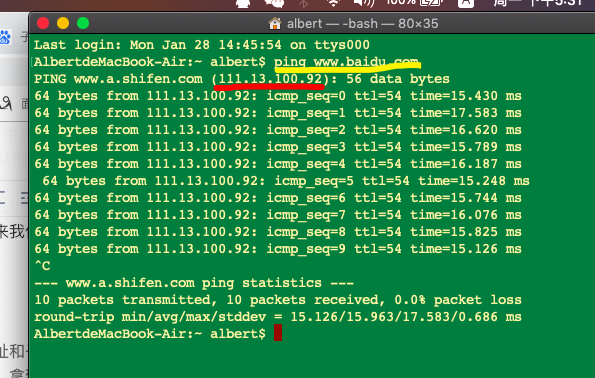
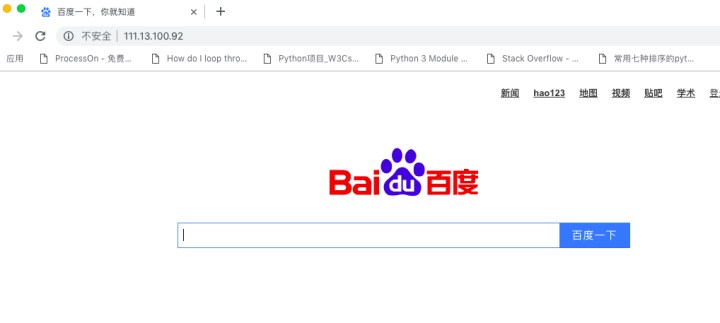
The yellow part is the command I entered: ping > www.baidu.com, and the red part is Baidu’s IP address. We can use this IP address to visit Baidu’s website directly
Suppose I am now in one subnet, and the office next door is in another subnet. We know that broadcast communication is limited to the same LAN. Here is a solution: one person stands at the door of each office, specifically responsible for communicating with the people at the doors of other offices; they just need to establish contact with each other. Once it is found from the subnet addresses that the source and destination addresses are not in the same subnet, the packet can’t wander around within the subnet; it has to be given to the person at the door, who then passes it on to his own subnet. The person standing at the door is called the gateway, and the gateway is usually configured on a router
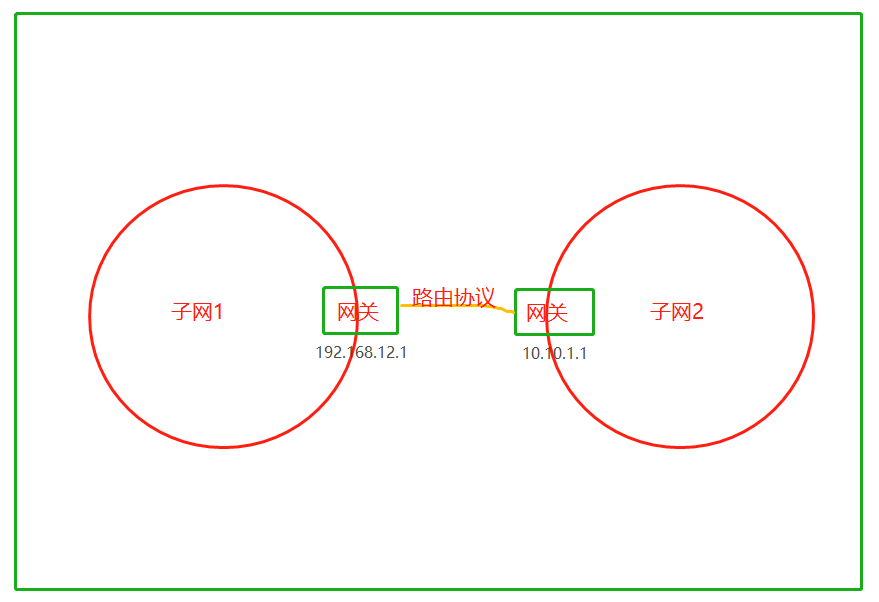
Each subnet has a gateway, whose IP address is usually configured to end in 1 or 255. Different gateways communicate with each other via routing protocols, which is another very large field, usually handled by network engineers. A subnet’s gateway is within its own LAN, and communication between them is done via MAC addresses.
Summary:
When the source and destination addresses are not in the same LAN, the packet is given to the gateway. Communication between gateways uses routing protocols; once the corresponding gateway is found, that gateway delivers the packet to the corresponding host via the Ethernet protocol.
Note:
The ARP protocol is executed automatically by the operating system. In the previous chapter we concluded that an IP address plus a MAC address can locate a unique machine in the whole world. Now that the ARP protocol can help us obtain MAC addresses automatically, we can say that an IP address plus a subnet mask can locate a unique machine in the whole world.