Chapter 19: Socket Programming
This article is part of the General-Purpose Python Programming tutorial series, which has been fully completed. Its goal is to take you from zero to mastery of the Python programming language. This tutorial does not just skim over Python’s content; it explains it in a refined and in-depth way, across 5 stages and 25 chapters. So you need to study patiently to truly gain something. Although it does not involve using any frameworks, it gives a comprehensive explanation of operating systems and network communication, and even rewrites some open-source modules and servers. After finishing it, you will not only have mastered the Python programming language, but also gained the ability to learn other programming languages quickly, the ability to read all Python source code without obstacles, and a comprehensive understanding of computers and networks. For complete beginners, it is an excellent textbook for getting into the field of computing and mastering a programming language. For those who already have some Python foundation, I believe this tutorial will take your skills to the next level.
1 Introduction to the Socket Layer
1. The Origin of the Socket Layer
Through the previous chapters, you have learned about computer networks, computer hardware and how to write software. Next, we will use what we have learned to write client and server software. Data is organized according to network protocols, sent out along the network protocols, and after it reaches the other side, it is unpacked according to the network protocols, and thus it arrives at the other side’s software.
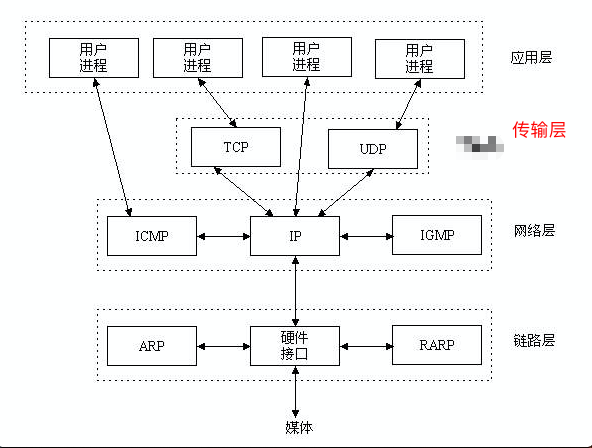
From now on, our work happens at the application layer. The application layer produces data and hands it to the transport layer below, which is responsible for transmitting it. You would need to control your operating system to perform the three-way handshake and the four-way wave with the target host, and also control the operating system to encapsulate the data format properly: first encapsulate the transport layer head, then the network layer head, then the data link layer head, and then convert it to binary and call the network card to send the data. If you wrote programs this way, writing a single TCP communication might take you half a year; before the core logic of the software was even written, you would be fired, and right after that your company would go bankrupt. In the file operations chapter, when we operated on the hard disk we used open rather than operating the hardware directly; open itself is the result of highly encapsulating the hard disk for our use. It is like an interface that we can use directly. Likewise, we can use code written by others to complete this communication process. There is a saying in the IT world about avoiding reinventing the wheel: we can use wheels others have already built, but if you want to become a true expert, building wheels is a path you must take.
If we want to write programs based on network communication and understand the TCP/UDP protocols, the IP protocol and the Ethernet protocol, we would really have to study the protocol of every layer thoroughly. It’s not that you couldn’t understand them, but even after studying TCP/IP for a year or two you wouldn’t dare to claim mastery. The TCP protocol has existed since the beginning of networking; it is very old and very important, so important that, like sunshine and rain, people sometimes even overlook it. Under these circumstances, the possibility of innovation is very low. Learning it certainly has benefits, but there is no need to understand it in detail. So for software development, it is best to handle only the application layer, with the transport layer and everything below it nicely encapsulated; it is enough to understand how they work.
2. The Socket Layer
The Socket layer is the socket layer (套接字层). It sits between the application layer and the transport layer, and its role is to encapsulate the transport layer and all protocols below it. So in the future, after we write the application layer software, any program written according to the socket layer’s standard will naturally follow the standards of TCP/UDP, the IP protocol and the Ethernet protocol. So what is the standard of the socket protocol? It’s very simple: you only need to remember a few interfaces.
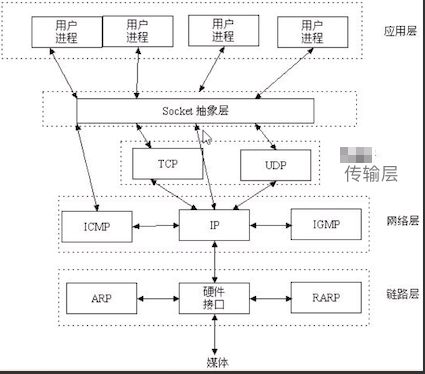
3. Introduction to the Socket Layer
A Socket is the intermediate software abstraction layer through which the application layer communicates with the TCP/IP protocol suite; it is a set of interfaces. In terms of design patterns, a Socket is actually a facade: it hides the complex TCP/IP protocols behind interfaces. For the user, a set of simple interfaces is all there is, and the Socket organizes the data to conform to the specified protocol.
利用套接字写出来的程序是希望能在客户端和服务端之间实现通信,
客户端和服务端的通信必不可少的就是ip和端口,
所以,一提到套接字,有人会说就是一堆ip和端口,
指的是套接字的工作原理,客户端和服务端都要有一个对应的ip和端口
Sockets originated in the 1970s in the University of California, Berkeley version of Unix, known as BSD Unix. Therefore, sockets are sometimes also called “Berkeley sockets” or “BSD sockets.” Initially, sockets were designed for communication between multiple applications on the same host. This is also called inter-process communication, or IPC. There are two kinds of sockets (or two families): file-based and network-based.
The file-based socket family Name of the socket family: AF_UNIX. Everything is a file; file-based sockets call the underlying file system to fetch data. Two socket processes running on the same machine can communicate indirectly by accessing the same file system
The network-based socket family Name of the socket family: AF_INET (there is also AF_INET6, used for ipv6, and some other address families, but they are either specific to a certain platform, deprecated, rarely used, or not implemented at all. Of all the address families, AF_INET is the most widely used. Python supports many address families, but since we only care about network programming, most of the time we only use AF_INET)
4. Socket Workflow
This is a client and server based on TCP communication. Let’s look at the server first. We learned object-oriented programming earlier; socket is actually a class, and calling the class with parentheses instantiates a socket object. Next comes binding. Both the client and the server have an IP and a port. The server provides a service, so it must have a fixed address; therefore the server’s IP and port need to be bound to the server machine. This amounts to announcing: my server machine is here, and all of you client machines can just send requests to this address. The next step is listening, meaning the server needs to listen for syn requests sent by clients. After that comes accept, which accepts the client’s connection. When a client sends a connect, it corresponds exactly to the server’s accept.
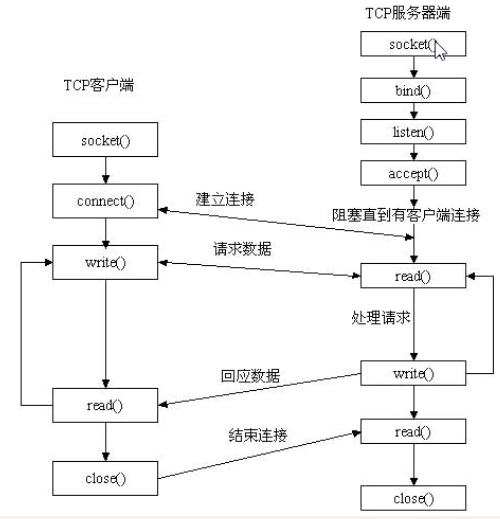
Data communication based on the TCP protocol requires establishing a connection through the three-way handshake. With sockets, this is very simple: you only need to remember the client’s connect and the server’s accept; underneath, they are the client and the server establishing a connection through the three-way handshake. Once the two-way connection is established, the client and the server start communicating: the client can send data to the server, and the server can send data to the client. This is a communication loop. When it’s done, the client can close the connection, and so can the server.
2 Socket Programming
1. Socket Programming
When writing socket-based programs, there must always be a server and a client. Next, we will implement the server and the client in code respectively.
Take a scenario from everyday life: the process of making a phone call. First you need a phone, then you insert a SIM card, and finally you dial, or stand by waiting for someone else to dial you. Once the call is connected, you and your friend have established a connection and can talk. When the conversation is over, you hang up to end the call.
Server code
import socket
phone = socket.socket(socket.AF_INET, socket.SOCK_STREAM)  # Buy a phone
phone.bind(('127.0.0.1', 8082))  # Insert the SIM card. Note: ports range 0-65535, and 0-1024 are reserved for the system
phone.listen(5)  # Enter standby mode; 5 is the number of pending connections (the backlog), i.e. five requests can wait at the same time
print('start...')
conn, client_address = phone.accept()  # Wait for a call to connect
print('连接来了:', conn, client_address)
# Send and receive messages
msg = conn.recv(1024)  # Receive a message; 1024 bytes is the maximum limit
print('客户端的消息: ', msg)
conn.send(msg + b'Albert')
# Hang up and reclaim system resources
conn.close()
# Power off
phone.close()
conn is a socket object. It represents the product of the TCP three-way handshake and is a two-way connection. client_address refers to the client’s IP and port. The server needs a fixed IP and port, so it must bind first and then wait for clients to connect.
Client code
import socket
phone = socket.socket(socket.AF_INET, socket.SOCK_STREAM)  # Buy a phone
phone.connect(('127.0.0.1', 8082))  # Dial; the address is the server's IP and port
phone.send('你好'.encode('utf-8'))  # Send the message b'你好'
data = phone.recv(1024)  # Receive a message
print(data.decode('utf-8'))
phone.close()
For the client, the IP and port do not need to be fixed, so there is no need to bind; it only needs to know the target host’s IP and port and dial directly to connect.
Note that after the server is shut down and restarted, our program sends the operating system an instruction to clean up the resources of the connection just established. Depending on the machine’s hardware configuration, some machines may not clean them up immediately, and you will get an error saying the port is already in use. In that case, just switch to another port.
2. Communication Loop
Imagine this scenario: at midnight, I call a friend and say “Hello,” he replies “Hello, Albert,” and then both of us hang up. If that were the case, there would definitely be something wrong with these two people.
Computer communication is similar to a phone call: it certainly can’t end after sending a single message. You should be able to send and receive messages repeatedly, many times over. This is the communication loop.
Server code
import socket
phone = socket.socket(socket.AF_INET, socket.SOCK_STREAM)
phone.bind(('127.0.0.1', 8082))
phone.listen(5)
print('start...')
conn, client_address = phone.accept()
print('连接来了:', conn, client_address)
while True:
    msg = conn.recv(1024)
    print('客户端的消息: ', msg)
    conn.send(msg + b'SB')
conn.close()
phone.close()
Client code
import socket
phone = socket.socket(socket.AF_INET, socket.SOCK_STREAM)
phone.connect(('127.0.0.1', 8082))
while True:
    msg = input('请输入你的名字>>:').strip()
    if msg in ['albert', 'Albert', 'mayite', '马一特']:
        msg = '机器禁止发送,请重新输入'
        print(msg)
        continue
    phone.send(msg.encode('utf-8'))
    data = phone.recv(1024)
    print(data.decode('utf-8'))
phone.close()
Now, if the client unilaterally closes the program, the server will still be waiting to receive, but the client has already run off, and the server program crashes. If that were the case, during the Double Eleven shopping festival on Taobao and Tmall, if you suddenly closed your program, the Tmall and Taobao programs would be paralyzed. This is something we absolutely cannot allow. So how do we solve it?
A user closing the client is an exception. When a predictable exception occurs, we can use if to check for it; but when user behavior is unpredictable and the exception is bound to happen, we use try to catch the exception.
Server code
import socket
phone = socket.socket(socket.AF_INET, socket.SOCK_STREAM)
phone.bind(('127.0.0.1', 8083))
phone.listen(5)
print('start...')
conn, client_address = phone.accept()
print('连接来了:', conn, client_address)
while True:
    try:
        msg = conn.recv(1024)
        print('客户端的消息: ', msg)
        conn.send(msg + b'SB')
    except Exception:
        break
conn.close()
phone.close()
3. Connection Loop
With the communication loop we just wrote, when the client exits, the server doesn’t raise an error, but it terminates along with it, which is certainly unreasonable. What we need is a server that can continuously provide services to client machines. One client exiting should not affect the server’s ability to serve other clients. So we also need to add a connection loop.
Server code
import socket
phone = socket.socket(socket.AF_INET, socket.SOCK_STREAM)
phone.bind(('127.0.0.1', 8081))
phone.listen(5)
print('start...')
while True:  # Connection loop
    conn, client_address = phone.accept()
    print('客户端 ', client_address)
    while True:  # Communication loop
        try:
            msg = conn.recv(1024)
            print('客户端的消息: ', msg)
            conn.send(msg + b'SB')
        except Exception:
            break
    conn.close()
phone.close()
Client code
import socket
phone = socket.socket(socket.AF_INET, socket.SOCK_STREAM)
phone.connect(('127.0.0.1', 8081))
while True:
    msg = input('>>>: ').strip()
    if msg in ['albert', 'Albert', 'mayite', '马一特']:
        msg = '机器禁止发送,请重新输入'
        print(msg)
        continue
    phone.send(msg.encode('utf-8'))
    data = phone.recv(1024)
    print(data.decode('utf-8'))
phone.close()
You only need one copy of the server code, while you can make 7 copies of the client code. Run the server first, then run the seven client programs one after another in order. You will find that your server machine can only serve one client machine at a time; only after the first client machine is closed can it serve the second client machine. This is the communication loop. Besides that, you will also find that the seventh client you run has no effect, because the server’s maximum number of pending connections is 5: apart from the one being served, 5 connection requests are already pending.
The program we wrote above can only serve one user at a time. It’s like a small restaurant with only one waiter: when a customer comes in, the waiter serves that customer first, while 5 more customers wait in line behind. The room is small and it’s raining outside, so a sixth person won’t queue outside. Only after the waiter has finished serving the first customer can the next customer in line sit down, order and eat.
You will surely wonder: how can a server machine serve multiple clients at the same time? That is what we will learn in the next stage, concurrent programming.