Chapter 12: Namespaces
This article is part of the Python General Programming tutorial series, which has been fully completed. Its goal is to take you from zero to mastery of the Python programming language. This tutorial doesn’t just skim over Python; it gives refined, in-depth explanations across 5 stages and 25 chapters. So you need to study patiently to truly gain something. Although it doesn’t involve using any frameworks, it gives a comprehensive explanation of operating systems and network communication, and even rewrites some open-source modules and servers. After finishing it, you will not only have mastered the Python programming language, but also gained the ability to learn other programming languages quickly, to read any Python source code without difficulty, and a comprehensive understanding of computers and networks. For complete beginners, it is an excellent textbook for entering the field of computing and mastering a programming language. For those who already have some Python foundation, I believe this tutorial will take your skills to the next level.
I. Class Instantiation
Calling a class ====> produces an object of the class; this object can also be called an instance of the class, and the process of calling a class is also called instantiating the class
class DeepshareStudent:
    school = 'deepshare'
    def __init__(self,name,age,gender):
        self.name = name
        self.age = age
        self.gender = gender
    def learn(self):
        print('%s is learning' % self)
    def eat(self):
        print('is eating')
    def sleep(self):
        print('is sleeping')
stu1 = DeepshareStudent('王二小',18,'male')
The last line of code is the instantiation of the class. Let’s review again what this line of code does
- First create an empty object obj, the same as all objects
- Pass this object together with the three arguments to the init function,
- Execute DeepshareStudent.__init__(obj,‘王二小’,18,‘male’)
II. Namespaces
We can use the class name plus .dict to view the class’s namespace. So can we view an object’s namespace too?
class DeepshareStudent:
    school = 'deepshare'
    def __init__(self,name,age,gender):
        self.name = name  # Put the name attribute into the object's namespace
        self.age = age
        self.gender = gender
    def learn(self):
        print('%s is learning' % self)
    def eat(self):
        print('is eating')
    def sleep(self):
        print('is sleeping')
stu1 = DeepshareStudent('王二小',18,'male')
print(stu1.__dict__)
The class’s namespace is created when the class is defined, so when is an object’s namespace created? First you have to tell me when the object is created: an object is only created when the class is called, and at that moment the object’s namespace is created. Having a namespace means the object has been stored, but storing is not the goal—our goal is retrieval
print(stu1.__dict__['name'])Without a doubt this works, but we have a better way
print(stu1.name)Now let’s modify the class we defined
class DeepshareStudent:
    school = 'deepshare'
    name = 'aaaaaaaaaa'
    def __init__(self,name,age,gender):
        self.name = name
        self.age = age
        self.gender = gender
    def learn(self):
        print('%s is learning' % self)
    def eat(self):
        print('is eating')
    def sleep(self):
        print('is sleeping')
stu1 = DeepshareStudent('王二小',18,'male')
Now there are two names. If I run the following code, what will be printed?
print(stu1.name)Obviously, when I use the object to look up its own unique name attribute, it should look for name in init
But what if it isn’t in the init function?
print(stu1.school)The object stu1 first looks for the school attribute in its own object namespace, but finds no such attribute, so it goes back one level and looks in the class’s namespace. Note that the object’s namespace and the class’s namespace are not the same thing; we’ll explain this next
If it isn’t in the class’s namespace either, will it keep looking further up?
school = 'deepshare'
class DeepshareStudent:
    name = 'aaaaaaaaaa'
    def __init__(self,name,age,gender):
        self.name = name
        self.age = age
        self.gender = gender
    def learn(self):
        print('%s is learning' % self)
    def eat(self):
        print('is eating')
    def sleep(self):
        print('is sleeping')
stu1 = DeepshareStudent('王二小',18,'male')
print(stu1.school)
Definitely not; PyCharm will already flag an error while you write the code. Now school is defined at the global level and has nothing to do with the object stu1
Let’s look at some more code
class DeepshareStudent:
    school = 'deepshare'
    def __init__(self,name,age,gender):
        self.name = name
        self.age = age
        self.gender = gender
    def learn(self):
        print('%s is learning' % self)
    def eat(self):
        print('is eating')
    def sleep(self):
        print('is sleeping')
stu1 = DeepshareStudent('王二小',18,'male')
stu2 = DeepshareStudent('王三小',18,'male')
print(DeepshareStudent.__dict__)
print(id(DeepshareStudent.__dict__))
print(stu1.__dict__)
print(id(stu1.__dict__))
print(id(stu2.__dict__))
I’ve now created two objects, stu1 and stu2. The printed results show that each of them has its own memory space, and the class also has its own memory space. So what is the relationship between them?

These three parts are completely independent; none contains another. It’s just that when you look up an attribute using object.attribute, it first searches the object’s namespace; if found, it uses what is stored in the object’s namespace; if not found, it searches the class’s namespace; and if still not found, an error is raised: the object has no such attribute
III. Bound Methods
Previously we studied an object’s characteristics (represented by variables); next we’ll study an object’s skills (represented by functions). Whether characteristics or skills, these are all attributes of the object, as we proved earlier. So next, let’s call the object’s attributes
class DeepshareStudent:
    school = 'deepshare'
    def __init__(self,name,age,gender):
        self.name = name
        self.age = age
        self.gender = gender
    def learn(self):
        print('%s is learning' % self)
    def eat(self):
        print('is eating')
    def sleep(self):
        print('is sleeping')
stu1 = DeepshareStudent('王二小',18,'male')
stu2 = DeepshareStudent('王三小',18,'male')
print(DeepshareStudent.learn)
print(stu1.learn)
print(stu2.learn)
print(id(DeepshareStudent.school))
print(id(stu1.school))
print(id(stu2.school))
Output
<function DeepshareStudent.learn at 0x1067bd488>
<bound method DeepshareStudent.learn of <__main__.DeepshareStudent object at 0x104215128>>
<bound method DeepshareStudent.learn of <__main__.DeepshareStudent object at 0x104215208>>
4550599216
4550599216
4550599216
From the output we can see that accessing the learn attribute through the class gives an ordinary function, while accessing the learn attribute through an object gives a
绑定方法,这个方法是绑定到类属性上的Let’s understand this again: the class gets the learn attribute directly from its own namespace, whereas the object looks for the learn attribute in its own namespace, doesn’t find it, and has to go look in the class’s namespace—it is effectively getting the learn attribute indirectly. Functions defined inside a class can be used by the class itself, but they are mainly meant for objects. Now look at the memory addresses: the memory addresses of the three function attributes above are completely different, while the memory addresses of the three variable attributes below are exactly the same. This is because variables inside a class are used directly by objects, while functions inside a class are bound to objects for use. How should we understand this?
All of you are Deepshare students and share a similar skill called learning, but can your learning end up in Xiao Ming’s head? Your learning doesn’t count as Xiao Ming learning, even though you all have the ability to learn. This is called a bound method: everyone uses the same function, but whoever it is bound to is the one executing it
So how does this show up in a program? (In fact, our earlier code already used it; I just haven’t explained it yet)
class DeepshareStudent:
    school = 'deepshare'
    def __init__(self,name,age,gender):
        self.name = name
        self.age = age
        self.gender = gender
    def learn(self):
        print('is learning')
    def eat(self):
        print('is eating')
    def sleep(self):
        print('is sleeping')
stu1 = DeepshareStudent('王二小',18,'male')
stu2 = DeepshareStudent('王三小',18,'male')
DeepshareStudent.learn('albert')
stu1.learn()
Running the code, we find that when the class calls the learn method, an argument must be passed, while when stu1 calls the learn method, no argument is needed. But learn really does require one argument, which means an argument is being passed automatically. How can we verify this?
class DeepshareStudent:
    school = 'deepshare'
    def __init__(self,name,age,gender):
        self.name = name
        self.age = age
        self.gender = gender
    def learn(self):
        print('is learning',self)  # Just print self and you'll see
    def eat(self):
        print('is eating')
    def sleep(self):
        print('is sleeping')
stu1 = DeepshareStudent('王二小',18,'male')
stu2 = DeepshareStudent('王三小',18,'male')
DeepshareStudent.learn('albert')
stu1.learn()
print(stu1)
Output
is learning albert
is learning <__main__.DeepshareStudent object at 0x1014d1128>
<__main__.DeepshareStudent object at 0x1014d1128>
Look carefully—aren’t they the same?
This shows that the essential principle of stu1 calling the learn method is passing itself in
stu1.learn() # DeepshareStudent.learn(stu1)This is a bound method. A function defined inside a class can be used by the class, but when the class uses it, it’s just an ordinary function, and you pass as many arguments as the ordinary function has parameters
print(DeepshareStudent.learn)
DeepshareStudent.learn('albert')
But functions defined inside a class are really meant for objects, and they are bound to the objects that use them; bound to different objects, they are different bound methods
print(stu1.learn)
print(stu2.learn)
What’s special about a bound method is that whoever calls it is automatically passed in as the first argument
class DeepshareStudent:
    school = 'deepshare'
    def __init__(self,name,age,gender):
        self.name = name
        self.age = age
        self.gender = gender
    def learn(self):
        print('is learning',self)
    def eat(self):
        print('is eating')
    def sleep(self):
        print('is sleeping')
stu1 = DeepshareStudent('王二小',18,'male')
stu2 = DeepshareStudent('王三小',18,'male')
stu1.learn()
stu2.learn()
Next, let’s use stu1 alone to illustrate
class DeepshareStudent:
    school = 'deepshare'
    def __init__(self,name,age,gender):
        self.name = name
        self.age = age
        self.gender = gender

    # self=stu1
    def learn(self):
        print('%s is learning' % self.name)  # self is stu1, and stu1 has the name attribute
    def eat(self):
        print('is eating')
    def sleep(self):
        print('is sleeping')
stu1 = DeepshareStudent('王二小',18,'male')
stu2 = DeepshareStudent('王三小',18,'male')
stu1.learn()
stu2.learn()
Output
王二小 is learning
王三小 is learning
In summary
Variables inside a class are shared by all objects, and all objects point to the same memory address; functions defined inside a class are really meant for objects, and they are bound to the objects that use them—bound to different objects, they are different bound methods
Functions defined inside a class must have the self parameter, but they can have other parameters too
class DeepshareStudent:
    school = 'deepshare'
    def __init__(self,name,age,gender):
        self.name = name
        self.age = age
        self.gender = gender
    def learn(self):
        print('%s is learning' % self.name)
    def choose(self,course):  # Add another function
        print('%s is choosing %s' %(self.name, course))  # Pass a course parameter
    def eat(self):
        print('is eating')
    def sleep(self):
        print('is sleeping')
stu1 = DeepshareStudent('王二小',18,'male')
stu2 = DeepshareStudent('王三小',18,'male')
stu1.choose('Python')  # Pass one actual argument
stu2.choose('AI')
Output
王二小 is choosing Python
王三小 is choosing AI
When we use PyCharm and need to pass arguments inside parentheses, PyCharm automatically shows us the function’s parameters. When we see the self parameter, we just treat it as if it doesn’t exist and only pass the other arguments. Now you understand why: self is passed automatically, and the object itself is automatically passed in as the first argument.
IV. Everything Is an Object
In Python there is a saying that everything is an object. Having covered object-oriented programming up to this point, we can now explain it
class DeepshareStudent:
    school = 'deepshare'
    def __init__(self,name,age,gender):
        self.name = name
        self.age = age
        self.gender = gender
    def learn(self):
        print('%s is learning' % self.name)
    def choose(self,course):
        print('%s is choosing %s' %(self.name, course))
    def eat(self):
        print('is eating')
    def sleep(self):
        print('is sleeping')
stu1 = DeepshareStudent('王二小',18,'male')
stu2 = DeepshareStudent('王三小',18,'male')
print(stu1)
print(type(stu1))
print(id(stu1))
Output
<__main__.DeepshareStudent object at 0x106776390>
<class '__main__.DeepshareStudent'>
4403454864
A single equals sign means assignment, and stu1 is really just a variable we defined. As we said on the very first day, a variable has an id, a type and a value. There’s not much to say about its value—it’s an object of the Deepshare class. The id represents its memory address; nothing much to say there either. Let’s look at what the type of stu1 is: ignoring main, the type of stu1 is Deepshare, and the class of stu1 is also Deepshare. So in Python
类与类型是一个概念With this concept made clear, let’s look at the following code
l1 = [1,2,3,4]  # list([1,2,3,4])
print(type(l1))
Output
<class 'list'>Writing a list as l1 is essentially the code after the #. We can see that the type of l1 is list, which means the class of l1 is list. So list is actually a class; it just isn’t capitalized, for the sake of appearance. So when we previously defined variables of various data types (str, int, float, list, tuple, set, and so on), we were actually calling classes to instantiate them and create objects
l1 = [1,2,3,4]  # list([1,2,3,4])
print(l1.append)
Output
<built-in method append of list object at 0x1077560c8>In the data types chapter we learned that a list has an append method that adds elements to the list. Now looking at it again, l1 is an object, and from the printed result we can see that append is actually a method. Although it isn’t called a bound method here, it really is a bound method.
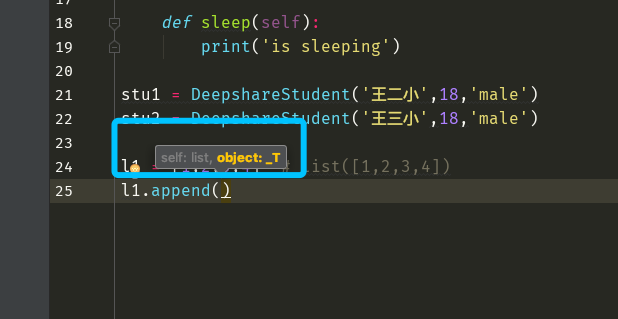
PyCharm actually does a nice job here: parameters like self that don’t need to be passed are marked in gray, while the parameters that actually need to be passed are shown in yellow. What is the characteristic of a bound method?
l1 = [1,2,3,4]  # list([1,2,3,4])
l1.append(5)  # Actually executes list.append(l1,5)
Since they’re the same, let’s give it a try
l1 = [1,2,3,4]
list.append(l1,5)
print(l1)
Output
[1, 2, 3, 4, 5]What is the essence of a bound method? Everyone has the same kind of function, but here’s the thing: you and I both have the ability to eat—when I finish eating, does the food end up in your stomach?
l1 = [1,2,3,4]
l2 = ['a','b','c']
l2.append('d')
print(l2)
print(l1)
This is a bound method: what l2 appends will certainly not be added to l1. We can also add elements in another way
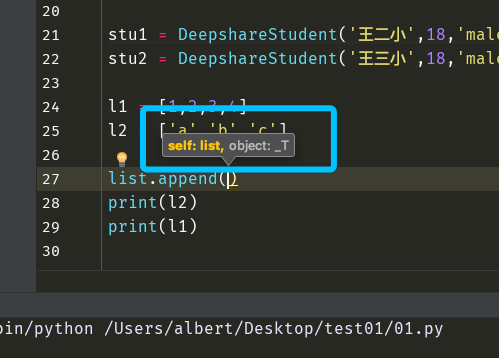
In this case, the self argument must be passed
l1 = [1,2,3,4]
l2 = ['a','b','c']
list.append(l2,'d')
print(l2)
print(l1)
Finally, let’s take another look at the class we wrote ourselves and Python’s built-in classes
class DeepshareStudent:
    school = 'deepshare'
    def __init__(self,name,age,gender):
        self.name = name
        self.age = age
        self.gender = gender
    def learn(self):
        print('%s is learning' % self.name)
    def choose(self,course):
        print('%s is choosing %s' %(self.name, course))
    def eat(self):
        print('is eating')
    def sleep(self):
        print('is sleeping')
stu1 = DeepshareStudent('王二小',18,'male')
stu2 = DeepshareStudent('王三小',18,'male')
print(int)
print(str)
print(list)
print(tuple)
print(set)
print(dict)
print(DeepshareStudent)
Output
<class 'int'>
<class 'str'>
<class 'list'>
<class 'tuple'>
<class 'set'>
<class 'dict'>
<class '__main__.DeepshareStudent'>
They are all called class; apart from main, they look the same, and of course the principles of how they are used are the same too.
V. Adding, Deleting, Modifying and Viewing Object Attributes
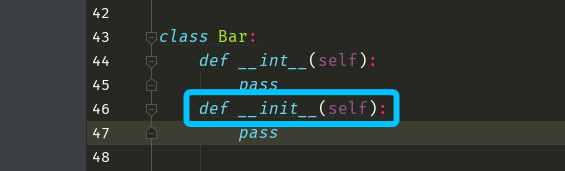
First, let me add one point here: for initialization we use the __init__ function, not the __int__ function (that’s for initializing an int object, which you will probably never use in your life). Don’t make this kind of silly mistake!!!
1 Viewing
class Bar:
    n = 1111
    def __init__(self,x):
        self.x = x
obj = Bar('abc')
print(obj.__dict__)
print(obj.x)
print(obj.n)
2 Adding
class Bar:
    n = 1111
    def __init__(self,x):
        self.x = x
obj = Bar('abc')
print(obj.__dict__)
print(obj.x)
print(obj.n)
obj.abc = 'abc'
print(obj.abc)
3 Modifying
class Bar:
    n = 1111
    def __init__(self,x):
        self.x = x
obj = Bar('abc')
print(obj.__dict__)
print(obj.x)
print(obj.n)
obj.abc = 'abc'
print(obj.abc)
obj.abc = '123'
print(obj.abc)
4 Deleting
class Bar:
    n = 1111
    def __init__(self,x):
        self.x = x
obj = Bar('abc')
print(obj.__dict__)
print(obj.x)
print(obj.n)
obj.abc = 'abc'
print(obj.abc)
obj.abc = '123'
print(obj.abc)
del obj.abc
# print(obj.abc)
VI. In-Class Exercises
Exercise 1
Implement the following feature: there is an object with a count attribute, and the count attribute counts how many objects the class it belongs to has produced, i.e., print(obj.count) prints the number of objects
Analysis:
Since we want to count how many objects there are, every object requires one call of the class, and each call of the class actually executes the init function inside the class. So we just need to write the corresponding logic in the init function
class Foo:
    count = 0
    def __init__(self):
        self.count += 1
obj1 = Foo()
obj2 = Foo()
obj3 = Foo()
print(obj1.count)
Is this how to write it? If you write it this way, it’s wrong. We can run the program and print it to see the result
1Why is that?
self是对象自己,obj1,obj2和obj3是互不相通的,虽然每次count都会加一,但是其实每个对象
都有自己的独一份的count,初始值永远是0,每次来都是加1,所以永远是1
We should modify the attribute they share. Which attribute is shared?
class Foo:
    count = 0
    def __init__(self):
        Foo.count += 1
obj1 = Foo()
obj2 = Foo()
obj3 = Foo()
print(obj1.count)
Although this time we didn’t add a count attribute to the objects’ own namespaces, the class has one. When an object looks up an attribute, it first searches its own namespace, and if not found, it searches the class it belongs to. In the class, this count variable attribute is shared by all objects.
Exercise 2:
Implement a “humans vs. dogs” battle program: people can bite dogs, and dogs can bite people. Both people and dogs have their own life values; after being bitten they lose health, and when the life value reaches 0, the person or dog dies
Following the steps, we first summarize the real-world objects
现实中的人类
"""
    人1
        特征:
            名字='张二炮'
            攻击力=60
            生命值=100
        技能:
            咬
    人2
        特征:
            名字='刘老三'
            攻击力=50
            生命值=100
        技能:
            咬
现实中的人类
    相同的特征 无
    相同的技能 咬
"""
现实中的狗类
"""
    狗1
        特征:
            名字='旺财'
            品种="京巴"
            攻击力=80
            生命值=50
        技能:
            咬
    狗2
        特征:
            名字='小黑'
            品种="藏獒"
            攻击力=200
            生命值=200
        技能:
            咬
现实中的狗类
    相同的特征 无
    相同的技能 咬
"""
Note:
Although the two people share the same kinds of characteristics—each has a name, an attack power and a life value—these belong to each of them independently. For example, after Zhang Erpao is bitten, his life value goes down, while Liu Laosan, who wasn’t bitten, keeps his original value. So we define the real-world human class as having no shared characteristics; likewise, the same goes for the real-world dog class.
Code implementation
class People:
    def __init__(self, name, aggressivity, life_value=100):
        self.name = name
        self.aggressivity = aggressivity
        self.life_value = life_value

    # Note: you certainly can't bite yourself—you must bite an enemy, so an enemy parameter has to be passed
    def bite(self, enemy): #self=p1   enemy=d1
        enemy.life_value-=self.aggressivity
        print("""
        人[%s] 咬了一口狗 [%s]
        狗掉血[%s]
        狗还剩血量[%s]
        """ %(self.name,enemy.name,self.aggressivity,enemy.life_value)
              )
class Dog:
    def __init__(self, name, dog_type, aggressivity, life_value):
        self.name = name
        self.dog_type = dog_type
        self.aggressivity = aggressivity
        self.life_value = life_value
    def bite(self, enemy): #self = d1    enemy= p1
        enemy.life_value-=self.aggressivity
        print("""
        狗[%s] 咬了一口人 [%s]
        人掉血[%s]
        人还剩血量[%s]
        """ %(self.name,enemy.name,self.aggressivity,enemy.life_value)
              )
p1 = People('张二炮', 60)
d1=Dog('小黑',"藏獒",200,200)
p1.bite(d1)
d1.bite(p1)
This code implements the basic logic and functionality of the program, but there are still some obvious bugs; if you’re interested, you can improve it yourself.