Chapter 16: The Seven-Layer Protocol Model
This article is part of the General Python Programming tutorial series, which has been fully completed. Its goal is to take you from zero to mastery of the Python programming language. This tutorial does not talk about Python in vague, general terms; instead it explains things in a refined, in-depth way, across 5 stages and 25 chapters. So you need to study patiently to really get something out of it. Although it does not involve using any frameworks, it gives a holistic explanation of operating systems and network communication, and even rewrites some open-source modules and servers. After finishing it, you will not only have mastered the Python programming language, but also gained the ability to learn other programming languages quickly, the ability to read any Python source code without obstacles, and a comprehensive understanding of computers and networks. For complete beginners, it is an excellent textbook for getting started in the computing field and mastering a programming language. For those who already have some Python foundation, I believe this tutorial will take your skills to the next level.
1 Client-Server Architecture
Through our previous studies we have already learned how to write programs. Clients and servers are nothing more than code, and we already have that skill. If a program we write can run independently without needing a network connection, its commercial value is certainly not high. So what we will learn next is communication, that is, how clients and servers communicate over a network.
C/S architecture refers to client-server architecture, where C stands for client and S stands for server. In terms of hardware, a printer and a computer form a C/S architecture. In terms of software, C/S architecture is everywhere. For example, the video website you watch is the server and your browser is the client; strictly speaking this is a B/S (browser <===> server) architecture, but B/S architecture is, strictly speaking, also a kind of C/S. There are many common C/S architectures, such as QQ, WeChat and so on that we often use; almost all the mobile apps we use are like this. In other words, what we use is the client, while the server is certainly running on that company’s servers. So the process of sending messages to each other is actually: our client first sends the message to the server, and then the server sends it to the other client receiving the message.
2 Introduction to Internet Protocols
Suppose I compare the process of making a phone call to going online (all phones being landlines). First, the phone lines need to be connected. These phone lines extend in all directions and together form something like a net. Now, if I want to call Yao Ming I need to speak Chinese, to call Ginóbili I need to speak Russian, and to call the Greek Freak Giannis I need to speak Greek. Using a different language for each person I call is obviously unrealistic. So we need a unified standard that everyone can speak and everyone can understand, and that language is English.
To achieve communication (earlier we used the phone call as an example), for a computer to go online it first needs a network cable plugged in, and then multiple connections are made through switches. We collectively call these devices between computers the physical connection medium (the communication carrier). Then comes communication, which requires a unified standard: a computer organizes data according to this standard and sends it to another computer, and the other computer decodes the data according to the same standard, thereby obtaining the data it actually wants. This standard is the Internet protocol. So the Internet protocol is equivalent to the English of the computer world.
学习网络编程,就是要编写一个客户端和服务端软件,然后实现客户端与服务端基于网络通信3 What Is a Network
A network mainly consists of two parts
- The physical connection medium
- Internet protocols
The physical connection medium is handled for us by network engineers, so we don’t need to worry about it. What we need to do is write programs, so we must understand Internet protocols, and the programs we write must also follow these protocols.
4 The OSI Seven-Layer Model
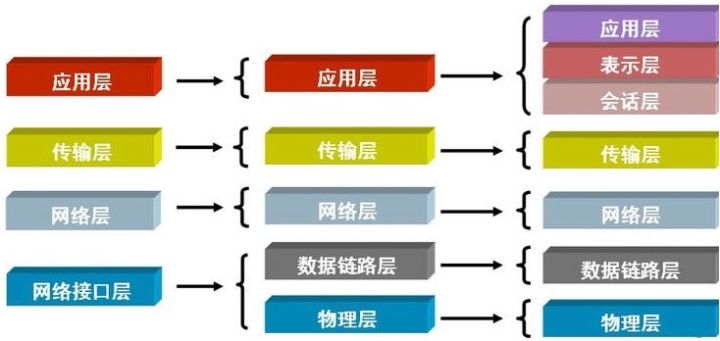
The OSI seven-layer model refers to these seven layers: application, presentation, session, transport, network, data link and physical. We collectively call the application, presentation and session layers the application layer, and we can also collectively call the data link layer and physical layer the network interface layer. Because the presentation and session layers generally do not need to be studied and implemented independently, we only need to master the five-layer model: the application layer, transport layer, network layer, data link layer and physical layer.
Since the Internet protocol is equivalent to the English of the computer world, when we learn English we first learn letters, then words, then sentences, then essays. Likewise, when computers learn Internet protocols, they should also learn step by step: physical layer ===> data link layer ===> network layer ===> transport layer ===> application layer.
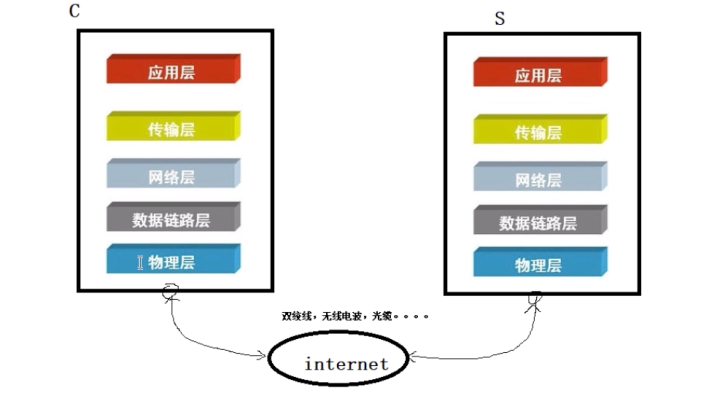
1. Physical Layer
A network cable connected to a client computer is actually connected to a device in the computer called the network card (NIC), which is specifically responsible for communicating with the outside world. Network cables are generally twisted pair or fiber optic cables, and radio waves can also be used. In between, the data passes through a whole bunch of devices such as switches, routers and firewalls, collectively called the physical connection medium; you can think of it as passing through the Internet and then connecting to the server device. The physical layer works first, sending electrical signals. There are two kinds of electrical signals, high voltage and low voltage; high voltage can be defined as the digit 1 and low voltage as the digit 0. If my client sends 0010101100, the server will receive these digits accordingly. But a bare sequence of binary digits is meaningless; it must be clear where one piece of content starts and ends, and where another piece starts and ends. That is to say, we need to group these binary digits. That is not the physical layer’s job, which brings us to the data link layer.
2. Data Link Layer
Grouping at the data link layer should also follow a unified standard. In the early days there was no unified standard; each company had its own, and the result was chaos. Later a unified standard was formed, called Ethernet (the Ethernet protocol). The Ethernet protocol specifies:
- A group of electrical signals forms a datagram, called a “frame”
- Each data frame is divided into two parts: the header (head) and the data (data)
This is similar to writing a letter: there is an envelope and the content of the letter. The envelope states who the sender and receiver of the letter are, and the letter paper inside contains the content of the letter.
The head contains: (fixed at 18 bytes) - Sender / source address, 6 bytes
- Receiver / destination address, 6 bytes
- Data type, 6 bytes
data contains: (minimum 46 bytes, maximum 1500 bytes)
Note: the header has a fixed length of 18 bytes; only with a fixed length does the receiver know by what standard to read it
- The specific content of the datagram
head length + data length = minimum 64 bytes, maximum 1518 bytes; anything exceeding the maximum limit is sent in fragments
Ethernet specifies that the head must contain the sender’s source address and the receiver’s destination address. The source address can be understood as the sender’s home, and the destination address as the receiver’s home. So how is the location of a “home” identified in a computer?
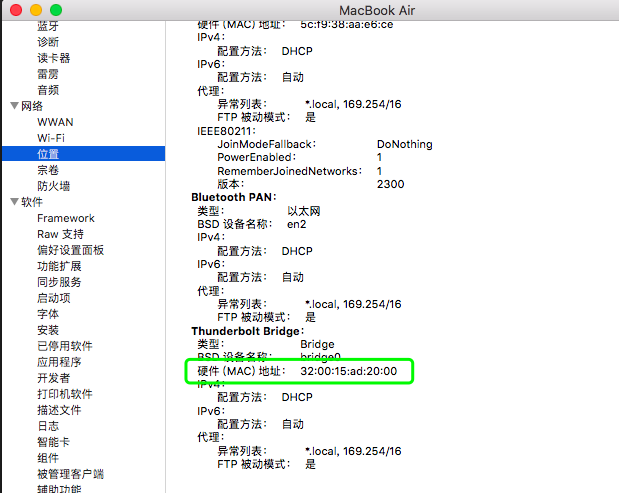
With a MAC address. Note that this MAC address has nothing to do with the Mac computer you use from Apple; they just happen to share the name. A MAC address (Media Access Control Address), literally a media access control address, is also called a LAN address, an Ethernet address or a physical address. It is an address used to identify the location of a device on a network.
mac地址是计算机上一个唯一的地址,是在计算机的网卡上的,每块网卡出厂时都被烧制上一个
世界唯一的mac地址,长度为48位2进制,通常由12位16进制数表示(前六位是厂商编号,后六位是流水线号)
这样做的目的就是要保证每一个mac地址是全世界独一无二的。
If you use macOS, you can click the Apple icon in the upper-left corner and view the system report; in the corresponding place you will see something like the figure below:
If you have used a Linux system, you can see that the computer’s network card files (in Linux everything is a file) are named eth0, eth1, eth2; this “eth” is the first three letters of Ethernet.
Computers communicate by broadcasting, which in plain terms means shouting; computers are all blind. For example, when Tang Seng (the monk Tang Sanzang) communicates with Sun Wukong, he just shouts: “Wukong, where are you? Come save me!” Theoretically, as long as he shouts loudly enough, Sun Wukong can hear it. From the form of address “Wukong”, Sun Wukong knows he is the one being called, and the content of the data received is to go save his master. Tang Seng shouts when he is captured by a demon, Bajie shouts when he is captured, Sha Seng shouts when he is captured; if everyone in the world were shouting, can you imagine how large the amount of data would be? This amount of data would be even more terrifying than a broadcast storm.
Theoretically, this broadcast-based communication can work, but it is not practical: on the one hand the amount of data is too large, and on the other the range is too wide. So computer communication also needs local area networks (LANs). One of our offices can be understood as a LAN, and a LAN can be understood as a broadcast domain. If I shout in this office, the office next door can’t hear it; this is a broadcast domain, and the amount of data won’t be very large. So the world’s network is not one big net as we imagined earlier, but is made up of many small networks.
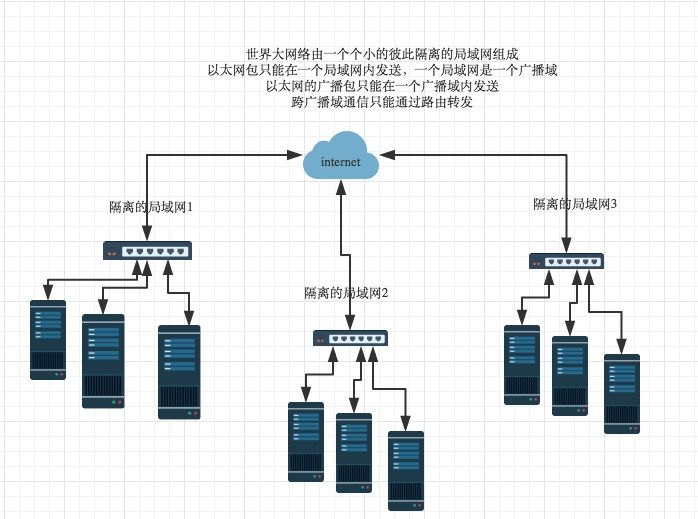
Suppose the WeChat client machine is my phone, and the WeChat server machine is in the office where I am. Then, based on how Ethernet works, we could achieve network communication through MAC addresses, but the problem is that this is impossible. If two machines are not on the same LAN, we must first locate the LAN it is on in some way, and then find the machine by its MAC address according to the Ethernet protocol. This is not something the data link layer can do, so next we move on to the network layer.
3. Network Layer
The network layer has the IP protocol. What we commonly call IPv4 is the fourth version of the IP protocol, and IPv6 is the sixth version. An IP datagram is also called an IP packet; it consists of an IP header and IP user data. The IP datagram specification states: the length of the IP header is generally between 20 and 60 bytes, and the maximum length of an IP packet cannot exceed 65535 bytes. The first 20 bytes of the header are fixed, and the rest is variable.
head: 20 to 60 bytes long (source IP address, destination IP address)
data: at most 65,515 bytes (minus the fixed length of the header)
IP地址用来定位在哪个局域网内,mac地址用来定位局域网的哪一台机器,
所以ip地址+mac地址就能定位到全世界范围内独一无二的一台机器
Now we can locate a machine. Let’s think again about what we are essentially doing: software on one machine produces data, then this software calls the hardware through the operating system, and finally the machine’s network card sends it out via the protocols described above. The receiving side works in reverse: the other side’s network card receives ===> the operating system unpacks ===> the server software gets the data. So, essentially, communication is really communication between one application and another.
For two pieces of software to communicate, they actually rely on the computer as a carrier. But a computer doesn’t run just one piece of software; we must have a way to identify where exactly a piece of software is. Clearly neither the Ethernet protocol nor the IP protocol can solve this, which brings us to the next layer: the transport layer
4.Transport Layer
The transport layer has the TCP protocol and the UDP protocol, both of which are port-based protocols.
A port is just a number. For example, suppose you have located me as working in the Zhonghai International Center office building. To find me based on this building, you still need a door number; the port number refers to exactly which door number it is.
So every piece of software on your computer that communicates over a network has a port number, and the same goes for phones.
Addendum: both the client and server must follow the Ethernet protocol, the IP protocol and the TCP/UDP protocols. So let’s think about what a service is. Opening a restaurant is a service, and the restaurant’s address certainly can’t change every few days, otherwise your customers won’t be able to find you. Likewise, the server’s address is the same: it needs a fixed address.
The TCP/UDP protocols are what we will cover in the next chapter. Now we have arrived at the last layer: the application layer
5. Application Layer
The application layer is application software. Since you write the application software, you can define this standard yourself. Of course, you can also follow some application-layer protocol standards that have already been established, common ones being http, mail and ftp. These application-layer protocols are there whether you use them or not, neither pleased nor sad.
Summary:
Sending process:
Application-layer software (with or without a protocol) =>transport layer (TCP/UDP protocol)=>network layer (IP protocol) =>data link layer (Ethernet protocol)=>physical layer ===> electrical signals sent (100011001010110)
The receiving process is the reverse
It doesn’t matter whether the application layer has a protocol or not. At the transport layer, a TCP/UDP protocol layer is wrapped around the outside, so the TCP/UDP protocol is now exposed on the outside; at the network layer an IP protocol layer is wrapped on, and so on. Unpacking is the reverse, starting from the outermost layer.