Chapter 24: Coroutine Control
This article is part of the General-Purpose Python Programming series, which has been fully completed. The goal is to take you from zero to mastery of the Python programming language. This tutorial does not skim over Python in broad strokes; instead, it explains things in a refined and in-depth way, across 5 stages and 25 chapters. So you need to study patiently to really gain something. Although it does not involve the use of any frameworks, it gives a global explanation of operating systems and network communication, and even rewrites some open-source modules and servers. When you finish, you will not only have mastered the Python programming language, but also have the ability to learn other programming languages quickly, the ability to read any Python source code without obstacles, and a comprehensive understanding of computers and networks. For complete beginners, it is an excellent textbook for entering the field of computing and mastering a programming language. For those who already have some Python foundation, I believe this tutorial will take your skills to the next level.
1. Coroutine Theory
The purpose of coroutines is to achieve concurrency within a single thread. Based on what we learned before, a single thread can only do one task at a time, and multiple tasks in a single thread are executed serially, so concurrency seems impossible. Let’s go back to our understanding of concurrency: multiple tasks that appear to run at the same time, that is concurrency. The essence of implementing concurrency is: switching + saving state. If we had a solution such that, when there are multiple tasks in a single thread, we interrupt task A while it is running and quickly switch to task B, then while B is running quickly switch to task C, and so on, switching back and forth among multiple tasks, provided that before each switch we save the running state of the previous task so we can switch back later and continue running it, then we would have achieved concurrency.
In fact, we already learned this usage when we studied yield earlier: it can both switch and save state. It’s just that at the time you didn’t know the concept of concurrency yet. Below is the code from that earlier lesson.
def eater(name):
    print('%s 准备开始吃饭啦' % name)
    food_list = []
    while True:
        food = yield food_list
        print('%s 吃了 %s' % (name, food))
        food_list.append(food)
g = eater('albert')
g.send(None)  # For the expression form of yield, None must be passed the first time it is used; g.send(None) is equivalent to next(g)
g.send('蒸羊羔')
g.send('蒸鹿茸')
g.send('蒸熊掌')
g.send('烧素鸭')
g.close()
# After close, the rest will not be eaten
# g.send('烧素鹅')
# g.send('烧鹿尾')
To make concurrent execution within a single thread more obvious, let’s look at the following code example.
import time
"""
我们现在没有开多进程多线程,那么默认就是一个进程一个线程
基于yield保存状态,实现两个任务直接来回切换,即并发的效果
两个任务交替打印,这就说明了他们之间是并发执行的
"""
# Task: consume
def consumer():
    while True:
        x = yield
        print(x)
# Task: produce
def producer():
    g = consumer()  # Create a generator
    print(g)
    a = next(g)  # Equivalent to passing None
    print(a)
    for i in range(10000):
        b = g.send(i)  # Equivalent to feeding it food as in the code above; there is no return value, i.e. the return value is None
        print(b)  # Print it, and you can see that the two tasks run alternately
start = time.time()
producer()
stop = time.time()
print(stop - start)
(The docstring says: “We have not started multiple processes or threads, so by default there is one process with one thread. Using yield to save state, the two tasks switch back and forth directly, which gives the effect of concurrency. The two tasks print alternately, which shows that they run concurrently.”)
If we started two threads, we could certainly also implement the producer-consumer model above. Note: switching between these two threads is controlled by the operating system (switching between multiple processes is also controlled by the operating system). But in the code we wrote above, switching within a single thread is controlled by our own application; as far as the operating system is concerned, all it sees is one thread. To implement a producer-consumer model, our original idea was to start multiple threads or multiple processes, and that kind of concurrency (switching + saving state) is controlled by the operating system. Now, with concurrency in a single thread, we do ourselves the work that the operating system would do. Comparing switching controlled by the operating system with switching controlled by ourselves, which one is faster?
The operating system has to control the switching of many processes or threads. These include not only the processes or threads we started ourselves, but also the operating system’s own, and possibly those of other applications, so it takes a long time before it switches to our own process or thread. Of course, “a long time” here is relative to a computer. With switching controlled by the application itself, it only needs to manage the tasks inside its own thread; this kind of switching is lightweight and much faster.
Next, let’s look again at the switching we controlled ourselves in the code above: is the concurrency we achieved meaningful?
The purpose of concurrency is to improve efficiency, and the essence of concurrency is switching + saving state. There are two kinds of switching: one happens when an I/O operation is encountered, and the other when a long-running computation is encountered. Only switching on I/O operations can improve efficiency. The code we wrote above didn’t encounter any I/O operations, yet it added switching time. If we executed the tasks serially, none of the tasks to be executed would be reduced, and not having to switch would actually save time. Therefore, this reduces the program’s execution efficiency.
If we have two purely computational tasks, let’s look at the time spent with and without switching, to verify the statement above.
# Purely computational tasks executed serially
import time
def task1():
    res=1
    for i in range(1000000):
        res+=i
def task2():
    res=1
    for i in range(1000000):
        res*=i
start=time.time()
task1()
task2()
stop=time.time()
print(stop-start)
# Purely computational tasks executed concurrently
def task1():
    res=1
    for i in range(1000000):
        res+=i
        yield
def task2():
    g=task1()
    res=1
    for i in range(1000000):
        res*=i
        next(g)
start=time.time()
task2()
stop=time.time()
print(stop-start)
From the printed results you can see that for purely computational tasks like these, serial execution is clearly more efficient. At this point we need to think: concurrency within a single thread should switch tasks only when an I/O operation is encountered; only then is such concurrency meaningful. So next we need to find a way to detect I/O operations in order to achieve the goal of switching whenever I/O is encountered.
Suppose there are now 10 tasks, each with 2 seconds of computation and 3 seconds of I/O. Executing them serially takes 50 seconds. With multiple processes it’s 5 seconds + process creation overhead + switching time; with multiple threads it’s 5 seconds + switching time; with a single thread controlling switching itself it’s 5 seconds + switching time (and this switching time is shorter than when it’s controlled by the operating system). The 3 seconds of I/O time can’t be reduced, let alone eliminated, but we can control things so that the CPU finishes the computation first and then the I/O operations are performed.
If you handle things this way in a single thread, you’ve actually pulled off something really awesome: you’ve fooled the operating system.
The operating system is always watching whether you’re working or slacking off. Encountering I/O is like slacking off, and the operating system immediately takes away your CPU execution rights, watching you cry without even looking back. Originally you had a computational task to execute, which is certainly executed by the CPU, and once it’s done
You say: I have an I/O operation to perform
CPU: Sorry, then I can’t keep you company anymore; my boss (the operating system) says I have to leave
Now suppose we treat both writing code and fixing bugs as computational tasks, both of which need the CPU’s help to complete. When you finish writing code, you can say to it:
You say: Big brother CPU, don’t go, I still have a bug-fixing task to do, you have to stay with me.
CPU: Fine, you rascal, forget it, I’ll wait for you a bit longer
You say: The bug-fixing task is done. Big brother, wait, I still have a code-writing task to do, you need to wait for me a bit longer
CPU: You’re pushing it, but fine, I’ll reluctantly wait a bit longer…
And just like that, without the CPU’s boss (the operating system) knowing, you’ve fooled the naive CPU. At the beginning we said you fooled the operating system; in fact, the operating system knows nothing at all. Switching controlled by the operating system is done per thread, and it can’t see what’s going on inside a thread. The one actually doing the work is its underling, the CPU, which has to do all the dirty and tiring work. The work is assigned by the operating system, which doesn’t know what’s happening inside the thread. So this can be understood as deceiving the operating system, thereby occupying the CPU as much as possible.
When we use this approach to reduce I/O as much as possible, the thread spends a lot of time in the computing state, so the process containing the thread is in the ready state more often. Relative to all the processes on the operating system, the operating system will then give CPU execution rights to the application we wrote as much as possible, and in that way the program’s execution efficiency is high.
The yield we used in the code above can achieve concurrency within a single thread, but it can’t switch when it encounters I/O.
import time
def task1():
    res = 1
    for i in range(1000000):
        res += i
        yield
        time.sleep(10)  # Wait here for 10 seconds
def task2():
    print('程序开始了')
    g = task1()
    res = 1
    for i in range(1,1000000):
        res *= i
        print(res)
        next(g)
start = time.time()
task2()
stop = time.time()
print(stop - start)
You can implement coroutines with yield, but if they can’t switch on I/O, they’re meaningless. Not all coroutines are related to improving efficiency. If there are two purely computational tasks in the same thread and you make them switch back and forth, that doesn’t improve efficiency; it actually reduces it. So coroutines don’t always improve efficiency. Note: this sentence is very important, and it’s a misconception some people have: coroutines don’t always improve efficiency.
Coroutine summary: concurrency within a single thread, also called micro-threads or fibers; the English name is Coroutine. To explain what a coroutine is in one sentence: a coroutine is a lightweight user-mode thread, i.e. coroutines are scheduled and controlled by the program itself.
As far as the operating system is concerned, coroutines don’t exist. It’s a concept conceived by programmers, which was eventually given a name.
Emphasis:
1. Python的线程属于内核级别的,即由操作系统控制调度
   (如单线程遇到IO或执行时间过长就会被迫交出CPU执行权限,切换其他线程运行)
2. 单线程内开启协程,一旦遇到IO,就会从应用程序级别
   (而非操作系统)控制切换,以此来提升效率(!!!非IO操作的切换降低效率)
(1. Python threads are kernel-level, i.e. their scheduling is controlled by the operating system (for example, when a single thread encounters IO or runs for too long, it is forced to give up CPU execution rights, and another thread is switched in to run). 2. When coroutines are started within a single thread, once IO is encountered, switching is controlled at the application level (rather than by the operating system), thereby improving efficiency (!!! switching on non-IO operations reduces efficiency).)
Compared with the operating system controlling thread switching, the user controls coroutine switching within a single thread.
Advantages
1. 协程的切换开销更小,属于程序级别的切换,操作系统完全感知不到,因而更加轻量级
2. 单线程内就可以实现并发的效果,最大限度地利用CPU
(1. Coroutine switching has lower overhead; it’s program-level switching that the operating system can’t perceive at all, so it’s more lightweight. 2. The effect of concurrency can be achieved within a single thread, making maximum use of the CPU.)
Disadvantages
1. 协程的本质是单线程下,无法利用多核优势。
      解决方案:可以是一个程序开启多个进程,每个进程内开启多个线程,每个线程内开启协程
2. 协程指的是单个线程,因而一旦协程出现阻塞,将会阻塞整个线程
(1. Coroutines essentially run in a single thread and can’t take advantage of multiple cores. Solution: a program can start multiple processes, start multiple threads within each process, and start coroutines within each thread. 2. Coroutines refer to a single thread, so once a coroutine blocks, it blocks the entire thread.)
2. The greenlet Module
The greenlet module actually can’t switch on I/O operations; all it can do is ordinary switching. We cover it here to lay the groundwork for gevent later. The gevent module can switch on I/O, and under the hood it wraps the greenlet module, while the greenlet module in turn wraps yield under the hood. So if you’re interested in studying the source code, first get this order straight.
Installation
pip3 install greenletUsage
from greenlet import greenlet
import time
def eat(name):
    print('%s eat 1' % name)
    # time.sleep(30)  # Will not switch when encountering IO
    g2.switch('James')  # Switch
    print('%s eat 2' % name)
    g2.switch()  # Switch
def play(name):
    print('%s play 1' % name)
    g1.switch()  # Switch; it switches back and forth among the three switch calls
    print('%s play 2' % name)
g1 = greenlet(eat)  # Only the function can go here; arguments cannot be passed
g2 = greenlet(play)
g1.switch('Albert')  # Pass arguments to the task on the first switch
3. The gevent Module
gevent can switch on I/O. Let’s look at how to use it.
Installation
pip3 install geventUsage
import gevent
def eat(name):
    print('%s eat 1' % name)
    gevent.sleep(5)  # Simulates I/O behavior, similar to time.sleep
    print('%s eat 2' % name)
def play(name):
    print('%s play 1' % name)
    gevent.sleep(3)
    print('%s play 2' % name)
g1 = gevent.spawn(eat, 'Albert')  # Submit a task, passing the memory address of the function and the arguments it needs
g2 = gevent.spawn(play, 'James')
This seems fine. Then you run the code and find that the program produces no output at all and just ends. What’s going on?
很明显,我们是在单线程下,异步提交任务,第一个任务提交完了,不在原地等待,继续提交下一个任务,
此时可能第一个任务还没有起来,第二个任务提交完了,后面没有其他的代码,主线程就执行完了,
同时我们可以确定没有其他的线程,那么主线程就结束了,这个进程也就结束了。
(Clearly, we are submitting tasks asynchronously in a single thread. After the first task is submitted, we don’t wait in place but go on to submit the next task. At this point the first task may not have started yet; the second task is submitted, there is no more code after it, so the main thread finishes. At the same time, we know there are no other threads, so once the main thread ends, the process ends too.)
Modification
import gevent
def eat(name):
    print('%s eat 1' % name)
    gevent.sleep(5)  # Switches when encountering IO
    print('%s eat 2' % name)
def play(name):
    print('%s play 1' % name)
    gevent.sleep(3)  # Switches when encountering IO
    print('%s play 2' % name)
g1 = gevent.spawn(eat, 'Albert')
g2 = gevent.spawn(play, 'James')
gevent.sleep(10)  # Just let the main thread sleep a bit longer
Obviously, making the main thread sleep for 10 seconds here isn’t reasonable. The solution you can think of is .join(); besides that, there’s a somewhat better joinall() method.
import gevent
def eat(name):
    print('%s eat 1' % name)
    gevent.sleep(5)
    print('%s eat 2' % name)
def play(name):
    print('%s play 1' % name)
    gevent.sleep(3)
    print('%s play 2' % name)
g1 = gevent.spawn(eat, 'Albert')
g2 = gevent.spawn(play, 'James')
# You can write these two lines, or the single line below
"""
g1.join()
g2.join()
"""
# gevent.joinall(g1, g2)  # Not allowed
# gevent.joinall((g1, g2))  # Allowed
gevent.joinall([g1, g2])  # The argument of joinall must be passed in as a whole; either a tuple or a list works
Below, we’ll walk you through part of the Python source code to show that the argument of joinall must be passed in as a whole and can’t be split up.
Step 1:
Click the location shown in the figure to go to the target code.
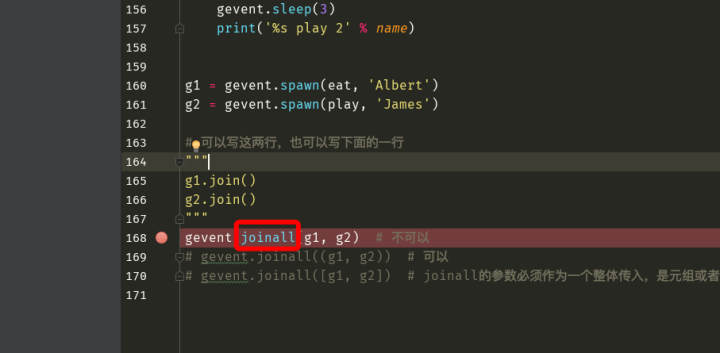
Step 2:
Clicking either of the two locations works; go to the target code again.
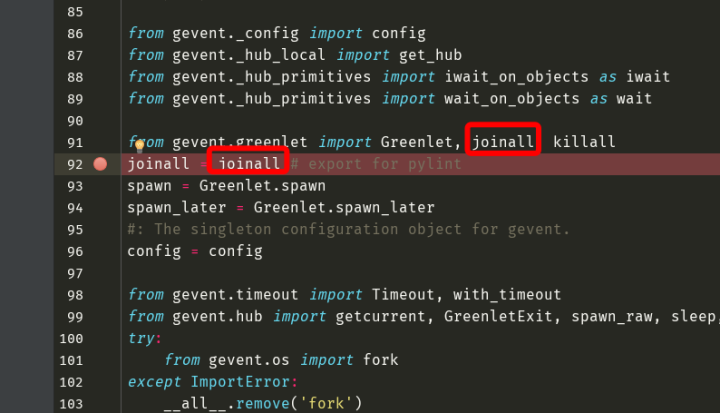
Step 3:
In this step you can see the joinall function. The argument you pass is the single parameter greenlets; note that it’s one parameter. At this point you already understand why the items can’t be passed separately. To get to the bottom of it, keep reading. You’ll find that what joinall normally returns is actually the return value of the wait function. Now click the wait function to go to the target code again.
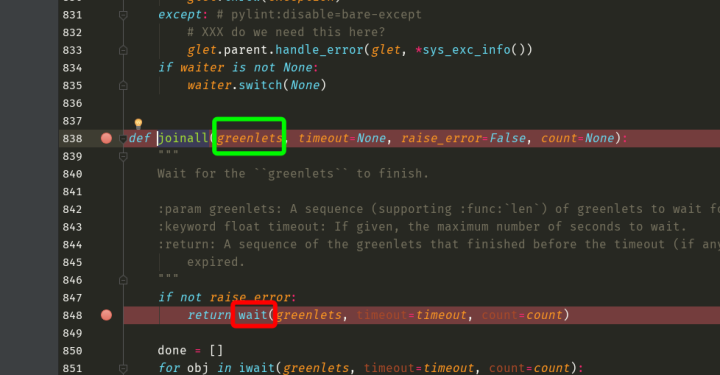
Step 4:
You’ll find you’ve arrived at the wait_on_objects function, and the parameter name greenlets has become objects. Look at the first sentence of the comment below; my translation: wait for the objects to be ready or for the event loop to finish.
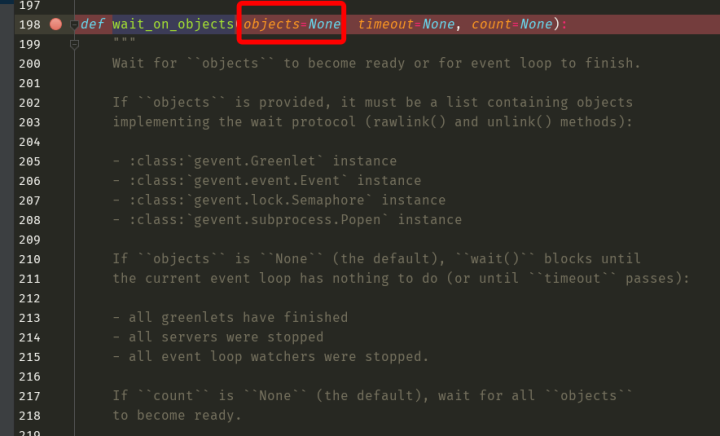
To get its return value and see why it raises an error, let’s keep reading. Clearly, execution has reached the iwait_on_objects function. Note: the argument you passed is now objects. Click again to go to the target code.
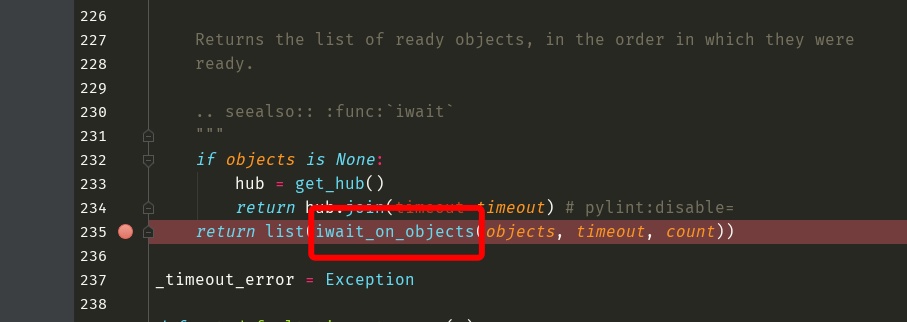
Step 5:
Clearly, the next thing to execute is instantiating the WaitIterator class to produce an object. Click again to reach the target code.
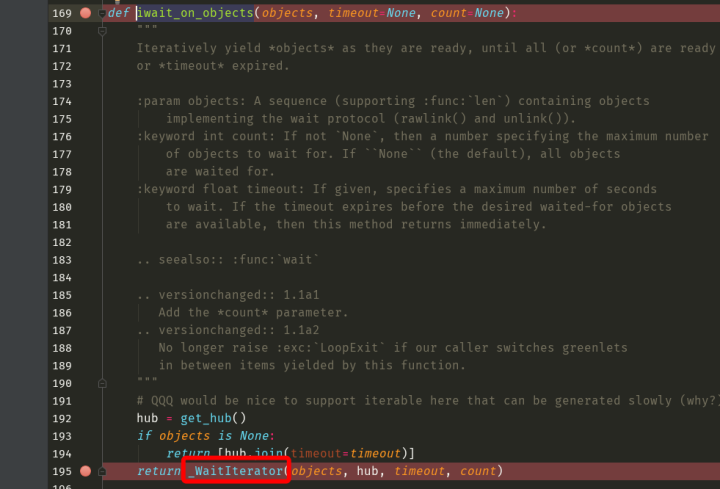
Step 6:
Through layer after layer of argument passing, we finally reach the location where the error is raised.
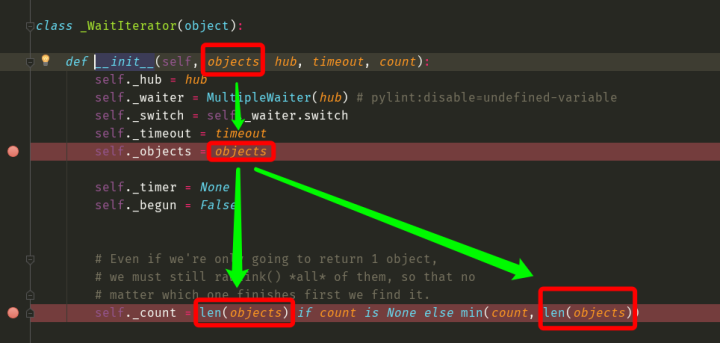
Demonstrating this process isn’t simply to explain how joinall is used, but to lay a foundation for reading source code in your future studies. The internet is flooded with information, and you may not yet be able to tell good from bad, but you’ve all read the story “The Little Horse Crossing the River”: you have to judge for yourself through your own thinking and actions, and in the process your technical skills will keep rising.
Back to using the gevent module. Above we used gevent.sleep to simulate I/O behavior. If we really had I/O operations, such as opening a file with open or a network connection, could it recognize them? Let’s simulate this with time.
import gevent
import time
def eat(name):
    print('%s eat 1' % name)
    time.sleep(5)  # After switching to time for the simulation, it surprisingly no longer works
    print('%s eat 2' % name)
def play(name):
    print('%s play 1' % name)
    time.sleep(3)
    print('%s play 2' % name)
g1 = gevent.spawn(eat, 'Albert')
g2 = gevent.spawn(play, 'James')
gevent.joinall([g1, g2])
After switching to time, it can no longer switch on I/O. So how do we make it detect file I/O and network connection I/O? Otherwise, what good is this iron rod to us?
Solution
from gevent import monkey  # monkey must be imported at the very beginning of the program
monkey.patch_all()  # Right after that, patch it; this effectively puts a mark on all IO behavior
import gevent
import time
def eat(name):
    print('%s eat 1' % name)
    time.sleep(5)  # Even after switching to time.sleep, the I/O behavior can still be recognized
    print('%s eat 2' % name)
def play(name):
    print('%s play 1' % name)
    time.sleep(3)
    print('%s play 2' % name)
g1 = gevent.spawn(eat, 'Albert')
g2 = gevent.spawn(play, 'James')
gevent.joinall([g1, g2])
Because importing the monkey module serves a single purpose, which is to put a mark on all the I/O operations below, these two lines can be combined into one with a semicolon in between. You can only do this in this special case, because these two lines together form a whole that represents a single operation.
from gevent import monkey;monkey.patch_all() # monkey must be imported at the very beginning of the programOur program has never started multiple threads; from start to finish there has been only one thread. Let’s now check the thread names.
from gevent import monkey;monkey.patch_all()
from threading import current_thread
import gevent
import time
def eat():
    print('%s eat 1' % current_thread().name)
    time.sleep(5)
    print('%s eat 2' % current_thread().name)
def play():
    print('%s play 1' % current_thread().name)
    time.sleep(3)
    print('%s play 2' % current_thread().name)
g1 = gevent.spawn(eat, )
g2 = gevent.spawn(play, )
print(current_thread().name)
gevent.joinall([g1, g2])
You can guess from the name DummyThread that you see: the program has only one thread, but to tell them apart, it uses names meaning fake thread-1 and fake thread-2.
Summary:
With the gevent module, you’ve actually mastered a really awesome technique that can greatly improve efficiency within a single thread. Combined with the multiprocessing and multithreading we covered before, when you encounter concurrency in the future, you can first start multiple processes, which takes advantage of multiple cores; then start multiple threads within each process, which greatly increases the number of concurrent tasks; and then use the gevent module in each thread to switch on I/O operations, pushing the efficiency of a single thread to the extreme. This way, one thread can actually stand in for more than 500 of the original threads. Now think about how awesome the program’s efficiency is.
Concurrency really means server-side concurrency. At work, we don’t actually need to write this server-side socket software ourselves; someone has already written it. There’s a very excellent piece of socket software called “Nginx”. The way Nginx works is that from the start it launches as many processes as there are CPUs, and then a bunch of threads within each process. Note: you can’t say it then starts a bunch of coroutines within each thread; that statement is wrong. A coroutine is a result, not an operating system unit. The correct way to put it is: it monitors the I/O behavior within each thread and switches whenever I/O is encountered, and the result of this implementation is called a coroutine. Our way of implementing coroutines can improve execution efficiency within a single thread, because not all coroutines can improve execution efficiency. Many people know that “Nginx” can achieve high concurrency, but how many know the principle behind it? And now you can write your own Nginx.